A fan that ran quietly for months and suddenly starts making noise is telling you something specific about what's wrong -- the character of the sound itself is often the fastest diagnostic clue available before opening the case.
Different fan noises point to different root causes -- rattling usually indicates a loose mount or physical obstruction, grinding typically signals bearing failure, and humming often points to electrical or resonance issues -- correctly identifying which category your fan noise falls into is the fastest path to the right fix rather than guessing.
- The specific character of fan noise -- rattling, grinding, humming, clicking -- correlates strongly with specific root causes, making sound diagnosis a genuinely useful first troubleshooting step.
- Rattling noise most often indicates a loose screw, cable contacting the blades, or debris caught in the fan rather than a fan defect itself.
- Grinding or scraping noise is a strong indicator of bearing wear or failure, generally signaling the fan needs replacement rather than simple cleaning.
- Humming or buzzing can indicate electrical issues, resonance with the case panel, or in some cases a failing capacitor in the fan's control circuitry.
- Knowing when a noise indicates a fan that can be cleaned and saved versus one that needs replacement prevents both unnecessary replacement and prolonging use of a genuinely failing component.
Learning to distinguish these noise categories by ear -- before opening the case -- narrows down the likely cause and the right next troubleshooting step significantly faster than trial and error.
Table of Contents
How Do You Actually Start Identifying the Source of Fan Noise?
Before diagnosing the specific noise character, confirming which fan is actually the source is the necessary first step.
Identify the noise source by listening carefully with the case open (safely, without touching moving components), temporarily testing each fan individually if your system has multiple, and noting whether the noise changes with fan speed -- a noise that scales with RPM strongly implicates the fan itself rather than an unrelated component.
Why Isolating the Specific Fan Matters Before Diagnosing Noise Character
A multi-fan system makes it easy to misattribute noise to the wrong fan, especially if noise seems to come from a general direction rather than a specific identifiable source. Testing fans individually -- temporarily disconnecting others if needed, or using software to spin down all but one fan -- confirms which specific unit is actually generating the noise before spending time diagnosing the wrong component.
What Does Rattling Noise Usually Indicate?
Rattling is one of the more common and often easily resolved noise categories, worth checking first.
Rattling noise most commonly indicates a loose screw or mounting hardware vibrating against the case, a cable lightly contacting the spinning blades, or small debris caught inside the fan housing -- these are typically simple mechanical issues rather than fan defects, and often resolvable without replacing the fan.
Why Rattling Is Usually the Easiest Category to Resolve
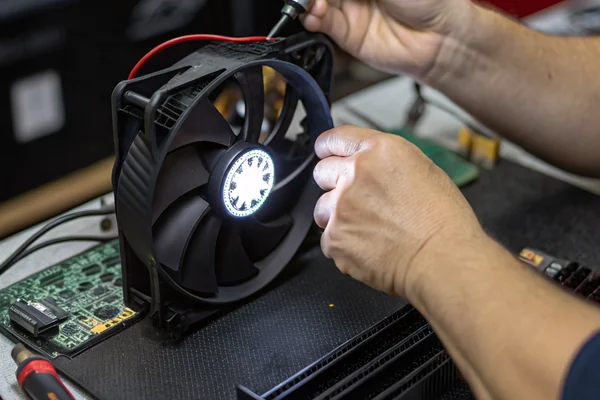
Because rattling generally stems from something physically loose or in contact with the fan rather than internal fan damage, a visual inspection with the case open -- checking for loose screws, cables routed too close to the blades, or visible debris -- often identifies and resolves the issue directly without needing to replace anything. This makes rattling worth investigating first, since it's frequently the cheapest and fastest fix among the noise categories.
What Does Grinding Noise Actually Signal About Your Fan?
Grinding noise carries a more serious diagnostic implication than rattling, generally pointing toward internal mechanical wear.
Grinding or scraping noise, particularly if it's consistent and scales with fan speed, strongly indicates bearing wear or failure -- the fan's internal bearing surfaces have degraded enough that they're no longer rotating smoothly, and this type of noise generally signals the fan needs replacement rather than a cleaning-based fix.
Why Grinding Noise Rarely Resolves Without Replacement
Unlike rattling, which often stems from an external, fixable cause, grinding noise reflects actual internal component wear that generally continues progressing rather than resolving on its own, and can eventually lead to complete fan failure if left unaddressed. While a very small number of grinding cases might be temporarily improved by opening the fan and adding lubricant (for sleeve bearing designs specifically), this is a temporary measure at best and generally signals the fan is approaching end of life regardless.
What Does Humming or Buzzing Noise Actually Point To?
This noise category has a wider range of possible causes than rattling or grinding, requiring a bit more diagnostic work to narrow down.
Humming or buzzing noise can indicate electrical issues (a failing capacitor or motor winding problem), physical resonance where the fan's vibration frequency matches and amplifies against the case panel, or in some cases, a fan running at an unstable low speed near its minimum threshold -- distinguishing between these requires a bit more diagnostic investigation than rattling or grinding.
Why Resonance Is an Often-Overlooked Humming Cause
A fan that's mechanically fine can still produce a noticeable humming or buzzing sound if its normal vibration frequency happens to resonate with the case panel it's mounted to, amplifying a vibration that would otherwise be inaudible -- this is why adding rubber isolation grommets, even to a mechanically healthy fan, sometimes resolves humming that initially seems like an internal fan problem. Testing whether the humming changes when you physically dampen the case panel (briefly touching it to change its resonance) can help distinguish resonance-driven humming from an actual internal fan issue.

When Should You Clean the Fan Versus Replace It Entirely?
Making this decision correctly avoids both unnecessary replacement and continuing to use a genuinely failing component.
Clean the fan first for rattling or dust-related airflow reduction without unusual internal noise, but replace the fan if you hear grinding, consistent internal noise after thorough cleaning, or if the fan is old enough that bearing wear is a reasonable expectation regardless of current noise level -- cleaning addresses external causes, while grinding-type noise generally reflects internal wear cleaning can't fix.
Why Age and Accumulated Runtime Matter Alongside Current Noise Level
A fan that's been running continuously for several years, even if not currently making obvious grinding noise, may be approaching the natural end of its bearing life, making preemptive replacement in a critical system a reasonable consideration rather than waiting for audible failure symptoms to appear. This is particularly relevant for fans in systems where failure has real consequences -- proactive replacement based on accumulated runtime, not just reactive replacement after noise appears, is a more conservative approach worth considering for important systems.
Our PC case cooling fan line uses fluid dynamic and dual-ball bearing options specifically selected for long-term quiet operation, validated on our in-house dynamic balance correction and anechoic noise testing equipment at our Dongguan facility to minimize the grinding and humming issues that develop from bearing wear over time. With over 20 years of production experience under ISO 9001 certification, we can support system builders sourcing reliable, long-lasting replacement fans.
How Can You Prevent Fan Noise Issues From Developing in the First Place?
A few preventive habits meaningfully reduce how often you encounter these noise diagnostic scenarios at all.
Prevent fan noise issues by periodically cleaning dust buildup before it restricts airflow and stresses the motor, ensuring cables are routed clear of blade paths during any case work, using anti-vibration mounts where your case supports them, and choosing quality bearing types (ball or fluid dynamic) for fans in systems where long-term reliability matters most.
Why Prevention Is Cheaper Than Diagnosis and Replacement
Regular dust cleaning prevents the accumulated buildup that both restricts airflow (forcing the fan to work harder, generating more heat and wear) and can directly interfere with blade movement, addressing one of the most common root causes of developing noise issues before it becomes a problem. Combined with careful cable routing during any case work and selecting quality bearings upfront for important systems, these preventive habits meaningfully reduce how often noise diagnosis becomes necessary in the first place.

FAQ
Is it normal for a brand-new fan to make some noise when first installed?
A brief break-in period with minor noise can occur, but persistent or worsening noise from a new fan is worth investigating rather than assuming it will resolve on its own, since it could indicate a manufacturing defect.
Can fan noise indicate a problem with the power supply rather than the fan itself?
In some cases, yes -- unstable voltage from a failing power supply can cause fans to run erratically or produce unusual noise, so if multiple fans develop noise issues simultaneously, checking power supply stability is worth considering.
Does fan orientation (intake vs exhaust) affect which noise issues are more common?
Not significantly for the noise categories discussed here -- these noise types relate to the fan's own mechanical and electrical condition rather than its airflow direction or mounting orientation.
How long should I expect a case fan to run before bearing-related noise becomes likely?
This varies significantly by bearing type and operating conditions, but sleeve bearing fans generally show wear-related noise earlier than ball or fluid dynamic bearing fans under equivalent conditions.
Can software fan curve adjustments fix a noise issue, or does that just mask it?
Reducing fan speed can reduce noise from a fan that's otherwise mechanically fine, but if the underlying cause is bearing wear, slowing the fan down only delays rather than resolves the eventual need for replacement.
Is it worth trying to lubricate a noisy fan myself, or should I just replace it?
For sleeve bearing fans specifically, careful lubrication can sometimes provide temporary improvement, but this isn't a permanent fix and carries some risk of damaging the fan if done incorrectly -- replacement is generally the more reliable long-term solution.
Learning to read fan noise by character -- rattling, grinding, humming -- turns a vague "my fan sounds weird" problem into a specific, actionable diagnosis. At Herays, our Dongguan facility manufactures case cooling fans with quality bearing options selected for long-term quiet reliability, backed by over 20 years of experience under ISO 9001 certification. If you're sourcing replacement fans for a build or product needing long-term quiet operation, we're glad to help match bearing type to your requirements.

Liang
I've been working with DC fans for 30 years — long enough to have seen the industry evolve from basic sleeve bearing designs to today's high-efficiency, IP68-rated systems built for the harshest environments imaginable. I founded Herays because I believed manufacturers and engineers deserved a supplier who could talk technical from day one. Not just hand over a datasheet, but actually help you select the right fan for your thermal load, your enclosure, your certification requirements. Most of what I write here comes directly from problems I've solved on the factory floor or in customer applications — medical devices, laser equipment, industrial automation, you name it. If it involves moving air efficiently and reliably, I've probably spent time thinking about it. When I'm not obsessing over airflow curves, I'm usually helping a customer figure out why their cooling system isn't performing the way their simulation said it would.
View all posts by Liang