They look similar enough to cause real confusion on the workbench -- same square frame, same blades, same connector. But swapping one where the other belongs creates either a thermally marginal build or a dead component.
Case fans and CPU cooler fans are not interchangeable in most real applications. They differ in static pressure tuning, typical blade geometry, and sometimes connector pinout -- a case fan dropped onto a CPU heatsink will move air, but almost certainly not enough of it through the fin stack where it counts.
- Case fans and CPU cooler fans share a physical form factor but are tuned for fundamentally different airflow tasks -- one moves volume freely, the other must push through dense heatsink fins.
- Static pressure capability is the critical differentiator: CPU cooler fans need high static pressure to overcome fin stack resistance, while case fans are optimized for high free-air CFM with low restriction.
- Mounting hole patterns and frame dimensions are often physically compatible, but that doesn't mean the aerodynamic performance will suit the destination.
- Both fan types use the same 3-pin or 4-pin PWM connector standard, so electrical compatibility is not the limiting factor -- performance mismatch is.
- When the operating environment, static pressure requirement, or noise budget genuinely differs, using the wrong fan type introduces real thermal or acoustic risk.
Understanding exactly where the differences live -- and where they don't -- separates a reliable thermal design from one that technically boots but runs hot.
Table of Contents
What Actually Makes a Case Fan Different From a CPU Cooler Fan?
Two fans can share identical dimensions and still be engineered for completely opposite jobs.
Case fans are optimized for high free-air CFM with low static pressure, moving large volumes of air across an open path. CPU cooler fans are optimized for high static pressure to push air through the dense, restrictive fin stacks on heatsinks -- different blade geometry and pitch reflect that difference in intended resistance.
The Core Aerodynamic Split
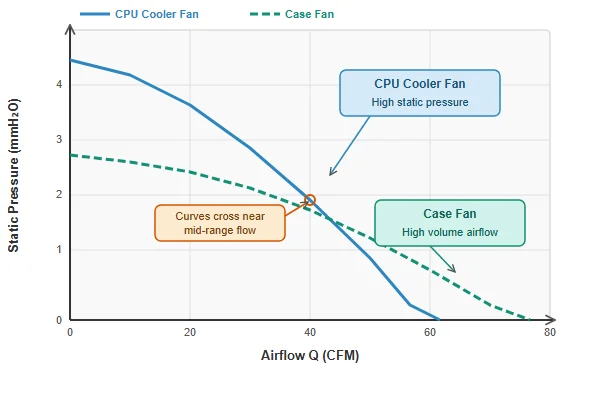
The key split is where on the P-Q curve1 each fan type is designed to operate. A case fan's performance peak sits toward the high-flow, low-pressure end -- it's efficient at shifting air across a relatively open path, which is exactly what chassis ventilation requires. A CPU cooler fan, by contrast, is designed to perform effectively further up the pressure axis, where the heatsink fin stack presents real resistance.
This translates into physical differences that show up in the blade geometry. CPU cooler fans tend to run higher blade pitch angles and more aggressive blade profiles precisely because they need to push air through resistance rather than across open space. Case fans are more often tuned for quieter, shallower-pitch operation because moving unobstructed air doesn't demand the same pressure aggression.
| Characteristic | Case Fan | CPU Cooler Fan |
|---|---|---|
| Primary metric | Free-air CFM | Static pressure (mmH₂O or Pa) |
| Blade pitch tendency | Shallower | Steeper |
| Typical noise priority | Quiet operation | Acceptable noise for thermal duty |
| Typical deployment | Chassis intake/exhaust | Heatsink fin stack |
The result is that physical similarity masks an aerodynamic design philosophy that points in opposite directions.
Are the Mounting Holes and Frame Dimensions Actually Compatible?
Mounting compatibility is real but misleading -- it tells you nothing about whether the fan is right for the job.
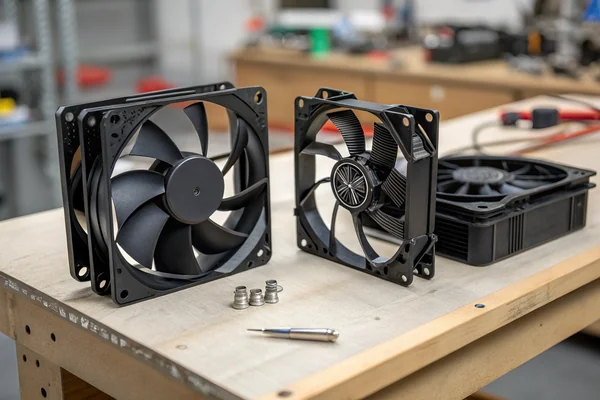
Standard 80mm, 92mm, and 120mm fan frames share the same bolt hole spacing across both types, so a case fan will physically mount onto most CPU coolers without modification. But frame compatibility doesn't confer aerodynamic suitability -- a fan that fits the mount may still fail to cool the heatsink adequately under load.
Why "It Fits" Is the Wrong Test
The 120mm standard, for example, uses 105mm diagonal hole spacing regardless of whether the fan came out of a chassis mount or a tower cooler. That standardization is genuinely useful for procurement flexibility, but it creates a trap: the ease of physical substitution encourages swapping without verifying that the replacement fan's static pressure output actually meets what the heatsink requires.
There's also a secondary mechanical consideration worth noting. Some CPU cooler fans use slightly different frame depths or clip-mount systems proprietary to a specific cooler rather than standard screws. In those cases, even the physical fitment breaks down, and forcing a standard case fan into a clip mount designed for a proprietary profile risks either loose contact or frame stress. Always verify both the hole pattern and the attachment mechanism before treating physical compatibility as confirmation of interchangeability.
What CFM and Static Pressure Numbers Actually Matter Here?
This is where most swap decisions go wrong -- people compare CFM specs across two fan types without looking at the number that actually governs heatsink performance.
Static pressure, measured in millimeters of water column (mmH₂O) or Pascals, is the spec that determines whether a fan can push air through a CPU heatsink fin stack effectively. A case fan with impressive free-air CFM may drop to a fraction of that airflow when placed against real fin-stack resistance -- the P-Q curve2 tells the actual story.
Reading the Right Spec for the Right Context
Free-air CFM is measured with no restriction in front of the fan -- a best-case number that almost never reflects real-world deployment conditions. The moment a fan is mounted against a heatsink, the effective airflow it delivers is determined by where the fan's P-Q curve intersects the heatsink's system resistance curve, not by its peak free-air number.
A typical high-quality CPU cooler fan might be rated at 2.5--3.5 mmH₂O of static pressure at its operating speed. A case fan optimized purely for free-air volume might deliver less than 1.5 mmH₂O under the same conditions. That gap matters significantly in a restrictive fin stack, where the pressure drop across the fins can easily exceed what the case fan can sustain. The result isn't zero airflow -- it's reduced, turbulent, and uneven airflow that leaves hot spots across the heatsink base rather than the uniform cooling the heatsink was designed for.
The reverse scenario -- mounting a high-pressure CPU cooler fan as a chassis intake or exhaust -- typically performs reasonably well since the system resistance is low, but it often generates more noise than necessary for that application, since the fan's blade geometry wasn't tuned for quiet free-air operation.
Do the Connectors Actually Differ Between the Two Types?
Connector compatibility is one area where the two types genuinely converge, which eliminates one common concern.
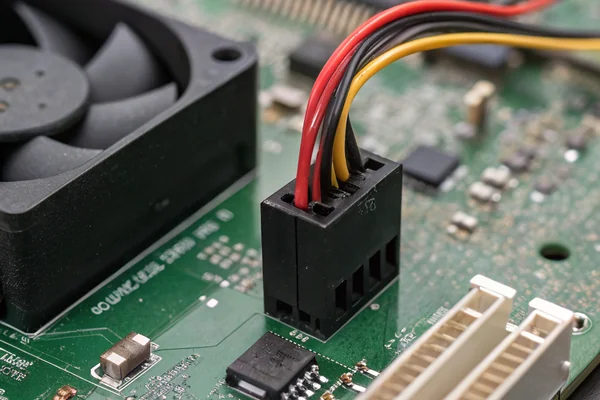
Both case fans and CPU cooler fans use the same standard 3-pin (voltage-controlled) or 4-pin PWM connector that plugs directly into standard motherboard fan headers -- connector type is not a meaningful differentiator between the two, and swapping one into the other's header works electrically regardless of the fan's aerodynamic purpose.
What the Connector Standard Actually Tells You
The 4-pin PWM fan connector3 is an industry-wide standard that applies across CPU cooler fans, case fans, and most other PC cooling components. Pin 1 is ground, pin 2 is 12V supply, pin 3 is tachometer signal, and pin 4 is the PWM control signal. None of that changes based on whether the fan is intended for a heatsink or a chassis panel.
The relevant caveat is that some CPU cooler fans are designed to operate at specific PWM duty cycles that correspond to thermal load on the CPU, while case fans may be controlled by a chassis temperature sensor on a separate header. Plugging a case fan into a CPU fan header doesn't break anything, but the control logic may behave differently than intended -- the motherboard's CPU fan speed alarm may trigger if the case fan's tachometer signal falls outside the expected range at low PWM duty cycles. That's a settings issue, not a hardware incompatibility, and it can typically be resolved in BIOS fan curve configuration.
When Is Swapping Actually Safe -- and When Does It Create Real Risk?
Context determines whether a swap is a reasonable shortcut or a genuine thermal hazard.
Replacing a CPU cooler fan with a case fan is risky whenever the heatsink requires meaningful static pressure to cool a loaded processor -- which describes almost every actively cooled desktop or server CPU. The reverse swap (case fan position filled by a CPU cooler fan) is generally safe aerodynamically but typically noisier than necessary for the application.
The Scenarios That Matter in Practice
The swap that's actually low-risk is mounting a CPU cooler fan as a case fan. The fan is over-engineered for the low-resistance task, it will move air effectively, and the main downside is noise -- a high-pressure blade profile in a low-restriction path generates more turbulence than a case-fan blade would at the same speed. For applications where noise matters, that's a real cost; for applications where airflow volume is the priority and noise is secondary, it's acceptable.
The swap that genuinely creates risk is the other direction: a case fan onto a CPU cooler. Under moderate CPU loads the temperature may stay within range, masking the problem. Under sustained load -- compilation, rendering, gaming -- the thermal headroom disappears and the CPU throttles or triggers an overheat shutdown. The failure mode is intermittent and load-dependent, which makes it harder to diagnose than an immediate failure.
The grey zone is low-TDP CPUs in undemanding applications. A processor pulling 15--35W in a well-ventilated chassis with a large, low-restriction heatsink surface may tolerate a case fan substitute without measurable thermal penalty. Verifying this requires actual temperature logging under representative load, not an assumption.
What Should You Actually Specify When Sourcing Fans for a Custom Cooling Design?
Most procurement mistakes in this space come from specifying the wrong primary metric rather than choosing the wrong physical component.
When sourcing fans for a custom cooling design, specify static pressure requirement and operating point on the P-Q curve first, then frame size and connector type. Sourcing by free-air CFM alone, without checking the static pressure spec against the actual system resistance, leads to fans that test well on a bench and underperform in the deployed application.
The Sourcing Checklist That Prevents Mismatches
For any design involving a heatsink, filter, or restricted airflow path, the procurement process should start with the system resistance estimate -- either measured or calculated from the component geometry -- and use that as the minimum static pressure requirement the fan must meet at its operating point. Free-air CFM is still relevant, but as a secondary check against the airflow volume the system needs once pressure losses are accounted for.
For open-air chassis positions with no obstruction, the approach flips: specify the free-air CFM target first, and verify that the static pressure spec isn't dramatically over-engineered for the position (which would indicate a blade geometry tuned for heatsink duty, likely to be noisier than necessary in an open-chassis role).
Additional sourcing dimensions worth specifying explicitly include bearing type (sleeve bearing suits lower-duty applications; ball or fluid dynamic bearing suits continuous-operation or high-temperature environments), PWM vs. voltage control, and connector pinout if the design uses a non-standard header.
Our PC Case Cooling Fan line and DC Axial Fan line are engineered for different points on exactly this performance spectrum -- case ventilation tuned for quiet, high-volume free-air operation, and axial fans with the static pressure profile needed for restrictive-path applications. Every production fan we ship is validated on our in-house CFM airflow test system and anechoic noise test chamber, and our team in Dongguan can pull the specific P-Q curve data for any fan in our catalog to confirm it meets your application's actual operating point, not just its free-air headline number.
Does Fan Speed Control Change the Equation When Swapping Fan Types?
PWM speed control doesn't close the aerodynamic gap between fan types -- it just makes the wrong fan quieter.
Throttling a case fan down via PWM to reduce noise when used in a CPU cooler position reduces both speed and static pressure simultaneously, compounding the pressure deficit rather than solving it. Speed control optimizes the performance of the right fan for a given load condition -- it doesn't compensate for a fan that was incorrectly specified for the position in the first place.
Why Slowing Down a Mismatched Fan Makes Things Worse
This is a failure mode that shows up in custom PC builds and embedded cooling designs alike. A case fan running at full speed on a heatsink may manage acceptable temperatures at light load. The instinct is then to dial it back via PWM to reduce noise. But reducing PWM duty cycle drops both RPM and, critically, static pressure output -- the two quantities move together on the fan's P-Q curve. The result is a fan that's now quieter but even less capable of pushing air through the fin stack under load.
The correct approach is to select a fan with the right static pressure profile first, then use PWM control to reduce speed (and noise) while staying within the fan's effective operating range for that application. A fan with genuine static pressure capability can often be run at reduced speed and still meet the heatsink's requirements with acceptable noise. A case fan running at full speed on a heatsink and then throttled down offers neither the performance nor the noise benefit that a properly specified CPU cooler fan would provide at a moderate PWM setting.
FAQ
Can a case fan physically damage a CPU cooler if used as a direct replacement?
Not through electrical incompatibility -- the connectors are the same standard. The risk is thermal: inadequate static pressure allows the CPU to run hotter than designed, accelerating long-term degradation or triggering thermal throttling under load.
Is there a static pressure number that definitively separates case fans from CPU cooler fans?
There's no official cutoff, but fans rated above roughly 2.0--2.5 mmH₂O static pressure at their operating speed are generally suited to heatsink duty. Fans below that threshold are typically optimized for free-air case ventilation. Always check the actual P-Q curve rather than relying on a single static pressure rating.
Do higher-end case fans ever cross over into CPU cooler fan territory aerodynamically?
Some premium case fans, particularly those with higher blade pitch and tighter tip clearances, approach the static pressure range of entry-level CPU cooler fans. However, these tend to be noisier than standard case fans at equivalent speeds, reflecting the inherent noise cost of higher-pressure blade geometry.
What happens if the CPU fan header doesn't detect a tachometer signal from a swapped fan?
The motherboard may trigger a CPU fan error on POST or log a fan-speed alarm. This is typically resolvable by adjusting fan speed alarm thresholds in BIOS, but it indicates the fan's rated minimum RPM may fall below the header's expected range.
Does blade count indicate whether a fan is better suited for case or heatsink use?
Not reliably on its own -- blade count interacts with pitch angle and blade shape to determine the overall pressure-airflow character. A fan with seven shallow-pitch blades may still generate less static pressure than a fan with five steep-pitch blades. Evaluate the P-Q curve rather than inferring performance from blade count alone.
Are CPU cooler fans always louder than case fans at the same physical size?
At the same RPM, CPU cooler fans typically generate more noise because their blade geometry creates more turbulence. In practice, CPU cooler fans often run at lower RPM under light load via PWM control, which can bring noise below a case fan running at fixed voltage. Speed matters more than blade geometry for perceived noise in most real deployments.
Should bearing type influence the choice between case fan and CPU cooler fan?
Bearing type matters more for longevity and orientation than for aerodynamic performance. Sleeve bearings suit intermittent-use applications in standard orientations; ball or fluid dynamic bearings suit continuous operation, high temperatures, or non-horizontal mounting. Both case fans and CPU cooler fans are available with either bearing type -- specify bearing type based on duty cycle and orientation, not fan role.
Swapping case fans and CPU cooler fans is almost always the wrong call when it matters -- the aerodynamic split between them is real, and connector compatibility masks it. At Herays, our Dongguan facility has over 20 years of DC axial and case fan production experience, certified under ISO 9001, ISO 14001, QC 080000, and IATF 16949. If your design has a specific static pressure or airflow target, we're glad to provide the P-Q curve data to confirm the right fan before it goes into production.
Fan curve (P-Q curve) is the graphical relationship between a fan's static pressure output and its airflow volume at a given speed. It is the primary tool for matching a fan to an application's actual system resistance rather than relying on free-air specifications alone. ↩
P-Q curve is the static pressure versus airflow volume performance curve measured under standardized laboratory conditions. Understanding where a fan's operating point falls on this curve -- determined by the intersection with system resistance -- is essential for predicting real deployed performance rather than bench performance. ↩
PWM fan connector is the four-pin connector standard used for pulse-width-modulation speed control of PC cooling fans, allowing motherboard firmware to vary fan speed in response to temperature without changing the supply voltage. The standard is consistent across case fans and CPU cooler fans, making electrical interchangeability straightforward even when aerodynamic suitability is not. ↩

Liang
I've been working with DC fans for 30 years — long enough to have seen the industry evolve from basic sleeve bearing designs to today's high-efficiency, IP68-rated systems built for the harshest environments imaginable. I founded Herays because I believed manufacturers and engineers deserved a supplier who could talk technical from day one. Not just hand over a datasheet, but actually help you select the right fan for your thermal load, your enclosure, your certification requirements. Most of what I write here comes directly from problems I've solved on the factory floor or in customer applications — medical devices, laser equipment, industrial automation, you name it. If it involves moving air efficiently and reliably, I've probably spent time thinking about it. When I'm not obsessing over airflow curves, I'm usually helping a customer figure out why their cooling system isn't performing the way their simulation said it would.
View all posts by Liang