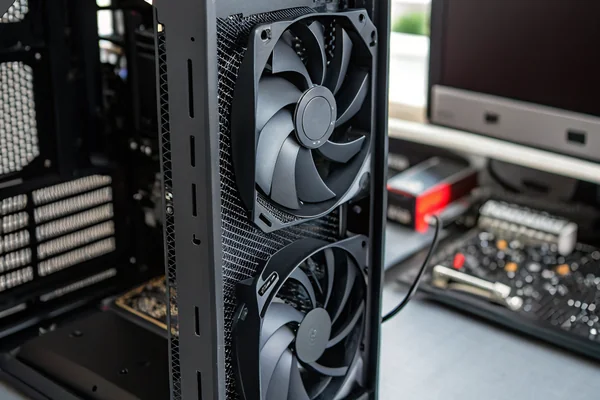
Choosing between RGB and non-RGB fans feels like a purely cosmetic decision — until it isn't. The wiring, connectors, and controller dependencies that come with RGB add real variables that affect more than just your case's appearance.
RGB and non-RGB case fans can deliver identical airflow and static pressure performance from the same underlying fan design — the lighting hardware itself does not meaningfully alter aerodynamic output. The real differences show up in cost, connector complexity, software dependencies, and long-term reliability rather than in CFM or noise figures.
- RGB LEDs and their supporting circuitry are electrically and mechanically separate from the fan's motor and blade assembly, so lighting hardware does not directly alter airflow or static pressure performance.
- The added connectors, control boards, and cabling that RGB requires introduce more potential failure points and complicate installation compared to a standard non-RGB fan.
- RGB fans typically cost meaningfully more than comparable non-RGB models, and locking into a specific ecosystem (ARGB headers, proprietary hubs) adds hidden downstream costs.
- Software and firmware dependencies — drivers, control apps, sync protocols — are a real operational burden that non-RGB fans entirely avoid.
- For applications where the fan is never seen, or where reliability and simplicity matter more than aesthetics, non-RGB is the straightforward engineering choice; RGB is worth the tradeoffs only when the visual output genuinely serves the build's purpose.
The performance question turns out to be the easy part. The more consequential differences between RGB and non-RGB fans are the ones that only become apparent after the fans are installed and the case is closed.
Table of Contents
What Does RGB Hardware Actually Add to a Case Fan, Physically?
The lighting system is a separate subsystem bolted onto the fan's core design, not integrated into it.
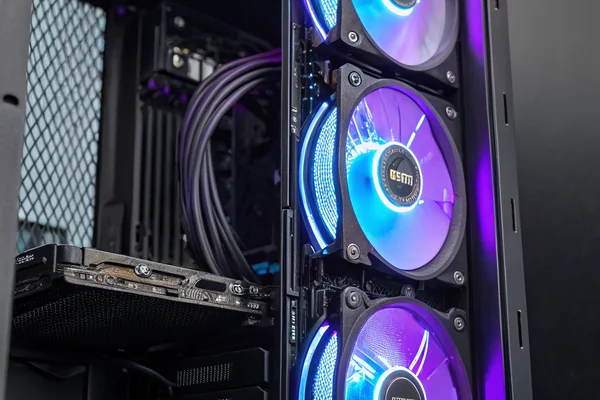
RGB case fans add a ring or array of addressable LEDs, a control board or driver circuit, and at least one additional connector — typically a 3-pin ARGB header — alongside the standard fan power connector, all of which are mechanically and electrically independent of the motor and blade assembly doing the actual airflow work.
The Physical Architecture of an RGB Fan
The fan motor, blade hub, and bearing assembly operate entirely on their own power circuit — usually a standard 4-pin PWM connector for speed control. The RGB lighting system draws power and data signals through a completely separate circuit. In most consumer ARGB fans, this means two connectors leaving the fan: one 4-pin PWM for the motor, one 3-pin 5V ARGB for the lighting. Some manufacturers add a third connector for a proprietary hub chain.
The LEDs themselves are typically mounted in a translucent diffuser ring around the blade assembly or integrated into the blade hub area. Neither location puts any component in the primary airflow path in a way that meaningfully obstructs blade rotation or air displacement. The added weight of the LED ring and PCB is negligible relative to the motor and blade mass.
What RGB does add physically is more cabling. A single RGB fan installation might require routing and managing three separate cables where a non-RGB fan requires one. Multiply that across six fans in a full tower build and cable management becomes a genuine engineering exercise rather than a minor inconvenience.
Does RGB Hardware Actually Change Airflow, Static Pressure, or Noise?
Under identical blade geometry and motor specs, the lighting system itself doesn't move the performance numbers.
RGB hardware does not meaningfully affect a case fan's airflow, static pressure, or acoustic output when the underlying blade geometry, motor, and bearing are identical to the non-RGB version — the lighting circuitry draws its own power separately and does not interact with the aerodynamic assembly.
Where the Aerodynamics Actually Come From
Airflow performance is determined by blade pitch angle, blade count, blade profile, rotational speed, and motor torque — none of which are altered by adding LEDs to the frame. Static pressure capability comes from the same variables. Noise is generated by blade tip turbulence, bearing mechanical noise, and motor vibration — again, variables untouched by the lighting system.
The one edge case worth acknowledging: if an RGB fan's frame geometry is physically different from its non-RGB counterpart — a thicker or differently shaped diffuser ring, for instance — that geometry could have a minor effect on the airflow path entering and exiting the blade assembly. This is a frame design difference, not an RGB-specific effect, and reputable manufacturers designing RGB and non-RGB variants from the same core design avoid introducing these differences. When comparing two fans from different product lines entirely, aerodynamic differences reflect blade and frame design choices, not the presence or absence of lighting.
One place where RGB does impose a real load is on the system's 5V rail through the ARGB header. The current draw of a full LED ring is measurable but small in the context of a modern PSU — it's not a performance concern in practice, but it is a real power draw that non-RGB fans don't impose.
| Parameter | RGB Fan | Non-RGB Fan (same blade design) |
|---|---|---|
| Airflow (CFM) | Identical | Identical |
| Static Pressure | Identical | Identical |
| Noise (dBA) | Identical | Identical |
| Connector count | 2–3 | 1 |
| 5V ARGB current draw | Yes (LEDs + controller) | None |
| Cable management complexity | Higher | Lower |
Are RGB Case Fans Less Reliable Than Non-RGB Fans Over Time?
The fan motor itself isn't the reliability concern — the additional electronics are.
RGB fans introduce more potential failure points than non-RGB fans: the LED components, solder joints on the LED PCB, the control IC, and the additional connectors can all fail independently of the motor and bearing, meaning a fan can lose its lighting while still spinning, or develop connection issues from the additional cable strain over time.
What Actually Fails in RGB Fan Systems
The motor and bearing determine a fan's operational lifespan — this is unchanged by RGB. Fluid dynamic bearings1 and ball bearings outlast sleeve bearings in all fan types, RGB or not, and that relationship holds regardless of what lighting system is attached.2
What RGB adds is a populated PCB with LEDs, solder joints, a driver IC, and connectors — all of which have their own failure modes. Individual LEDs can fail and create dead zones in the diffuser ring. The solder joints on a flexible or rigid LED PCB can crack under the vibration a fan generates over years of operation. The ARGB controller IC can fail, taking the lighting with it. These failures don't stop the fan from moving air, but they do mean that a system's aesthetic output degrades independently of its functional output, sometimes in visually unpleasant ways.
The additional connectors also represent real failure points. Each connection in a system is a potential source of intermittent contact, oxidation, or physical damage during a cable pull. Non-RGB fans, running a single 4-pin PWM connector, simply have fewer places for things to go wrong.
For applications where the fan will run continuously — server-adjacent builds, always-on workstations, industrial edge compute — the simpler electrical path of a non-RGB fan is a legitimate reliability argument, not just an aesthetic preference.
What Does RGB Software and Ecosystem Lock-In Actually Cost You?
Addressable RGB is a software story as much as a hardware one, and the software side has real operational costs.
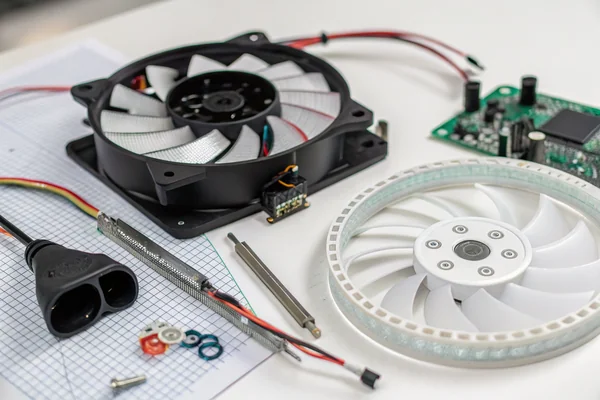
RGB fans require a software layer — a motherboard manufacturer's lighting control application, a standalone hub controller, or both — to do anything beyond default static lighting, and that software layer introduces driver conflicts, firmware update dependencies, and ecosystem lock-in that non-RGB fans entirely avoid.
The Real Complexity of ARGB Ecosystems
Addressable RGB (ARGB)3 control depends on the 5V 3-pin header on the motherboard and the software suite that interprets lighting profiles and syncs them across components. Each major motherboard manufacturer runs a proprietary ecosystem — ASUS Aura Sync, MSI Mystic Light, Gigabyte RGB Fusion, ASRock Polychrome — and these applications have a long-established reputation in the enthusiast community for conflicting with each other, conflicting with GPU software, and occasionally requiring a full uninstall-reinstall cycle after a driver update. None of this is hypothetical; it's a routine topic in PC builder forums.
Third-party RGB controllers and hubs (common when fans don't connect directly to a motherboard header) add their own firmware dependency and their own application layer. A build with fans on a proprietary hub, GPU LEDs on a separate controller, and a keyboard on a third application can easily be running three separate lighting applications simultaneously, each with its own update cycle and compatibility matrix.
Non-RGB fans have no software dependency at all. Speed control through a standard PWM signal works the same way it did twenty years ago and requires no application, driver, or firmware version to function correctly. For builders who prioritize operational simplicity — or who manage systems they don't want to maintain constantly — this absence of software dependency is a genuine advantage.
How Much More Do RGB Fans Actually Cost, and Is the Premium Justified?
The price gap is real and compounds across a multi-fan build.
RGB fans command a meaningful price premium over comparable non-RGB models — often 30–60% more per fan depending on the tier — and that gap multiplies across a full build, making the total cost of an RGB cooling solution substantially higher than a functionally equivalent non-RGB alternative.
Where the Cost Actually Goes, and When It's Worth Paying
The premium reflects the additional BOM: the LED ring PCB, the driver IC, the ARGB connector and cabling, and the translucent diffuser tooling. For a single fan, this premium may be modest in absolute terms. Across six fans in a full tower build — plus a hub controller if the motherboard has limited ARGB headers — the cost difference becomes significant.
Beyond the fans themselves, a full RGB system often requires a controller hub (if not using direct motherboard headers), which is another purchase. Some high-end RGB fan kits bundle a hub and remote; these kits cost more than the fan hardware alone would suggest.
The premium is worth paying when the build's visual output matters to its purpose — showcase builds, content creation rigs filmed for video, retail display systems, gaming setups where the aesthetic is part of the experience. It is not worth paying when the fan will live inside a server rack, an industrial enclosure, a workstation under a desk, or any other environment where nobody will ever see it running. In those applications, the premium pays for complexity and maintenance burden with no functional return.
How Does RGB Affect Fan Sourcing and Procurement for OEM or Volume Buyers?
RGB introduces supply chain and specification complexity that non-RGB purchases avoid entirely.
For OEM builds, volume procurement, or custom integration projects, RGB fans require specifying and sourcing not just the fan but the controller, cabling, and software ecosystem — adding supplier dependencies and qualification scope that non-RGB fans simply don't carry.
Why Procurement Complexity Matters at Scale
A single enthusiast building one PC can absorb the complexity of ARGB headers and ecosystem software as a one-time learning exercise. An OEM integrating cooling fans into a product line faces a different situation: each additional component (hub controller, ARGB cabling, compatible header on the target platform) is another item to qualify, stock, source, and support. If a proprietary hub controller reaches end-of-life, it can strand an entire cooling solution even if the fans themselves are still available.
For most OEM and industrial applications, the answer is non-RGB fans specified to the airflow, static pressure, noise, and bearing-life requirements of the application. The absence of lighting circuitry means simpler qualification, simpler cable harnesses, fewer SKUs to manage, and no software dependency to maintain across product generations. This is the dominant choice in any application where the fan's performance characteristics — not its appearance — are the governing specification criteria.
Our PC Case Cooling Fan line is engineered around the aerodynamic assembly first — blade geometry, bearing selection, and motor tuning — rather than built around a lighting system. Every fan we supply is validated on our in-house CFM airflow test system and anechoic noise test chamber as part of our ISO 9001 and IATF 16949 quality process, so the performance specifications on our datasheets reflect measured results rather than theoretical figures. For OEM builds or volume sourcing where you need verified airflow and noise data without the ecosystem dependencies of RGB, we're glad to discuss the right specification for your application.
When Should You Actually Choose RGB, and When Should You Skip It?
The decision is simpler than the marketing around RGB fans makes it seem.
Choose RGB when the fan's visual output is genuinely part of the product or build's purpose and the software ecosystem is manageable in your context; skip it in any application where the fan will not be seen, where software simplicity matters, where reliability over years of continuous operation is the priority, or where the cost premium offers no functional return.
A Practical Decision Framework
The most useful question isn't "is RGB worth it in general" but "will anyone see this fan running in its installed location, and does that visibility serve a purpose?" For a gaming PC built to be displayed on a desk with a windowed panel, the answer may genuinely be yes. For a workstation under a desk, a NAS in a closet, an industrial edge compute unit, or any embedded cooling application, the answer is no — and in those cases, choosing non-RGB simplifies procurement, installation, and maintenance with no performance trade-off whatsoever.
A secondary question: is the target platform's RGB ecosystem well-matched to the fans being considered? Mixed-ecosystem builds — fans from one brand, motherboard from another, GPU from a third — often result in two or three separate lighting applications running in parallel, each with its own quirks. If that management overhead is acceptable, RGB remains viable; if it isn't, non-RGB removes the problem entirely rather than requiring it to be managed.
| Scenario | RGB or Non-RGB? | Key Reason |
|---|---|---|
| Gaming PC with windowed case panel | RGB viable | Visible, aesthetic purpose served |
| Workstation under a desk | Non-RGB | Not visible, premium buys nothing |
| OEM product integration | Non-RGB | Simpler BOM, no software dependency |
| Server / industrial enclosure | Non-RGB | Continuous operation, reliability priority |
| Showcase / display build | RGB appropriate | Visual output is the product |
| Mixed-ecosystem build | Non-RGB or careful matching | Avoids multi-app conflict |
FAQ
Can an RGB fan be run without the lighting active to simplify installation?
Yes — the motor circuit and lighting circuit are independent, so the fan spins and moves air normally even if the ARGB connector is left unconnected. The LEDs simply won't illuminate.
Does running the RGB LEDs at full brightness generate meaningful heat inside the case?
The thermal output of a consumer LED ring is negligible relative to the heat generated by a GPU or CPU and managed by the cooling system. It is not a practical concern for case thermal performance.
Are all ARGB fans compatible with all motherboard ARGB headers?
The 3-pin 5V ARGB standard is broadly compatible across manufacturers for basic on/off and color control, but advanced effects and sync features typically require the motherboard manufacturer's specific software and sometimes a proprietary header or hub.
Do RGB fans require more maintenance than non-RGB fans?
The bearing and motor maintenance intervals are identical. The LED system may require software updates or troubleshooting that a non-RGB fan never would, and individual LEDs can fail independently of the motor over time.
Is there any acoustic difference between an RGB fan and a non-RGB fan with identical blade and motor specs?
No measurable acoustic difference results from the LED circuitry itself. Any noise difference between two fan models reflects blade design, bearing type, or motor characteristics — not the lighting hardware.
Can RGB fans be used in commercial or light industrial builds if the application calls for it?
Technically yes, but the ARGB control circuitry, proprietary connectors, and software dependencies make them a poor fit for most commercial applications where operational simplicity and long service life are priorities.
What should I look for on a datasheet to compare an RGB and non-RGB version of the same fan?
Check that the CFM, static pressure, and dBA specifications are identical between the two variants — if they match, the aerodynamic assembly is the same and performance differences will be negligible. Also verify connector type and count to understand the installation differences.
RGB and non-RGB case fans are the same engineering story underneath — the lighting is a separate system that neither helps nor hurts the airflow work the fan actually does. The real decision is about complexity, cost, and whether the visual output serves a genuine purpose in the application. Herays has manufactured DC axial and PC case cooling fans from our Dongguan facility for over 20 years, certified to ISO 9001, ISO 14001, and IATF 16949. If you have a specific airflow, noise, or reliability requirement to solve — with or without lighting — we're glad to work through the specification with you.
Fluid dynamic bearings use a thin pressurized oil film to support shaft rotation with lower friction and longer rated life than sleeve bearings, making bearing type selection one of the primary drivers of long-term fan reliability regardless of what other features the fan carries. ↩
The GamersNexus bearing comparison guide at gamersnexus.net provides independently measured service life data across sleeve, ball, and fluid dynamic bearing types, useful as a reference when evaluating fan longevity claims from manufacturers. ↩
Addressable RGB (ARGB) refers to LED systems where each diode in an array can be individually controlled for color and brightness via a data signal, as opposed to standard RGB where all LEDs in a zone change together — the distinction matters for ecosystem compatibility because ARGB and standard RGB headers use different voltages and pinouts. ↩

Liang
I've been working with DC fans for 30 years — long enough to have seen the industry evolve from basic sleeve bearing designs to today's high-efficiency, IP68-rated systems built for the harshest environments imaginable. I founded Herays because I believed manufacturers and engineers deserved a supplier who could talk technical from day one. Not just hand over a datasheet, but actually help you select the right fan for your thermal load, your enclosure, your certification requirements. Most of what I write here comes directly from problems I've solved on the factory floor or in customer applications — medical devices, laser equipment, industrial automation, you name it. If it involves moving air efficiently and reliably, I've probably spent time thinking about it. When I'm not obsessing over airflow curves, I'm usually helping a customer figure out why their cooling system isn't performing the way their simulation said it would.
View all posts by Liang