Two identical fan counts can produce very different dust accumulation and thermal results depending on one setup choice most builders never explicitly think about: whether the case runs positive or negative pressure.
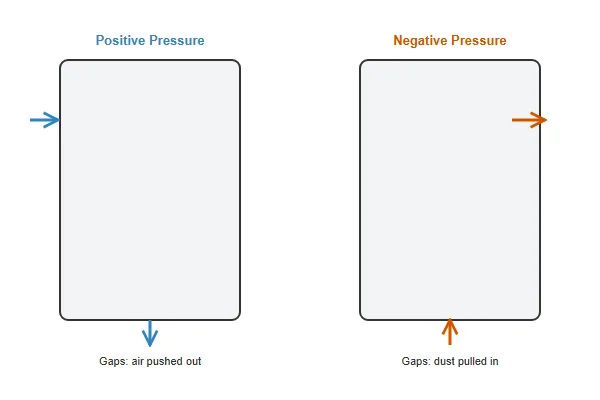
Positive pressure -- more intake airflow than exhaust -- reduces dust accumulation by forcing air out through small gaps rather than pulling unfiltered air in, while negative pressure -- more exhaust than intake -- can improve raw thermal performance slightly but pulls dust in through every unfiltered opening; a balanced setup with matched, filtered intake and exhaust is the middle-ground most builds should target.
- Pressure balance is determined by relative airflow, not fan count alone -- a case with more intake fans isn't automatically positive pressure if the exhaust fans move more air per unit.
- Positive pressure reduces dust accumulation significantly by pushing air out through unfiltered gaps rather than pulling dust in through them, at a potential small thermal performance cost.
- Negative pressure can offer marginally better raw exhaust efficiency but pulls in dust through every case opening, seam, and cable grommet that isn't a filtered intake.
- A balanced setup -- filtered intake roughly matching exhaust airflow -- is the practical middle ground most builders should target rather than chasing either extreme.
- Case design (filter placement, gap sealing) interacts with fan configuration to determine actual pressure balance, meaning the same fans can produce different results in different cases.
Understanding what pressure balance actually is -- and how to achieve the balance you want -- prevents both unnecessary dust buildup and unnecessary thermal compromise.
Table of Contents
What Do "Positive" and "Negative" Pressure Actually Mean in a PC Case?
These terms describe airflow balance, not something more exotic, but the distinction has real practical consequences.
Positive pressure means more air is entering the case through intake fans than leaving through exhaust fans, causing air to also escape through small unfiltered gaps (rather than being pulled in through them) -- negative pressure is the reverse, with more air leaving than entering, causing unfiltered gaps to become additional intake points pulling in unfiltered dust-laden air.
Why This Matters More Than It Might Seem
Every PC case has small openings beyond its designed intake and exhaust fans -- PCIe slot covers, cable grommets, seams between panels -- that aren't filtered. Under positive pressure, air flows outward through these gaps, meaning any dust nearby gets pushed away rather than pulled in. Under negative pressure, the case actively pulls air in through these same unfiltered gaps to make up for the exhaust deficit, and that air brings dust with it. This single dynamic is why pressure balance has an outsized effect on long-term dust accumulation compared to its effect on raw cooling performance.
| Pressure State | Airflow Balance | Dust Through Gaps | Typical Thermal Trade |
|---|---|---|---|
| Positive | Intake > Exhaust | Pushed out (less dust) | Slightly less exhaust efficiency |
| Balanced | Intake ≈ Exhaust | Minimal either direction | Neutral |
| Negative | Exhaust > Intake | Pulled in (more dust) | Slightly better exhaust efficiency |
What Are the Real Benefits and Downsides of Positive Pressure?
Positive pressure's main advantage is well understood, but it comes with a genuine, if usually modest, tradeoff.
Positive pressure's primary benefit is significantly reduced dust accumulation, since incoming air is filtered at the intake fans while unfiltered gaps become outlets rather than inlets -- the tradeoff is a small reduction in raw exhaust efficiency, since exhaust fans aren't given priority to pull air through the case as aggressively as they could in a negative-pressure configuration.
Why the Thermal Tradeoff Is Usually Smaller Than Builders Expect
The thermal performance difference between well-configured positive and negative pressure setups is typically modest for most builds -- a few degrees at most under sustained load -- because the total airflow moving through the case matters more than the specific balance between intake and exhaust for overall cooling capacity. The dust reduction benefit, by contrast, compounds significantly over months of operation, since less dust accumulation means less airflow restriction over time and less frequent deep cleaning. For most builders, this makes positive pressure's tradeoff a reasonable one to accept.
What Are the Real Benefits and Downsides of Negative Pressure?
Negative pressure isn't simply "wrong" -- it has a specific, narrower use case where its tradeoff makes sense.
Negative pressure can offer marginally more aggressive exhaust performance, useful in builds prioritizing maximum raw airflow through the case above all else, but it accelerates dust accumulation through every unfiltered gap and typically requires more frequent case cleaning to maintain the same long-term thermal performance a positive-pressure setup would sustain with less maintenance.
Why Negative Pressure Sometimes Still Makes Sense
Certain builds -- particularly those with large radiators or high-airflow-priority configurations where every bit of exhaust efficiency matters -- may deliberately accept negative pressure's dust tradeoff in exchange for maximizing raw thermal headroom. This is a legitimate choice when the builder understands and accepts the maintenance tradeoff, rather than an accidental configuration resulting from not thinking about pressure balance at all. The mistake isn't choosing negative pressure deliberately -- it's ending up there unintentionally through uncoordinated fan selection.
How Do You Actually Set Up a Balanced Configuration?
Balanced pressure is often the most practical target for builders who want reasonable dust control without a significant thermal compromise.
A balanced setup means matching total intake CFM to total exhaust CFM as closely as practical, using filtered intake locations for the primary airflow path, and minimizing large unfiltered openings elsewhere in the case -- achieving this requires checking actual fan CFM specs rather than assuming equal fan count produces equal airflow.
Why Matching Fan Count Doesn't Guarantee Matched Airflow
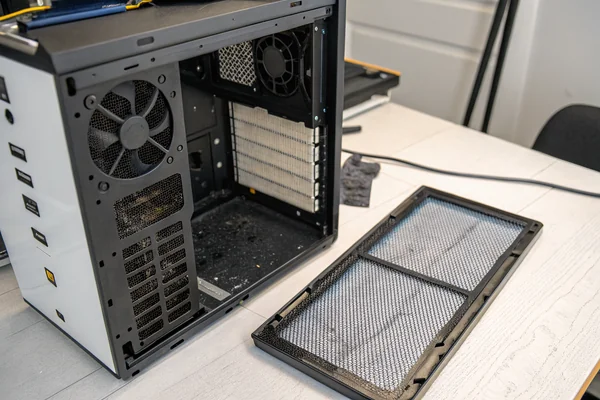
Intake and exhaust fans are frequently different sizes or models across the front, top, and rear of a case, meaning equal fan count at each position doesn't guarantee equal total CFM between intake and exhaust. Checking actual rated CFM for each fan position and summing intake versus exhaust totals gives a much more accurate picture of actual pressure balance than counting fans alone -- and adjusting fan speed via BIOS or software fan curves offers a practical way to fine-tune the balance without physically changing fan hardware.
Does Case Design Actually Affect Pressure Balance Beyond Fan Choice?
Fan selection is only part of the equation -- the case's own construction meaningfully affects how pressure balance actually plays out.
Case design factors -- how well panel seams are sealed, how many unfiltered gaps exist, and where filters are positioned -- interact directly with fan configuration to determine actual pressure balance, meaning identical fan setups can produce different dust and thermal outcomes in different case models.
Why the Same Fan Configuration Can Behave Differently in Different Cases
A case with well-sealed panels and minimal unfiltered gaps will realize more of positive pressure's dust-reduction benefit than a case with loose panel fits and multiple unfiltered openings, even with identical fan hardware and speed settings. This is why pressure balance recommendations are somewhat case-specific -- a builder switching cases with the same fans may find their achieved pressure balance shifts meaningfully, which is worth re-checking rather than assuming the previous case's balance carries over automatically.
Our PC case cooling fan line includes precisely rated CFM specifications for accurate intake/exhaust balance calculation, validated on our in-house CFM airflow test system at our Dongguan facility to ensure published specs reflect real-world performance. With over 20 years of production experience under ISO 9001 certification, we can help system builders and integrators calculate the exact fan combination needed for a target pressure balance across specific case models.
How Does Pressure Balance Interact With Liquid Cooling Radiators?
Radiators add a variable to the pressure balance calculation that pure air-cooled builds don't need to consider.
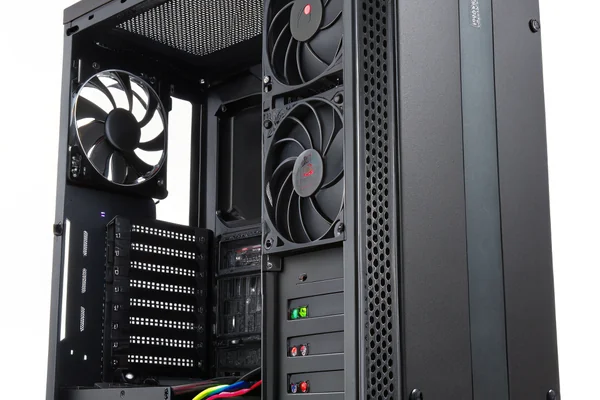
Radiator fans count toward whichever side of the pressure balance they're configured as (intake or exhaust), and the radiator itself adds meaningful airflow restriction that reduces a fan's actual delivered CFM below its unrestricted rating -- both factors need to be included when calculating pressure balance for a liquid-cooled build, not just non-radiator fan positions.
Why Radiator Restriction Changes the Calculation
A fan pushing or pulling air through a radiator's dense fin array delivers meaningfully less airflow than the same fan's rated free-air CFM, since the radiator itself represents significant static pressure resistance. This means a pressure balance calculation that uses unrestricted CFM ratings for radiator-mounted fans will overstate their actual contribution, potentially leading to an unintentionally negative-pressure result even when the fan count and nominal ratings suggested balance. Using fans with sufficient static pressure capability for radiator duty, and accounting for that restriction in the balance calculation, avoids this common liquid-cooling-specific miscalculation.
FAQ
How do I calculate whether my current build is positive, negative, or balanced?
Sum the rated CFM of all intake fans and separately sum all exhaust fans, then compare the totals -- keep in mind actual CFM can differ somewhat from rated spec depending on installed filters and restrictions, so this is an estimate rather than an exact measurement.
Does liquid cooling radiator placement affect pressure balance calculations?
Yes -- radiator fans count toward whichever side (intake or exhaust) they're configured as, and radiators themselves add airflow restriction that can reduce a fan's actual delivered CFM compared to its unrestricted rating.
Is slightly positive pressure generally better than perfectly balanced?
Many builders target slightly positive rather than perfectly balanced specifically to bias the dust-reduction benefit, accepting a marginal thermal tradeoff -- this is a reasonable default for most non-extreme builds.
Can I achieve positive pressure without adding more intake fans, just by adjusting speed?
Sometimes, if your existing intake and exhaust fans have enough speed range -- increasing intake fan speed relative to exhaust fan speed shifts the balance without requiring additional hardware.
Does dust filter quality affect the pressure balance calculation itself?
Filters add some airflow restriction, which can reduce actual intake CFM below the fan's unrestricted rating -- worth factoring in when fine-tuning balance, particularly with denser filter materials.
Should server or workstation builds follow the same pressure guidance as gaming PCs?
The same principles apply, though server and workstation environments sometimes prioritize different tradeoffs -- continuous 24/7 operation in a dusty environment often makes positive pressure's maintenance benefit even more valuable than in a typical gaming build.
Pressure balance is one of the more overlooked configuration choices in PC building, with real, compounding consequences for long-term dust accumulation and maintenance. At Herays, our Dongguan facility manufactures PC case cooling fans with precisely validated CFM specifications to support accurate pressure balance planning, backed by over 20 years of experience under ISO 9001 certification. If you're specifying fans for a build or product with specific airflow balance requirements, we're glad to help work through the calculation.

Liang
I've been working with DC fans for 30 years — long enough to have seen the industry evolve from basic sleeve bearing designs to today's high-efficiency, IP68-rated systems built for the harshest environments imaginable. I founded Herays because I believed manufacturers and engineers deserved a supplier who could talk technical from day one. Not just hand over a datasheet, but actually help you select the right fan for your thermal load, your enclosure, your certification requirements. Most of what I write here comes directly from problems I've solved on the factory floor or in customer applications — medical devices, laser equipment, industrial automation, you name it. If it involves moving air efficiently and reliably, I've probably spent time thinking about it. When I'm not obsessing over airflow curves, I'm usually helping a customer figure out why their cooling system isn't performing the way their simulation said it would.
View all posts by Liang