Running out of motherboard fan headers is a common problem in builds with six or more fans, but the fix -- a splitter or a hub -- isn't interchangeable, and picking wrong can mean losing speed control across your whole build.
A fan hub or splitter lets multiple fans share a single motherboard header, but they work differently -- passive splitters simply combine power and typically share one tachometer signal, while powered hubs distribute PWM control more reliably across many fans and often supply power independently, which matters more as fan count grows.
- Once a build exceeds the motherboard's available fan headers, a hub or splitter becomes necessary to consolidate multiple fans onto fewer control points.
- Passive splitters are simple and cheap but typically only report one fan's tachometer signal back to the motherboard and may struggle with current limits at higher fan counts.
- Active/powered fan hubs draw power directly from the PSU rather than the motherboard header, avoiding the current limit issue and often providing more reliable per-fan PWM distribution.
- PWM signal distribution quality varies between hub designs -- some genuinely replicate the PWM signal to every fan, while cheaper designs may not control all connected fans equally well.
- For large builds with many fans, a quality powered hub is generally worth the added cost over a simple splitter, given the control and power delivery advantages.
Understanding the real functional difference between splitters and hubs -- not just price -- clarifies which one actually fits a build with more fans than available headers.
Table of Contents
Why Would You Need a Fan Hub in the First Place?
The core problem a hub or splitter solves is straightforward, but worth understanding clearly before choosing a solution.
Motherboards typically offer a limited number of dedicated fan headers -- often four to eight depending on the board -- and builds with more fans than available headers need a way to consolidate multiple fans onto fewer control points, which is exactly the problem fan hubs and splitters solve.
Why This Becomes a Real Constraint in Larger Builds
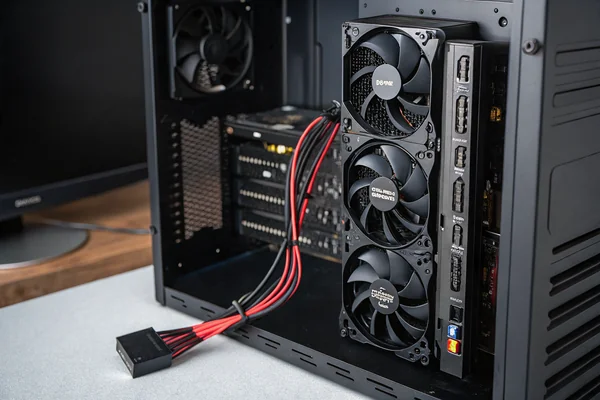
A build with front, top, rear, and radiator-mounted fans can easily exceed six or more total fans, quickly outpacing typical motherboard header counts, especially once CPU fan and AIO pump headers are also accounted for separately. Once you exceed available headers, the choice isn't whether to use a hub or splitter -- it's which type actually fits your specific fan count and control requirements.
What's the Actual Difference Between Passive Splitters and Active Hubs?
This distinction determines both cost and functional capability, making it the central decision in this category.
Passive splitters are simple cable-based Y-connectors or multi-way adapters that combine several fans' power and control lines onto a single motherboard header connection with no additional electronics, while active/powered hubs include their own circuit board that draws power directly from the PSU and distributes PWM signal to each connected fan more reliably.
Why This Isn't Just a Price Difference
A passive splitter routes the motherboard header's PWM signal to all connected fans simultaneously but typically only reports one fan's tachometer signal back to the motherboard, meaning you lose individual RPM monitoring for the other fans on that splitter. A powered hub, by drawing power independently from the PSU rather than relying solely on the motherboard header's limited current capacity, avoids overloading a single header and often provides more consistent PWM signal distribution across all connected fans, which becomes increasingly important as fan count grows.
| Feature | Passive Splitter | Powered Hub |
|---|---|---|
| Power source | Motherboard header | PSU (SATA/Molex) |
| Current limit risk | Higher at scale | Lower (PSU-sourced) |
| Tachometer reporting | Usually one fan only | Often per-fan or aggregate |
| Typical cost | Low | Moderate |
Should You Choose a Powered or Non-Powered Hub for Your Build?
This decision depends primarily on how many fans you're actually consolidating and how much you value reliable per-fan control.
Choose a powered hub for builds with more than three or four fans, or any build where reliable PWM speed control and adequate current delivery matter -- a simple passive splitter remains a reasonable choice only for very small fan counts (two to three) where current draw and control precision are less likely to become limiting factors.
Why Current Draw Becomes a Real Concern at Higher Fan Counts
Motherboard fan headers have a rated maximum current output, and a passive splitter drawing power for many fans through a single header risks exceeding that rating, potentially causing unreliable operation or, in worst cases, header damage. A powered hub sidesteps this entirely by sourcing power directly from the PSU, which has far more current capacity to spare than a single motherboard header was ever designed to provide.
How Does PWM Signal Distribution Actually Work Across a Hub?
Understanding the mechanics clarifies why hub quality genuinely varies in ways that affect real-world fan control.
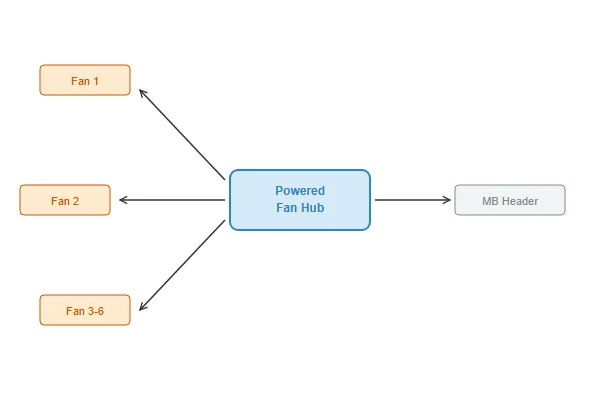
A quality PWM hub replicates the motherboard's PWM control signal accurately to every connected fan while independently supplying each fan's power from the PSU, allowing all fans to respond consistently to the same speed curve -- lower-quality hub designs may not distribute the PWM signal as accurately, resulting in some connected fans not responding proportionally to speed changes.
Why This Matters More as You Add More Fans to a Single Hub
A hub controlling two or three fans has less room for signal distribution inconsistency to become noticeable, but a hub managing six or more fans on a single PWM signal line needs genuinely robust signal replication circuitry to keep every fan responding consistently — inconsistent response across fans on the same hub can show up as some fans seemingly ignoring speed curve changes that others respond to normally. Checking independent reviews or specifications for a hub's PWM channel count and signal distribution design, rather than assuming any "PWM hub" label guarantees equal performance, is worth the extra diligence for larger fan counts.
What Should You Actually Look for When Choosing a Hub for a Large Build?
A few specific criteria separate hubs that perform reliably at scale from ones that struggle.
For large builds, look for a hub with enough dedicated fan ports for your actual fan count (with some margin for future additions), confirmed PSU-sourced power delivery rather than motherboard-header-only power, and either per-fan tachometer reporting or at minimum a reliable aggregate RPM signal, along with independent review data confirming consistent PWM response across all ports.
Why Margin for Future Expansion Is Worth Planning For
Choosing a hub with exactly your current fan count in ports, with no room to add fans later, often means a full hub replacement if the build grows -- selecting a hub with a few spare ports beyond current needs is a modest additional cost that avoids that future replacement. This is particularly relevant for builds likely to grow over time, such as adding fans during a case upgrade or expanding liquid cooling.
Our PC case cooling fan line uses standard PWM connectors compatible with both passive splitters and powered hubs, and we can advise OEM and system integrator customers on fan count and hub selection for larger multi-fan builds based on our production experience. With over 20 years of manufacturing PWM-controllable DC fans under ISO 9001 certification, we understand the practical current and signal distribution considerations at scale.
How Should You Route and Manage Cables When Using a Hub in a Large Build?
Hub-based fan management introduces its own cable management considerations beyond simply connecting fans.
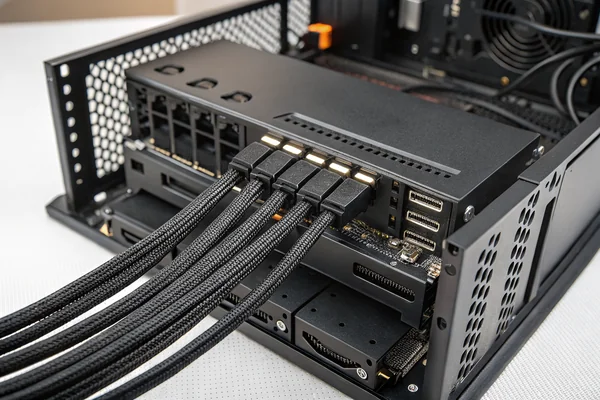
Route each fan's individual cable to the hub along the case's designated cable channels rather than letting them run loose across the case interior, label or note which port controls which fan position for future troubleshooting, and mount the hub itself in an accessible location for future fan additions or replacements rather than tucking it somewhere difficult to reach.
Why Cable Organization at the Hub Pays Off Later
A hub with six or eight fan cables converging on it can become a tangled mess without deliberate routing, making future troubleshooting -- identifying which physical fan corresponds to which port if one stops responding -- unnecessarily difficult. Taking the extra few minutes during initial build to route cables cleanly and note the port-to-fan mapping saves meaningfully more time during any future diagnostic or expansion work.
FAQ
Can I mix a passive splitter and a powered hub in the same build?
Yes, this is common -- using a passive splitter for a small group of fans (like two radiator fans) while using a powered hub for the remaining case fans is a reasonable hybrid approach for many builds.
Do fan hubs affect noise or performance of the fans themselves?
No -- a hub or splitter only affects power delivery and control signal distribution, not the fans' own mechanical performance or noise characteristics.
How many fans can a typical powered hub support?
This varies by specific product, commonly ranging from four to ten ports, so checking a hub's rated maximum fan count against your actual build requirement is important before purchase.
Does using a hub void any fan or motherboard warranty?
Generally no, since hubs are a standard accessory category, though checking your specific motherboard manufacturer's documentation for any stated concerns is a reasonable precaution for unusual builds.
Can RGB fans be connected through the same hub as their power/PWM connection?
Typically no -- RGB/ARGB lighting uses a separate connector and signal path from fan power/PWM, meaning most fan hubs only address power and speed control, with lighting requiring its own separate hub or direct motherboard connection.
Is it worth buying a more expensive hub with software control features?
This depends on whether you value granular per-fan control through software over BIOS-level control alone -- for builds where fine-tuned per-fan curves matter, software-controllable hubs can offer genuine additional value beyond basic power/signal distribution.
Choosing between a passive splitter and a powered hub comes down to your actual fan count and how much reliable per-fan control matters for your build. At Herays, our Dongguan facility manufactures PWM-standard case cooling fans compatible with both approaches, backed by over 20 years of experience under ISO 9001 certification. If you're specifying fans for a large multi-fan build or product design, we're glad to help think through hub compatibility.

Liang
I've been working with DC fans for 30 years — long enough to have seen the industry evolve from basic sleeve bearing designs to today's high-efficiency, IP68-rated systems built for the harshest environments imaginable. I founded Herays because I believed manufacturers and engineers deserved a supplier who could talk technical from day one. Not just hand over a datasheet, but actually help you select the right fan for your thermal load, your enclosure, your certification requirements. Most of what I write here comes directly from problems I've solved on the factory floor or in customer applications — medical devices, laser equipment, industrial automation, you name it. If it involves moving air efficiently and reliably, I've probably spent time thinking about it. When I'm not obsessing over airflow curves, I'm usually helping a customer figure out why their cooling system isn't performing the way their simulation said it would.
View all posts by Liang