A high-bay LED fixture can lose a third of its rated lifespan just from running a few degrees hotter than it should. Most of that heat has nowhere to go once the passive heat sink runs out of surface area.
A DC axial fan matters for LED lighting because most of the electricity going into a high-power LED turns into heat, not light, and that heat has to leave the junction fast enough to protect both lumen output and rated lifespan -- something a passive heat sink alone can't always do once wattage or ambient temperature climbs.
- LEDs convert roughly 70-80% of input power to heat rather than light, and that heat concentrates at a tiny junction area -- thermal management is not optional past a certain wattage.
- Passive heat sinks work fine at lower power or with generous airflow around the fixture. Active fan cooling becomes necessary once wattage climbs, ambient temperature is already elevated, or the fixture housing is too compact for a big enough passive sink.
- Fan size should track the combined heat load of the LED array and its driver electronics, not just the LED wattage alone -- drivers generate real heat too.
- Commercial fixtures near occupied spaces often need fans under 25 dBA, while industrial high-bay applications can tolerate more, since ambient noise there is already higher.
- A fan running 24/7 for years needs a bearing rated for continuous duty, not just a speed and airflow number that looks good on a datasheet.
Getting fan-assisted cooling right for an LED fixture comes down to a handful of decisions, and most of them trace back to how much heat the fixture actually has to move.
Table of Contents
Why Do LEDs Waste Most of Their Power as Heat?
LED efficiency numbers sound impressive, but they hide a real thermal problem. A large share of the input power still ends up as waste heat.
LEDs need active thermal management because 70-80% of their input power converts to heat rather than light, and that heat concentrates at a small junction that degrades faster the hotter it runs.
What Happens When the Junction Runs Hot
Every LED has a junction temperature1 rating, and lumen output and rated lifespan both depend on staying under it. Run the junction hot for long enough and two things happen at once: light output drops gradually (lumen depreciation), and the color point can shift, which matters a lot in retail or hospitality lighting where consistent color temperature is part of the product. The L70 rating most manufacturers publish -- the point at which output has dropped to 70% of initial -- assumes the junction stays within its designed operating range. Push past that range regularly, and the real-world L70 point arrives much sooner than the datasheet promised.
| Junction Temp vs Rating | Typical Effect |
|---|---|
| At or below rated Tj | Lumen output and color point track the datasheet curve |
| Modestly above rated Tj | Faster lumen depreciation, L70 arrives earlier than spec |
| Significantly above rated Tj | Visible color shift, accelerated failure, possible thermal shutdown |
High-power fixtures -- high-bay, stadium, horticultural grow lights, and anything automotive -- pack a lot of wattage into a small junction area, which is exactly why they're the fixtures that most often need fan assistance rather than a passive sink alone.
Passive Heat Sink or Fan: Which One Does Your LED Fixture Actually Need?
Passive cooling is the simpler, more reliable option whenever it's physically big enough to do the job.
Choose fan cooling over a passive heat sink when the fixture's wattage, ambient temperature, or housing size make a passive sink too large or too slow to keep the junction in range.
A passive heat sink cools through natural convection alone -- no moving parts, nothing to fail, no noise. That makes it the right default whenever there's enough surface area and airflow around the fixture to keep up with the heat load. The problem shows up at the edges: a fixture that needs to stay compact, one that's already sitting in a hot ambient environment (an enclosed housing, an outdoor fixture in summer), or a wattage high enough that the required passive heat sink would be larger and heavier than the fixture design allows.
A fan doesn't replace the heat sink -- it works with it, moving more air across the same fin area than natural convection would on its own. That lets a fixture use a smaller heat sink than a passive-only design would need, at the cost of a moving part and some added noise and power draw. The tradeoff is usually worth it once passive cooling alone can't keep the junction temperature in range, but it's rarely worth it below that point, since a fan adds a component that can fail where a passive sink simply can't.
Are You Sizing the Fan for the LEDs and Forgetting the Driver?
Fan sizing for LED fixtures gets missed more often on the driver side than the LED side.
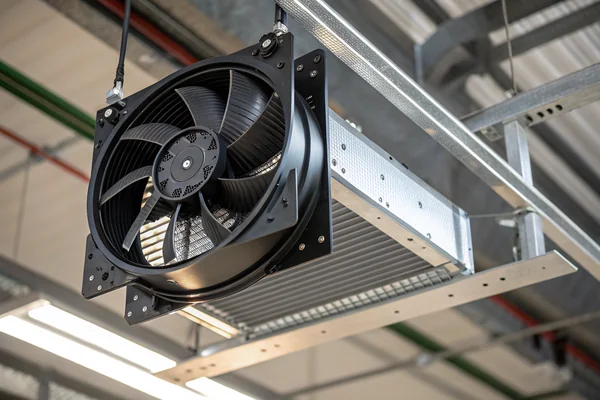
Fan size should be based on the combined heat load of the LED array and its driver, since the driver's power electronics generate real heat too and are often the more thermally sensitive component.
The LED driver -- the power supply and dimming circuitry -- runs its own semiconductors under continuous load, and those components often have a lower maximum operating temperature than the LEDs themselves. A fixture that only sizes cooling around the LED array can end up with a driver running hotter than its rated limit even while the LEDs stay comfortably within theirs.
In practice, smaller fixtures with compact drivers tend to use 40-60mm fans focused on the driver compartment, while larger fixtures -- high-bay, stadium, and area lighting -- often need 92-120mm fans moving air across the whole heat sink assembly. The right number comes from matching CFM to the fixture's actual watts-to-dissipate and its internal airflow path, not from picking whatever fan physically fits the available mounting space.
How Loud Is Too Loud for a Fan in a Commercial LED Fixture?
Noise tolerance for LED fixture fans varies enormously by where the fixture actually lives.
Commercial fixtures near occupied spaces typically need fans under roughly 25 dBA, while industrial high-bay fixtures can tolerate noticeably more since the surrounding ambient noise is already higher.
An office ceiling fixture, a retail display light, or a restaurant pendant all sit close to people who notice a hum that would be completely unremarkable on a factory floor twenty feet up. That gap in acceptable noise level drives real design differences: ball bearings over sleeve bearings for consistent low-speed noise behavior, and PWM speed control2 that lets the fan run slow -- and quiet -- most of the time, ramping up only when heat load actually demands it.
Running a fan at full speed constantly when it doesn't need to be there wastes noise budget for no thermal benefit. A fixture that only speeds up its fan when junction temperature actually rises spends most of its life at its quietest operating point, which matters more for how a space actually feels than the fan's rated maximum dBA ever will.
Will Your Cooling Fan Survive Years of Running 24/7?
Fixtures that run continuously put a different kind of pressure on the fan than ones that cycle on and off.
A fan reliable enough for 24/7 LED operation needs a bearing system rated for continuous duty across the fixture's full service life, not just a speed and airflow spec that looks good on paper.
Street lighting, security lighting, and many commercial fixtures never really turn off, which means the cooling fan accumulates run hours at a pace a cycling application never sees. Bearing choice becomes the deciding factor here more than almost any other spec: a bearing rated for intermittent duty can wear out well before the LEDs themselves reach end of life, turning a well-designed fixture into an early field failure. For genuinely high-value or hard-to-access installations, some fixture designs add a second fan specifically so a single bearing failure doesn't leave the fixture thermally unprotected until the next service visit.
We've supplied fans into LED lighting programs for over 20 years, and the fixtures that come back for warranty work almost always trace back to a fan spec'd for the LED wattage alone, without accounting for driver heat or real duty cycle. Every fan we build for continuous-duty lighting applications goes through our in-house temperature cycling and bearing life validation as part of our ISO 9001 and IATF 16949 quality process, and we can pull that test data at your actual operating temperature and speed before you commit to a fixture design.
What Should You Ask an LED Fan Supplier Before You Commit to a Design?
Most fixture-level fan failures trace back to a spec sheet nobody actually verified. The wrong question at sourcing stage costs far more than it saves.
Ask for bearing life data at your fixture's actual operating temperature and duty cycle, not just the fan's rated maximum, along with real noise and airflow curves rather than free-air numbers alone.
What a Datasheet Won't Tell You
A standard fan datasheet reports free-air CFM, rated voltage, and a maximum operating temperature -- none of which describe how the fan behaves once it's mounted inside a sealed fixture housing, running continuously, at whatever ambient temperature that housing actually reaches under load. Two fans with identical datasheet specs can have meaningfully different real-world service life once installed.
The gap matters most for bearing life and noise. A supplier's rated bearing life is usually measured under controlled lab conditions, not at the elevated temperature many LED fixtures actually run at internally. Asking for bearing life data at the fixture's specific operating temperature and duty cycle -- not the datasheet's best-case number -- shows whether the fan will actually survive the application, rather than just looking good on paper.
| Question to Ask | Why It Matters |
|---|---|
| Bearing life at the fixture's actual operating temperature? | Rated hours assume lab conditions, not a hot sealed fixture |
| Noise data at the actual drive voltage/speed used? | Rated dBA is usually measured at full speed, not typical operating speed |
| Airflow curve under the fixture's actual back-pressure? | Free-air CFM overstates real performance behind a heat sink or grille |
| Sample test data before mass production? | Confirms the fan performs as specified before committing to tooling |
A supplier that can answer these with real test data, rather than reciting datasheet numbers back, is the one worth building a fixture around.
How Does Fan Placement Inside the Fixture Affect Cooling Performance?
The same fan, in the same fixture, can perform completely differently depending on where it sits relative to the heat sink and airflow path.
Fan placement affects cooling performance by determining whether air flows directly across the hottest fins, gets trapped in dead zones, or fights backpressure from vents and housing geometry -- placement can matter as much as fan selection itself.
Push, Pull, and Dead Zones
Mounting a fan to blow directly onto the heat sink (push) versus pulling air across it and out through a vent (pull) changes how effectively that airflow interacts with the fin geometry, and one orientation isn't universally better -- it depends on fin density and the fixture's internal layout. What consistently hurts performance regardless of orientation is a dead zone: a pocket where air recirculates instead of exchanging with cooler air from outside the fixture, which happens most often when a fan sits too close to a wall, grille, or component that restricts intake or exhaust.
Vent placement matters as much as fan placement. An intake and exhaust positioned close together lets some exhaust air simply get pulled back in, quietly reducing effective cooling despite the fan running at full rated speed. Spacing intake and exhaust vents as far apart as the fixture geometry allows, and keeping at least a small clearance around the fan itself, usually does more for real-world cooling than upgrading to a higher-CFM fan in a poorly laid out housing.
FAQ
Do all LED fixtures need a cooling fan?
No. Many LED fixtures cool adequately with a passive heat sink alone, especially at lower wattage or with generous airflow around the fixture. Fans become necessary once wattage, ambient heat, or housing size limits push past what passive cooling can handle.
Can a fan failure damage the LEDs immediately?
Not usually immediately, but a failed fan removes the active cooling the fixture was designed around, and sustained overheating accelerates lumen depreciation and can eventually trigger thermal protection or hasten failure.
What bearing type is best for outdoor LED fixtures?
Ball bearings generally handle the temperature swings and continuous duty of outdoor lighting better than sleeve bearings, though the right choice also depends on the specific temperature range and vibration environment.
Does dimming the LEDs reduce the fan cooling requirement?
Yes, generally. Lower drive current means less heat generated, which is exactly why PWM-controlled fans that scale speed to actual thermal load make sense for dimmable fixtures.
How do I know if my fixture's heat sink is actually adequate without a fan?
Measure junction temperature (or a close proxy near the LED board) under worst-case ambient conditions and full load, and compare it against the LED manufacturer's rated maximum. A comfortable margin at worst-case conditions usually means passive cooling is sufficient.
Is IP rating relevant to the cooling fan in an outdoor fixture?
Yes -- an outdoor or enclosed fixture needs a fan with an IP rating suited to moisture and dust exposure, not just airflow performance, since a fan failure from environmental ingress defeats the cooling design just as surely as a bearing failure does.
Getting fan cooling right for an LED fixture comes down to sizing for the true heat load -- LEDs and driver together -- and matching bearing life to how the fixture will actually run for years, not just how it performs on day one. At Herays, our Dongguan facility has supplied DC fans into lighting programs for over 20 years, validating bearing life and thermal performance under ISO 9001 and IATF 16949 certification before a single unit ships. If you're specifying cooling for a new fixture design, ask for that validation data at your actual operating conditions, not just the fan's rated maximum.
Junction temperature is the highest operating temperature of the actual semiconductor inside a device. Exceeding the rated junction temperature accelerates degradation, which is why LED lumen output and rated lifespan both depend on keeping it in range. ↩
PWM speed control varies fan speed by rapidly switching power on and off rather than changing voltage. It lets a fan run slower, and quieter, whenever the actual heat load doesn't call for full speed. ↩

Liang
I've been working with DC fans for 30 years — long enough to have seen the industry evolve from basic sleeve bearing designs to today's high-efficiency, IP68-rated systems built for the harshest environments imaginable. I founded Herays because I believed manufacturers and engineers deserved a supplier who could talk technical from day one. Not just hand over a datasheet, but actually help you select the right fan for your thermal load, your enclosure, your certification requirements. Most of what I write here comes directly from problems I've solved on the factory floor or in customer applications — medical devices, laser equipment, industrial automation, you name it. If it involves moving air efficiently and reliably, I've probably spent time thinking about it. When I'm not obsessing over airflow curves, I'm usually helping a customer figure out why their cooling system isn't performing the way their simulation said it would.
View all posts by Liang