A network switch doesn't get a maintenance window. It runs continuously for years, and the cooling fan keeping it alive rarely gets a second thought until it fails during business hours.
A DC axial fan matters in network switches and routers because this equipment runs continuously, often for years without a planned shutdown, which means the fan has to handle sustained duty cycle reliability rather than the intermittent operation typical consumer electronics fans are built around.
- Network equipment generates continuous heat from switching silicon and power supplies, and it runs 24/7 for years, which makes fan duty cycle reliability a bigger concern than raw airflow.
- Always-on operation means the fan accumulates run-hours at a pace that intermittent-use applications never see, making bearing life the deciding spec more than almost anywhere else.
- Office-adjacent network closets and wiring rooms often need quieter fans than typical data center equipment, since these spaces aren't always acoustically isolated from occupied areas.
- 5V and 12V are both common in networking gear, and the right choice depends on matching the equipment's existing power architecture, not on which voltage performs better.
- A fan failure in a switch doesn't always cause immediate downtime, but it starts a countdown toward thermal throttling or shutdown that IT teams often don't notice until it's urgent.
Getting fan selection right for network switches and routers means designing around continuous-duty reliability first, since this is equipment that's expected to simply keep running.
Table of Contents
Why Does Network Equipment Need Active Cooling at All?
Switching silicon and power supplies generate real heat, even in equipment with no moving parts of its own beyond the fan.
Network switches and routers need active cooling because switching ASICs1, especially in higher port-count and higher-speed equipment, along with internal power supplies, generate continuous heat that a compact chassis can't dissipate through passive convection alone.
Where the Heat Actually Comes From in a Switch
The switching silicon that moves data between ports draws real power proportional to port count, port speed, and traffic load, and that power shows up as heat concentrated on a relatively small chip package. Add the internal power supply's own conversion losses, and a fully populated, high-speed switch in a compact 1U or 2U chassis can generate enough heat that passive cooling alone would let internal temperature climb well past safe operating limits.
| Equipment Type | Primary Heat Source | Typical Cooling Approach |
|---|---|---|
| Access switch (low port count) | Switching ASIC, PSU | Small fan(s) or fanless with heat sink |
| Core/aggregation switch | High-speed ASIC, multiple PSUs | Multiple fans, often redundant |
| Router (enterprise) | Routing processor, PSU | Fan(s) sized to processor TDP |
What Does "Always-On" Actually Demand From a Router or Switch Fan?
This equipment doesn't get the intermittent rest cycles most consumer electronics fans are designed around.
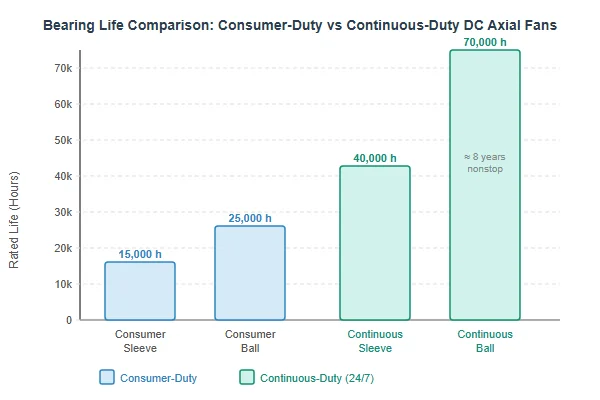
Always-on operation demands a fan rated for genuine continuous duty across the equipment's full expected service life -- often years of uninterrupted operation -- which makes bearing type and rated life the most important spec, ahead of airflow performance for most switch and router applications.
Why Continuous Duty Changes the Bearing Calculation
A fan rated for typical consumer electronics use might assume intermittent operation with rest periods that allow some thermal and mechanical recovery. Network equipment offers no such rest -- the fan runs essentially nonstop from installation until replacement or failure, which means bearing wear accumulates on a different timeline entirely. Ball bearings generally outperform sleeve bearings for this kind of sustained continuous duty, and rated life figures should be evaluated specifically against years of uninterrupted operation, not a generic datasheet number calculated under lighter-duty assumptions.
How Quiet Does a Fan Need to Be for an Office-Adjacent Network Closet?
Not all network equipment lives in an isolated data center, and that changes the noise calculation considerably.
Network equipment installed in office-adjacent closets, under desks, or in open-plan wiring nooks typically needs quieter fans than equivalent data center gear, since these spaces often aren't acoustically isolated from people working nearby.
Why Placement Changes the Noise Requirement
Enterprise data center switches can often run louder fans without complaint, since data centers are dedicated, typically unoccupied spaces with their own ambient noise floor. A switch serving a small office, retail location, or branch site often sits in a closet, cabinet, or even open shelving near where people actually work, where the same fan noise that's unremarkable in a data center becomes a real annoyance. Specifying quieter fans -- and PWM-controlled speed that only ramps up under real thermal load -- matters more for this category of deployment than for dedicated data center equipment.
5V or 12V: Which Voltage Actually Matches Your Networking Gear?
The voltage question here is almost always about matching existing equipment architecture, not performance.
5V and 12V are both common in networking gear, and the right choice depends entirely on matching the fan to the voltage rail the specific switch, router, or power supply already provides -- there's no inherent cooling performance advantage to either voltage in this context.
Matching, Not Choosing on Merit
Compact access switches and smaller networking devices often run internal fans on 5V rails shared with other low-power internal components, while larger switches and routers more commonly use 12V fans, sometimes alongside separate higher-voltage rails for the switching silicon itself. When replacing or specifying a fan for networking equipment, the practical starting point is always the existing power architecture the device provides, not a general preference for one voltage over the other.
What's the Right Way to Replace a Failing Router or Switch Fan?
Fan replacement in network equipment should prioritize matching original specifications closely, given how continuous-duty this equipment is.
Replace a failing router or switch fan with a unit matching the original's mounting, voltage, connector, and ideally airflow/static pressure performance -- a mismatched replacement can create new noise or cooling problems even if it physically fits.
Getting the Replacement Right the First Time
Because network equipment runs continuously, a poorly matched replacement fan doesn't just create a one-time inconvenience -- it becomes the new baseline for years of operation. Confirming the original fan's full specification (not just physical size) before sourcing a replacement, and testing the replaced unit under real load rather than just confirming it spins, both matter more here than in equipment with more forgiving duty cycles.
Does Port Count or Switch Density Change the Cooling Requirement?
Higher port count and higher switching capacity both translate fairly directly into higher heat generation.
Higher port count and switch density generally increase cooling requirements, since more active ports and higher aggregate switching capacity mean more power flowing through the switching silicon -- a densely populated high-speed switch needs meaningfully more cooling than a lightly populated access switch of similar physical size.
Why Density Matters More Than Chassis Size Alone
Two switches of identical physical dimensions can have very different cooling needs depending on port count, port speed, and how fully populated those ports actually are in real deployment. A switch spec'd for a lightly loaded deployment and then fully populated with high-speed connections later can end up thermally under-provisioned relative to its actual operating load, which is worth checking explicitly when equipment gets repurposed or upgraded rather than replaced outright.
What Happens to Network Uptime When a Switch's Fan Fails?
Fan failure in network equipment rarely causes instant downtime, which is exactly why it's dangerous.
A failed switch or router fan typically triggers a gradual temperature rise rather than immediate failure, which can go unnoticed until thermal protection throttles performance or forces a shutdown -- often at the worst possible time, during peak traffic load.
Why This Failure Mode Is Especially Dangerous
Unlike an obvious hardware failure, a dead cooling fan in a switch often produces no immediate symptom at all -- traffic keeps flowing normally while internal temperature climbs quietly in the background. By the time thermal protection intervenes, either throttling switching performance or shutting the unit down entirely, the failure often looks sudden and unexplained to whoever's troubleshooting it, even though the actual cause (a fan that stopped working days or weeks earlier) was quietly building the whole time. This is the practical argument for fan monitoring or alerting on any network equipment where unplanned downtime is genuinely costly.
We've supplied fans into networking equipment programs for over 20 years, and continuous-duty bearing reliability is consistently the spec that matters most to this customer base -- more than raw CFM. Every fan we build for networking customers is validated for sustained continuous operation as part of our IATF 16949 and ISO 9001 quality process, and we can supply both 5V and 12V options with real bearing life data at your actual duty cycle, not just a generic industry MTBF figure.
FAQ
Do all network switches have replaceable fans?
Not always. Some compact or lower-cost switches integrate the fan into the chassis in a way that makes replacement difficult or impractical, while enterprise-grade switches often support hot-swappable fan trays.
How can I tell if a network switch's fan has failed without opening the case?
Listen for the fan (or notice its absence), check for any fan status indicators or management interface alerts if the equipment supports them, and monitor for rising equipment temperature through SNMP or similar tools if available.
Is a fanless (passively cooled) switch a better choice for a quiet environment?
It can be, for lower-power access switches where passive cooling is genuinely sufficient, but fanless designs aren't always available or adequate for higher-density, higher-speed switching equipment.
Do redundant fans matter for network switches the way they do for UPS systems?
Yes, for similar reasons -- a fan failure during peak traffic load is a bad time for cooling to degrade, which is why many enterprise switches support redundant, hot-swappable fan modules.
Does ambient temperature in a network closet affect how hard the fan has to work?
Significantly. A poorly ventilated closet or cabinet raises the baseline ambient temperature the fan is working against, which can push even a well-specified fan to run louder and wear faster than it would in a properly cooled space.
Should I proactively replace network equipment fans before they fail?
For equipment supporting business-critical infrastructure, many IT teams do replace fans proactively on a schedule, given the asymmetry between a planned swap and unplanned downtime during peak business hours.
Network equipment cooling is fundamentally a continuous-duty reliability problem, not just an airflow spec, since this is hardware that's expected to simply keep running for years without a planned rest. At Herays, our Dongguan facility has supplied DC fans into networking equipment programs for over 20 years, validating bearing life and continuous-duty reliability under ISO 9001 and IATF 16949 certification. If you're specifying cooling for always-on infrastructure, ask for real bearing life data at your actual duty cycle, not a generic datasheet number.
An ASIC (Application-Specific Integrated Circuit) is a chip designed for one specific function rather than general-purpose computing. Switching ASICs are purpose-built to move network traffic between ports at high speed, and their power draw scales with port count and throughput. ↩

Liang
I've been working with DC fans for 30 years — long enough to have seen the industry evolve from basic sleeve bearing designs to today's high-efficiency, IP68-rated systems built for the harshest environments imaginable. I founded Herays because I believed manufacturers and engineers deserved a supplier who could talk technical from day one. Not just hand over a datasheet, but actually help you select the right fan for your thermal load, your enclosure, your certification requirements. Most of what I write here comes directly from problems I've solved on the factory floor or in customer applications — medical devices, laser equipment, industrial automation, you name it. If it involves moving air efficiently and reliably, I've probably spent time thinking about it. When I'm not obsessing over airflow curves, I'm usually helping a customer figure out why their cooling system isn't performing the way their simulation said it would.
View all posts by Liang