A NAS sitting in a living room or home office has to satisfy two requirements that pull in opposite directions -- continuous reliable cooling and near-total silence -- for years without a break.
Cooling a NAS or home server for silent 24/7 operation means selecting fans with genuine low-speed stability and long-rated bearing life, sizing for the drives' actual thermal needs rather than general electronics cooling assumptions, and accepting that some noise tradeoff is often necessary since drives themselves generate heat that needs continuous, not intermittent, airflow.
- NAS cooling needs differ from general PC cooling because hard drives have their own specific thermal requirements and are more sensitive to both overheating and to certain types of vibration.
- Noise sensitivity matters more for NAS builds than typical desktop PCs, since these systems commonly sit in living spaces or home offices rather than under a desk.
- Fan lifespan under genuine 24/7 continuous operation is a different reliability question than typical desktop use, making bearing type a more consequential selection factor.
- Recommended fan sizes for NAS cases skew toward larger, slower-spinning options where case size allows, following the same low-RPM-for-quiet principle as other builds.
- Temperature monitoring for always-on systems benefits from continuous logging, not just occasional spot-checks, given how these systems run unattended for extended periods.
Understanding what makes NAS cooling requirements genuinely different from general PC cooling clarifies why generic case fan advice doesn't always translate directly to this application.
Table of Contents
What Makes NAS Cooling Requirements Different From General PC Cooling?
Hard drives introduce thermal and vibration considerations that general electronics cooling doesn't typically need to address.
NAS cooling needs to manage hard drive temperatures specifically, not just general electronics heat, since HDDs have their own defined safe operating temperature ranges and can be sensitive to certain vibration frequencies that affect performance or accelerate wear -- this makes airflow direction and placement relative to the drive bays a more specific consideration than in typical general-purpose PC cooling.
Why Drive-Specific Airflow Matters More Than General Case Airflow
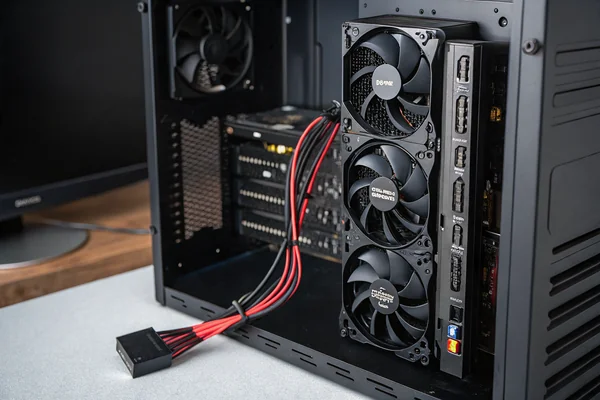
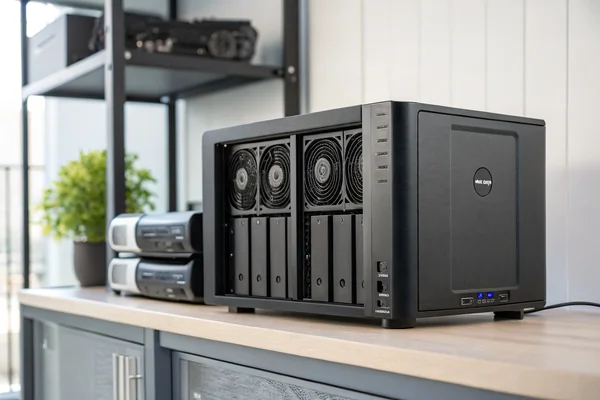
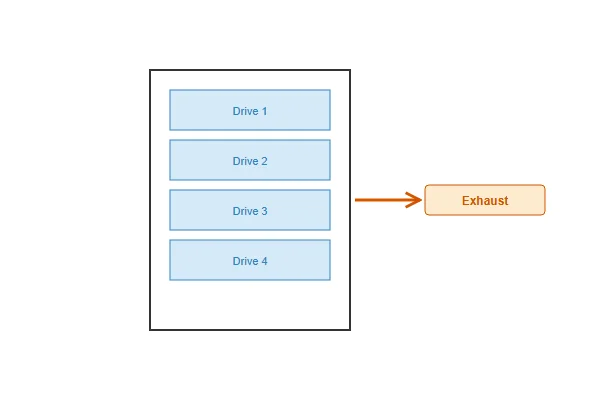
Unlike CPU or GPU cooling, where airflow just needs to reach a heatsink effectively, hard drives benefit from airflow that reaches each individual drive in a multi-bay enclosure relatively evenly, since drives positioned in airflow shadow can run meaningfully hotter than drives with direct airflow exposure. This is why NAS case and fan placement design often specifically addresses drive bay airflow distribution as a distinct consideration from general case cooling.
Why Does Noise Sensitivity Matter More for NAS Builds Than Typical Desktop PCs?
The physical environment a NAS typically occupies changes what counts as an acceptable noise level.
NAS and home server builds commonly sit in living rooms, home offices, or bedrooms rather than under a desk in a dedicated office, and because they run continuously rather than only during active use, even modest fan noise becomes a persistent, always-present background sound in a way that occasional desktop PC noise during active gaming sessions typically isn't.
Why "Acceptable Desktop Noise" Isn't the Right Bar for NAS Builds
A noise level that's perfectly tolerable during an active gaming session, where other sounds (game audio, conversation) mask it, becomes far more noticeable as a constant background hum in a quiet home environment during sleep or quiet work hours. This is why NAS-focused fan selection often targets a meaningfully lower noise ceiling than general desktop PC builds, even when both use similarly capable hardware.
How Does Fan Lifespan Actually Differ Under Genuine 24/7 Continuous Operation?
Continuous operation creates a different reliability profile than typical intermittent desktop use, making bearing selection more consequential.
A fan running genuinely 24/7 for years accumulates far more total operating hours than a typical desktop PC fan that only runs during active use sessions, meaning bearing type and rated continuous-duty lifespan become significantly more consequential selection factors for NAS applications than for builds with substantial idle-off time.
Why This Changes the Bearing Type Calculation
A sleeve-bearing fan that performs adequately in a desktop PC running a few hours daily may reach its practical wear limit meaningfully faster under genuine round-the-clock NAS operation, simply due to the much higher accumulated operating hours over the same calendar time period. This is a strong argument for prioritizing ball or fluid dynamic bearing fans specifically for NAS builds, even if the cost premium seems less justified for a lighter-duty desktop application.
What Fan Sizes Actually Work Well for Common NAS Case Types?
NAS case size constraints shape realistic fan size options, similar to the SFF PC building context.
Recommended fan sizes for NAS cases generally follow the same low-RPM-for-quiet principle as other quiet builds -- larger fans (120mm or 140mm where case size allows) running at lower speed for a given airflow target, though many compact NAS enclosures are limited to 80mm or 92mm rear-mounted fans due to their smaller overall footprint.
Why NAS Case Size Constraints Often Limit This Option
Many consumer and prosumer NAS enclosures prioritize a compact footprint suited to living room or shelf placement over accommodating larger fans, meaning the larger-fan-for-quiet strategy that works well in full-size PC cases isn't always available in compact NAS form factors. Where case size does allow a larger fan option, taking it generally produces a meaningful noise benefit; where it doesn't, selecting the best available bearing type and quality within the constrained size becomes the primary lever instead.
Why Does Temperature Monitoring Matter More for Always-On Systems?
Continuous unattended operation changes what monitoring approach actually catches problems before they become failures.
Always-on NAS systems benefit from continuous temperature logging rather than occasional manual spot-checks, since a gradually developing cooling problem -- a failing fan, accumulating dust, a drive running progressively hotter -- can develop and worsen over weeks between manual checks, while continuous logging can flag a developing trend before it becomes a failure.
Why Trend Detection Matters More Than Point-in-Time Checks
A single temperature reading tells you the system's current state, but a logged trend over weeks or months reveals whether temperatures are gradually climbing -- a signal of developing dust accumulation, fan degradation, or increasing drive load -- that a one-time check can't reveal. Most NAS operating systems include built-in temperature logging and alerting capability that's worth actually configuring and reviewing periodically, not just leaving available but unused.
Our PC case cooling fan line includes options with fluid dynamic and dual-ball bearings specifically suited to genuine 24/7 continuous-duty applications like NAS and home server cooling, validated on our in-house dynamic balance and noise testing equipment at our Dongguan facility. With over 20 years of production experience under ISO 9001 certification, we can support NAS and server case manufacturers with fan specifications matched to continuous-duty reliability requirements.
What Should NAS Case and System Manufacturers Consider When Specifying Fans?
For manufacturers designing NAS enclosures rather than buyers selecting fans for an existing unit, fan specification is an upstream design decision.
NAS system manufacturers should specify fans with documented continuous-duty MTBF data measured under representative conditions, confirm noise ratings at actual expected operating speed (not just maximum), and validate drive bay airflow distribution during enclosure design rather than treating fan placement as an afterthought to the case's mechanical layout.
Why Airflow Validation During Design Prevents Field Complaints
A NAS enclosure designed primarily around drive bay density and aesthetics, with fan placement added afterward, risks uneven drive cooling that surfaces as field reliability complaints or thermal throttling reports well after the product has shipped. Validating airflow distribution across all drive bays during the design phase, using thermal simulation or physical prototype testing, catches this class of problem before it becomes a costly post-launch issue.

FAQ
Should NAS cooling fans run at a fixed speed or a temperature-responsive curve?
A temperature-responsive curve is generally preferable, allowing quieter operation during low-load periods while still ramping up during active drive access or higher ambient temperature conditions.
Does drive count in a NAS affect fan sizing requirements significantly?
Yes -- more drives generate more cumulative heat and require adequate airflow reaching each bay, meaning higher-drive-count NAS builds generally need more capable cooling than a two-bay unit with the same fan type.
Can I retrofit a quieter fan into an existing NAS enclosure?
Often yes, if the replacement fan matches the physical mounting and connector type, though confirming your specific NAS model's fan specifications before purchasing a replacement avoids a compatibility mismatch.
Is SSD-based NAS storage less demanding on cooling than traditional HDDs?
Generally yes, since SSDs typically generate less heat and have no moving parts sensitive to vibration, though SSDs still benefit from adequate cooling, particularly under sustained heavy read/write workloads.
How do I know if my NAS's current cooling is actually adequate?
Checking drive temperatures against manufacturer-rated safe operating ranges through your NAS's monitoring software, ideally tracked over time rather than a single check, is the most reliable way to confirm adequate cooling for your specific configuration.
Does NAS placement location (open shelf vs enclosed cabinet) affect cooling fan requirements?
Yes -- an enclosed cabinet or poorly ventilated location raises ambient temperature around the NAS, which can necessitate more capable cooling than the same NAS would need on an open, well-ventilated shelf.
NAS and home server cooling rewards fans selected specifically for genuine 24/7 continuous-duty reliability and low noise together, not just general quiet-PC-fan recommendations. At Herays, our Dongguan facility manufactures continuous-duty-rated case cooling fans validated for extended reliable operation, backed by over 20 years of experience under ISO 9001 certification. If you're specifying fans for a NAS or home server product, we're glad to help match specifications to your continuous-duty requirements.

Liang
I've been working with DC fans for 30 years — long enough to have seen the industry evolve from basic sleeve bearing designs to today's high-efficiency, IP68-rated systems built for the harshest environments imaginable. I founded Herays because I believed manufacturers and engineers deserved a supplier who could talk technical from day one. Not just hand over a datasheet, but actually help you select the right fan for your thermal load, your enclosure, your certification requirements. Most of what I write here comes directly from problems I've solved on the factory floor or in customer applications — medical devices, laser equipment, industrial automation, you name it. If it involves moving air efficiently and reliably, I've probably spent time thinking about it. When I'm not obsessing over airflow curves, I'm usually helping a customer figure out why their cooling system isn't performing the way their simulation said it would.
View all posts by Liang