Fans fail quietly. One slows down, temperatures creep up, and by the time something shuts off or crashes, the warning signs were there for weeks -- just invisible without knowing what to watch for.
PC case fans typically last 30,000 to 50,000 hours under rated conditions, with bearing type being the single biggest variable. But real-world lifespan often falls well short of that number due to dust accumulation, thermal stress, and vibration -- making the "rated hours" spec a ceiling, not a guarantee.
- Rated fan lifespan is measured in hours at controlled conditions; real-world environments almost always shorten that figure, sometimes significantly.
- Bearing type is the strongest predictor of longevity -- fluid dynamic bearings generally outlast sleeve bearings by a wide margin, while ball bearings sit in between.
- The earliest and most reliable failure warning is acoustic: a fan that has started grinding, rattling, or buzzing is almost always at the beginning of its end.
- Environmental factors -- dust, high ambient temperature, humidity, and vibration -- compound over time and can cut rated lifespan in half or worse.
- Replacement beats maintenance for most consumer case fans; cleaning and relubrication are only genuinely cost-effective for larger, more expensive industrial or workstation-class fans.
Understanding what actually limits a fan's life -- rather than relying on the rated hours number alone -- is what separates a proactive cooling strategy from a reactive one.
Table of Contents
What Actually Determines When a Case Fan Reaches the End of Its Life?
Most people assume the motor fails first. The bearing usually goes first.
The primary life-limiting component in a PC case fan is the bearing assembly, not the motor winding. As bearing lubrication degrades and physical wear accumulates, rotational resistance increases, speed drops, noise rises, and eventually the fan either seizes or spins too slowly to provide meaningful airflow.
Why the Bearing Is Almost Always the Weak Link
Fan motor windings in modern brushless DC designs are genuinely durable and rarely fail under normal operating conditions. The bearing, by contrast, operates under constant mechanical load, heat, and the accumulated effects of any contamination that works its way in over time. Lubrication -- whether an oil film in a sleeve or fluid dynamic bearing, or the grease in a ball bearing -- degrades thermally and gradually dries out or redistributes away from the contact surfaces. Once lubrication fails, metal-on-metal wear accelerates rapidly, and failure follows.
This is why the rated MTBF (mean time between failures1) figure on a datasheet should be read as a bearing-life estimate more than a motor-life estimate. The bearing is where the clock is running.
| Component | Typical Failure Mode | Repairability |
|---|---|---|
| Bearing | Lubrication loss, wear, seizure | Rare -- usually requires full fan replacement |
| Motor winding | Rarely fails in brushless DC designs | Not field-serviceable |
| Blade assembly | Crack or chip from impact | Sometimes -- if blades are replaceable |
| Connector/cable | Physical damage, corrosion | Often yes -- resolder or swap connector |
The additional reality is that a fan running near its thermal limit -- because the system it's cooling is thermally dense, or ambient temperature is high -- ages its bearing faster than a fan in a cooler environment doing less work. Rated hours at 25°C ambient and rated hours at 50°C ambient are meaningfully different numbers, even if only one number shows on the datasheet.
Does Bearing Type Make That Much Difference to How Long a Fan Lasts?
Yes -- bearing type has a larger effect on longevity than almost any other single spec.
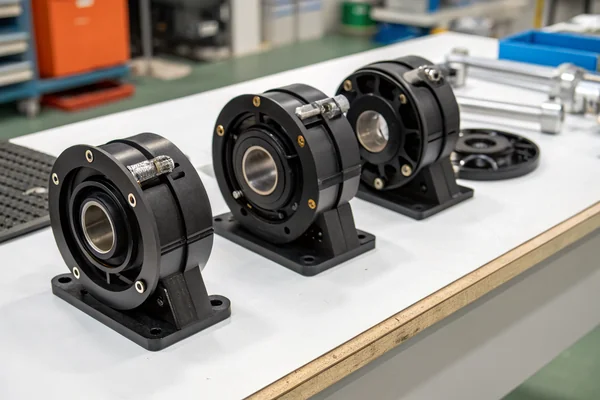
Fluid dynamic bearings generally deliver the longest lifespan and quietest operation over time; ball bearings offer solid durability and perform better in non-horizontal orientations; and sleeve bearings are the most cost-sensitive option, with the shortest lifespan and the strongest orientation dependency.
How Each Bearing Type Ages Differently
Sleeve bearings2 rely on a thin film of oil between a shaft and a bushing. That oil film is effective when the shaft is horizontal, but gravity pulls the shaft off-center in vertical orientations, accelerating wear. Over time the oil migrates out of position or dries up, and the shaft starts to wobble. A sleeve bearing fan typically shows its age through increasing noise and eventually an audible wobble before it fails outright. These are the least expensive bearings, and their lifespan reflects that.
Ball bearings use physical rolling elements and grease rather than an oil film, making them less sensitive to orientation. They handle vibration better than sleeve bearings and are more tolerant of higher temperatures. The failure mode is usually grease degradation or contamination causing the rolling elements to wear the races, which shows up as a characteristic grinding sound that gets progressively worse. Independent longevity comparisons -- including GamersNexus's bearing guide3 -- consistently show ball bearings outlasting sleeve bearings in side-by-side testing.
Fluid dynamic bearings (FDB) take the oil film concept further, engineering the shaft geometry to generate hydrodynamic pressure that keeps the shaft centered without any physical contact. With proper lubrication this becomes a nearly frictionless design with minimal wear, and FDB fans routinely carry the highest rated lifespan figures in the consumer fan market. The tradeoff is cost -- FDB fans are the most expensive bearing option, and that cost is real even if the longevity premium is genuine.
What Are the Real Warning Signs a Case Fan Is About to Fail?
Fans rarely fail without warning -- they announce it acoustically and thermally well before they stop.
The most reliable early indicator of fan failure is a change in noise character -- grinding, rattling, intermittent buzzing, or a wobble sound that wasn't present before. Secondary indicators include rising system temperatures at the same workload, visibly reduced blade speed, or a fan that stops and restarts inconsistently.
Reading the Warning Signs Before They Become System Events
A change in acoustic signature is the most actionable early warning because it's detectable without any tools. A healthy fan produces a consistent, smooth airflow tone. A failing bearing introduces irregularities -- a grinding frequency from metal-on-metal contact, a rattle if a blade is starting to wobble out of alignment, or an intermittent buzz if the fan is losing rotational consistency. Any of these sounds in a previously quiet fan should be treated as a prompt to plan replacement, not a minor nuisance to tolerate.
Thermal symptoms follow acoustics, usually with a lag. A fan running at reduced speed because of bearing drag is moving less air, which means system temperatures rise -- but the rise can be gradual enough that it doesn't trigger any alerts until thermal margins are already compromised. Monitoring CPU and case temperatures over time with a stable workload is a genuinely useful practice, because a trend upward in temperatures without any change in workload almost always points to cooling degradation, and a failing fan is often the cause.
| Warning Sign | What It Indicates | Urgency |
|---|---|---|
| Grinding or rattling noise | Bearing wear or contamination | Replace soon |
| Inconsistent speed / stop-start | Lubrication failure or coil issue | Replace promptly |
| Rising temperatures, stable load | Reduced airflow from speed loss | Investigate immediately |
| Visible wobble on running fan | Shaft or blade imbalance | Replace immediately |
| No noise change, gradual CFM drop | Early bearing drag | Monitor, plan replacement |
Software monitoring helps close the gap. Most case fans connected through a fan controller or motherboard header report RPM, and a sustained drop in reported speed -- without any deliberate speed change in firmware -- is worth investigating even if the fan is still acoustically normal. Some failures start as speed reduction before the audible symptoms appear.
Which Environmental Conditions Cut Fan Life the Shortest?
Environment has as much influence on actual lifespan as bearing type does.
Elevated ambient temperature, accumulated dust, high humidity, and chronic vibration all accelerate bearing wear and lubrication degradation beyond the conditions assumed in rated lifespan specs -- with temperature being the most aggressive single factor, since bearing lubricant life degrades roughly exponentially with heat.
Why the Operating Environment Rewrites the Datasheet Number
Lubrication chemistry follows temperature. Oils and greases that are rated for a certain viscosity and longevity at 25°C become less viscous, oxidize faster, and migrate out of position at 50°C, 60°C, or higher. A fan operating in a hot server room, an industrial enclosure near a heat source, or a poorly ventilated PC case is aging its bearing at an accelerated rate relative to what the rated hours figure implies.
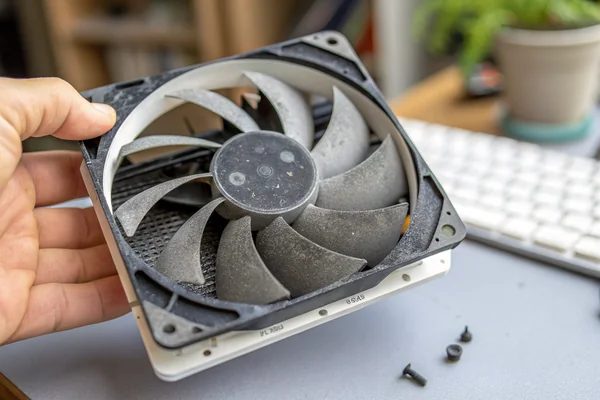
Dust acts as both a direct mechanical threat and an insulation problem. Dust accumulation on blades adds uneven weight, which creates vibration that stresses the bearing differently than clean balanced rotation. Dust inside the bearing housing works as an abrasive. And dust coating the motor stator interferes with heat dissipation, raising the operating temperature of both motor and bearing. All three effects compound over time.
High humidity accelerates corrosion on bearing surfaces and electrical contacts. In industrial or near-coastal environments, this can be a meaningful contributor to early failure even if temperatures and dust loads are otherwise manageable. Low-quality fan designs with minimal sealing are particularly vulnerable here.
Vibration from adjacent components -- HDDs, resonant panel structures, other fans -- adds load cycles to the bearing that aren't present in the controlled test conditions that generate rated MTBF figures. In densely packed industrial systems or poorly isolated chassis, vibration can become a significant secondary stressor on fan bearing life.
When Does Cleaning Extend Fan Life, and When Is Replacement the Right Answer?
The maintenance-versus-replacement decision depends on the fan's application and cost tier, not just its condition.
For most consumer-grade PC case fans, replacement is more cost-effective than maintenance once failure symptoms appear -- the labor and materials cost of relubrication approaches or exceeds fan cost. Cleaning, however, is genuinely preventive and worth doing on any fan before failure symptoms begin.
Why Maintenance Has Real Limits for Low-Cost Fans
Relubrication of a sleeve bearing or FDB fan is technically possible by accessing the shaft through the label and applying fresh oil -- but it requires the right lubricant type, a careful hand, and the acceptance that this is a temporary measure rather than a permanent fix once wear has already occurred. For a fan that costs $10 to $20 to replace, that labor equation rarely makes sense unless the fan is in a difficult-to-reach location or replacing it involves significant downtime.
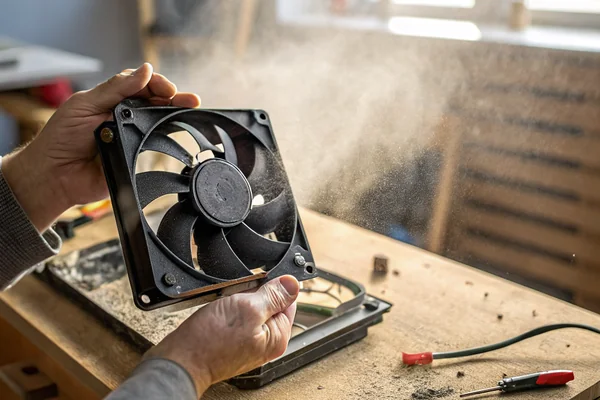
Where maintenance genuinely pays off is in prevention, not repair. Cleaning dust from blades and housing before buildup becomes heavy -- every three to six months in a dusty environment, annually in a cleaner one -- reduces vibration load, helps with motor cooling, and avoids the abrasive damage that comes from dust working into the bearing. A clean fan under normal thermal load simply ages its bearing more slowly than a dusty one, regardless of bearing type.
For industrial or workstation-class fans in the $50 to $150 range, relubrication and careful cleaning becomes a more legitimate maintenance activity with a real cost justification. The threshold for "replacement versus maintenance" scales with the cost and accessibility of the fan, not with a universal rule.
How Should You Factor Fan Lifespan Into a Sourcing or Replacement Decision?
Lifespan specs interact with procurement decisions in ways that aren't obvious from the datasheet alone.
When sourcing replacement or project fans, matching bearing type to the application's operating environment -- temperature, orientation, duty cycle, and acceptable replacement frequency -- is more important than comparing raw rated-hours numbers between manufacturers, since those numbers assume very different test conditions.
Why "50,000 Hours" From Two Different Manufacturers Isn't the Same Number
Rated lifespan figures are generated under specific test conditions -- temperature, speed, load -- that vary between manufacturers and aren't always disclosed. A 50,000-hour rating from one manufacturer tested at 25°C, full-speed, horizontal orientation isn't directly comparable to a 50,000-hour rating from another manufacturer tested at different conditions. Procurement decisions based purely on the rated hours figure without understanding what conditions it was tested under are making an incomplete comparison.
A more useful procurement framework asks: what bearing type is appropriate for this application's orientation and temperature range? What is the target replacement interval, and is the cost-per-fan consistent with that interval being acceptable? Is the fan being sourced from a manufacturer with documented testing processes and quality standards, or is the rated lifespan number essentially unverifiable?
For applications where fan failure carries a real cost -- industrial equipment, 24/7 systems, hard-to-access installations -- specifying a higher-tier bearing type and sourcing from a manufacturer with traceable quality documentation is worth the unit cost premium. For standard PC desktop builds with accessible fans and low failure cost, the calculus is different.
Our PC case cooling fan line is tested on in-house temperature cycling equipment and automated dynamic balance test systems at our Dongguan facility, validating bearing and blade assembly performance under real stress conditions -- not just catalog specs. We hold ISO 9001 and IATF 16949 certification, and we can discuss bearing type selection and rated lifespan validation methodology directly if you're specifying fans for an application where longevity and documentation matter.
FAQ
How long should a typical PC case fan last in a home desktop?
Under normal use -- moderate ambient temperatures, reasonable dust levels, moderate duty cycle -- a quality ball bearing or FDB fan can realistically deliver three to seven years before showing meaningful wear. Sleeve bearing fans in the same conditions typically age faster, especially in vertical orientations.
Does running a fan at lower speed actually extend its life?
Generally yes. Lower rotational speed reduces bearing load and generates less heat, slowing lubrication degradation. Fan controllers and PWM speed management that keep a fan running only as fast as cooling demand requires will, over time, extend bearing life relative to running constantly at full speed.
Is it worth buying a higher-end fan just for the better bearing type?
Depends on the application. For a 24/7 system, a hard-to-access installation, or anywhere fan replacement is disruptive or costly, yes -- the bearing type premium is real and justified. For a standard desktop with easy access and inexpensive replacement fans, the cost-benefit math is less compelling.
Can you tell a fan's bearing type without opening it?
Often yes -- look at the spec sheet or product listing. Most manufacturers list bearing type explicitly. If it's not listed, that's usually a signal that it's a lower-cost sleeve bearing design, since manufacturers of FDB or quality ball bearing fans typically advertise the bearing type as a differentiator.
Does fan orientation affect which bearing type to choose?
Yes, meaningfully. Sleeve bearings are most vulnerable to vertical shaft orientation because gravity pulls the shaft off-center in the oil film. Ball bearings and FDB designs are less sensitive to orientation. If a fan will run vertically mounted -- which most case fans do -- sleeve bearing is the weakest choice on longevity grounds.
Should system temperature monitoring replace physical fan inspection?
No -- it should complement it. Temperature monitoring catches downstream effects of reduced airflow, but acoustic inspection catches early bearing degradation before speed loss is significant enough to register thermally. Both together give a more complete picture than either alone.
When is the right time to replace a fan proactively rather than waiting for failure?
If a fan is in a system where unexpected failure carries real risk -- a 24/7 server, an industrial controller, medical equipment cooling -- proactive replacement on a fixed schedule based on rated lifespan (with a reasonable safety margin) is the right approach. For standard desktop PCs, waiting for the first acoustic warning sign and replacing promptly is a reasonable and practical threshold.
Fan lifespan comes down to bearing type, operating environment, and how early the warning signs get caught -- not the rated-hours number alone. At Herays, our Dongguan facility has produced and tested DC axial and PC case cooling fans for over 20 years, with ISO 9001 and IATF 16949 certification backing our validation process. If longevity and documented performance matter to your application, we're glad to talk through the specifics.
Mean time between failures (MTBF) is a statistical measure of the average expected time between component failures under specified operating conditions. In fan applications it reflects primarily bearing life rather than motor winding life, and the assumed test conditions heavily influence how the number translates to real-world use. ↩
Sleeve bearings are plain cylindrical bushings that support a rotating shaft on a thin film of oil, relying on hydrodynamic pressure to prevent metal contact. They are cost-effective but sensitive to mounting orientation and lubricant degradation, making them the shortest-life bearing option in most fan applications. ↩
GamersNexus's comparative bearing guide provides independent measured longevity and acoustic data across sleeve, ball, and fluid dynamic bearing fan types under controlled conditions, making it one of the more reliable publicly available reference points for real-world bearing lifespan comparison. ↩

Liang
I've been working with DC fans for 30 years — long enough to have seen the industry evolve from basic sleeve bearing designs to today's high-efficiency, IP68-rated systems built for the harshest environments imaginable. I founded Herays because I believed manufacturers and engineers deserved a supplier who could talk technical from day one. Not just hand over a datasheet, but actually help you select the right fan for your thermal load, your enclosure, your certification requirements. Most of what I write here comes directly from problems I've solved on the factory floor or in customer applications — medical devices, laser equipment, industrial automation, you name it. If it involves moving air efficiently and reliably, I've probably spent time thinking about it. When I'm not obsessing over airflow curves, I'm usually helping a customer figure out why their cooling system isn't performing the way their simulation said it would.
View all posts by Liang