A UPS that overheats doesn't just shut down quietly. It can derate output right when a facility needs full battery backup, during the exact power event it was bought to handle.
A DC axial fan matters in UPS and power supply design because power electronics -- rectifiers, inverters, transformers -- waste a meaningful share of their throughput as heat, and that heat has to leave the enclosure fast enough to keep the system from derating or shutting down under the load it was sized for.
- Power conversion electronics never reach 100% efficiency, and the lost energy shows up as heat concentrated in a compact enclosure -- exactly where airflow is hardest to move.
- Redundant fans matter more in UPS design than almost anywhere else, since a fan failure during a power event is the worst possible time for cooling to degrade.
- Hot-swap fan trays let a failed fan get replaced without powering down the UPS, which matters enormously for facilities that can't tolerate planned downtime.
- 24V and 48V are both common in telecom power systems, and picking the wrong one usually isn't about fan performance -- it's about matching the rail that's actually available.
- MTBF numbers on a fan datasheet are a statistical average across a large population, not a promise about any single unit -- they're useful for comparison, not for predicting when your specific fan will fail.
Getting fan selection right for a UPS or power supply comes down to a few decisions that matter more here than in typical electronics cooling, mostly because the cost of a cooling failure is so much higher.
Table of Contents
Why Do Power Electronics Generate So Much Heat to Begin With?
Every power conversion stage loses some energy as heat, and in a UPS that loss happens across several stages at once.
Power electronics generate heat because no conversion stage -- rectifier, inverter, transformer -- is 100% efficient, and the lost energy has to go somewhere, usually straight into the enclosure air as waste heat.
Where the Losses Actually Concentrate
A UPS takes AC power, converts it to DC to charge batteries, then inverts it back to AC to supply the load, and each of those conversion stages loses a percentage of throughput as heat. At the power levels a UPS handles, even a 90-95% efficient stage is dissipating a real number of watts as heat, and that heat concentrates around switching semiconductors and transformers rather than spreading evenly through the enclosure.
The problem compounds because UPS enclosures are often sealed or semi-sealed for dust and safety reasons, which limits natural convection exactly where the heat load is highest. That's the core reason fan-assisted cooling is standard on any UPS above a modest power rating -- passive cooling alone rarely keeps pace with concentrated losses in a constrained enclosure.
| Conversion Stage | Typical Efficiency | Where Heat Concentrates |
|---|---|---|
| AC-DC rectifier | ~94-97% | Rectifier diodes/switching devices |
| DC-DC (battery charging) | ~92-96% | Charging circuit components |
| DC-AC inverter | ~94-97% | Inverter switching stage |
Does Your UPS Actually Need Redundant Cooling Fans?
Redundancy matters more in a UPS than in almost any other fan application, for one simple reason: timing.
A UPS needs redundant cooling fans whenever a single fan failure during a power event -- exactly when the system is under full load -- would be unacceptable, which is most facility-critical and data center applications.
Why Timing Makes UPS Cooling Different
A fan failure in a typical electronics enclosure is a maintenance issue. A fan failure inside a UPS is a risk that shows up precisely when the UPS is needed most -- during a utility power outage, running on battery, at or near full inverter load, which is also when internal heat generation peaks. Losing cooling at that moment can force the UPS to derate output or shut down, defeating the entire point of having backup power in the first place.
That's why N+1 fan redundancy -- one more fan than the minimum needed to keep the system cool -- is standard practice on facility-critical UPS designs. The added cost and complexity is small compared to the cost of a UPS that fails during the outage it exists to survive.
Can You Replace a Failed Fan Without Powering Down the System?
Hot-swap capability is what turns a fan failure from an emergency into routine maintenance.
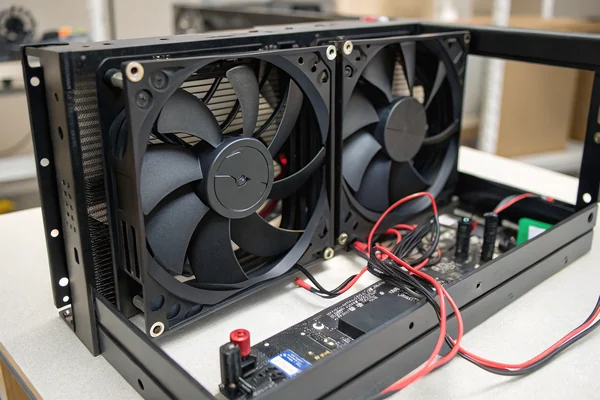
Hot-swap fan trays let a technician replace a failed cooling fan while the UPS keeps running, which matters enormously for any facility that can't tolerate planned downtime for something as routine as fan replacement.
What Hot-Swap Actually Requires
A hot-swappable fan tray is physically designed so a single fan module can be pulled and reinserted without exposing anyone to live high-voltage components and without interrupting airflow to the rest of the system for more than a brief moment. This usually means the fan sits in its own removable tray with a blind-mate connector, and the system's control logic is designed to tolerate one fan's absence briefly during the swap without triggering a shutdown.
Not every UPS supports this. Smaller or lower-cost units often integrate the fan directly into the chassis in a way that requires powering down to service. For any facility where planned downtime is expensive or operationally difficult, confirming hot-swap fan capability before purchase is worth the extra question at the sourcing stage.
24V or 48V: Which Fan Voltage Actually Matches Your Telecom Power Rail?
The voltage question here usually isn't about which fan performs better -- it's about matching what's actually available.
24V and 48V DC are both standard in telecom power systems, and the right choice comes down to matching the fan to the rail your equipment actually runs on, not a performance difference between the two voltages themselves.
Matching the Rail, Not Chasing Performance
Telecom central office and cabinet power commonly runs at -48V DC (nominal), while some equipment and UPS accessory circuits use 24V. A fan rated for the wrong voltage either won't run correctly or will run outside its designed operating range, so the practical decision is almost always about matching the existing power architecture rather than picking whichever voltage sounds more robust.
Where a genuine choice exists -- new equipment design rather than retrofitting an existing rail -- 48V systems generally allow thinner gauge wiring for the same power delivery, which can matter in dense cabinet layouts, while 24V remains common where equipment already standardizes on it. Neither voltage is inherently the better fan choice; the fan needs to match the system it's going into.
What MTBF Number Should You Actually Trust?
MTBF numbers get treated as a reliability guarantee more often than they should be.
Trust an MTBF number as a comparative statistic across a large population of fans under specified conditions, not as a prediction of how long any single unit -- including yours -- will actually run.
Reading MTBF the Right Way
Mean Time Between Failures1 is a statistical average calculated across a large sample of units under specified test conditions, usually a moderate ambient temperature and rated voltage. It does not mean any individual fan is expected to run for that many hours before failing -- a 100,000-hour MTBF does not promise over 11 years of continuous operation from your specific unit, especially if actual operating conditions run hotter or harder than the test conditions the number was calculated under.
The useful way to use MTBF is comparative: at the same test conditions, a fan rated for a higher MTBF is statistically more reliable than one rated lower, from the same testing methodology. Comparing MTBF numbers calculated under different conditions or different manufacturers' methodologies is close to meaningless, which is exactly why asking a supplier how their MTBF number was actually derived matters more than the number itself.
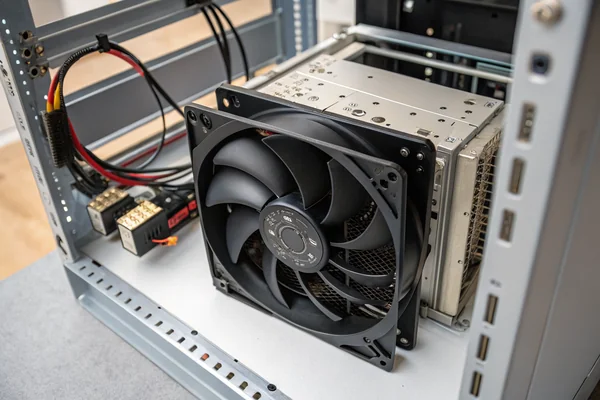
What Happens Inside a UPS When the Cooling Fan Actually Fails?
Understanding the failure mode makes clear why redundancy and hot-swap capability matter as much as they do.
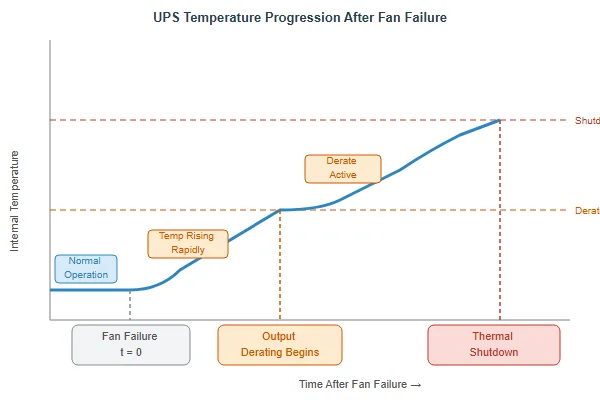
When a UPS cooling fan fails, internal temperature climbs until either thermal protection derates output to reduce heat generation, or the system shuts down entirely to protect the power electronics from thermal damage.
The Sequence From Fan Failure to Shutdown
Most well-designed power electronics include thermal protection that monitors internal temperature and responds before hardware damage occurs, but that response usually costs something operationally. The first stage is typically derating -- reducing output capacity to lower internal heat generation, which may mean a UPS can no longer support its full rated load exactly when a facility might need it most. If temperature keeps climbing, a full shutdown follows to prevent damage to switching semiconductors and other heat-sensitive components.
Neither outcome is acceptable for a facility-critical application, which is the whole argument for redundant, hot-swappable, properly-specified cooling rather than treating the fan as an afterthought in the power design. A UPS is only as reliable as its least redundant subsystem, and cooling is a subsystem worth taking as seriously as the power electronics it protects.
How Do You Size a Fan for a UPS Battery Compartment vs the Power Module?
Battery compartments and power electronics bays have different thermal needs, and one fan spec rarely fits both well.
Size cooling separately for the battery compartment and the power electronics bay, since batteries need moderate, steady airflow to stay within a narrow temperature range for long life, while power electronics need higher airflow focused on concentrated heat sources.
Two Different Thermal Jobs
Batteries, particularly VRLA and lithium chemistries common in UPS systems, have a relatively narrow temperature range where they age normally -- running consistently hot shortens service life meaningfully, sometimes by half for every several degrees above the ideal range. That calls for steady, moderate airflow that keeps the whole compartment within a tight band, rather than high-velocity air focused on one hot spot.
The power electronics bay is the opposite problem: heat concentrates around switching components and transformers, so airflow needs to be higher-velocity and directed at those specific hot zones rather than spread evenly. Using the same fan spec for both compartments usually means over-cooling one and under-cooling the other. Treating them as separate thermal design problems, even within the same UPS chassis, tends to produce better results than a single one-size-fits-all fan choice.
We've supplied fans into UPS and telecom power programs for over 20 years, and the recurring issue we see isn't fan failure -- it's fans specified without redundancy or hot-swap capability because nobody asked for it at the design stage. Every fan we build for power infrastructure customers is validated for continuous-duty operation as part of our IATF 16949 and ISO 9001 quality process, and we can supply both 24V and 48V options validated against telecom-standard vibration and temperature cycling profiles, with real MTBF data from our own bearing life testing rather than a generic industry figure.
FAQ
Does a UPS fan need to run continuously, or only when the system is under load?
Most UPS designs run cooling fans continuously at a baseline speed, ramping up under higher load or higher internal temperature, since power electronics generate some heat even at idle and consistent airflow helps avoid thermal cycling stress.
Can I retrofit a UPS with a higher-CFM fan to improve cooling?
Sometimes, but only if the replacement fan matches the mounting, voltage, and connector specifications, and if the enclosure's airflow path can actually use the extra CFM. A higher-CFM fan in a restrictive enclosure often just adds noise without meaningfully improving cooling.
Why do some UPS units use multiple smaller fans instead of one larger fan?
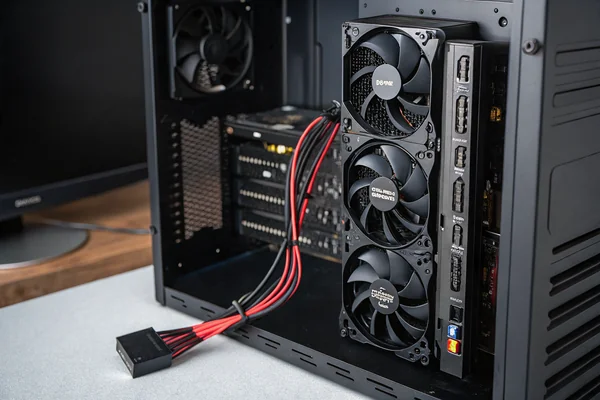
Multiple smaller fans support redundancy (losing one fan doesn't eliminate all cooling) and can be distributed to target specific hot zones more precisely than a single larger fan positioned in one location.
Is fan noise a real concern for UPS units in occupied office spaces?
Yes, for smaller UPS units placed near desks or in occupied areas. Data center and facility UPS units are usually in dedicated spaces where noise matters less, but office-adjacent installations often need quieter fan specifications.
How often should UPS cooling fans be inspected or replaced proactively?
This depends on the fan's rated life and the facility's risk tolerance, but many critical-infrastructure operators replace fans proactively on a schedule well before expected end-of-life, rather than waiting for failure, given the cost asymmetry between a scheduled swap and an unplanned outage.
Does redundant fan cooling meaningfully increase the cost of a UPS?
It adds some cost, but it's typically a small fraction of the total UPS cost relative to the risk it mitigates, which is why N+1 fan redundancy is standard rather than optional on facility-critical designs.
Cooling is not a minor spec on a UPS or power supply -- it's the subsystem that determines whether the system actually performs when a power event demands full output. At Herays, our Dongguan facility has supplied DC fans into UPS and telecom power programs for over 20 years, validating bearing life, redundancy configurations, and thermal performance under ISO 9001 and IATF 16949 certification. If you're specifying cooling for a power-critical design, ask for real test data at your actual operating conditions, not just a datasheet MTBF number.
Mean Time Between Failures is a statistical average of the expected time between failures for a repairable system, calculated across a population of units under specified test conditions. It's a comparative reliability metric, not a prediction of any single unit's actual service life. ↩

Liang
I've been working with DC fans for 30 years — long enough to have seen the industry evolve from basic sleeve bearing designs to today's high-efficiency, IP68-rated systems built for the harshest environments imaginable. I founded Herays because I believed manufacturers and engineers deserved a supplier who could talk technical from day one. Not just hand over a datasheet, but actually help you select the right fan for your thermal load, your enclosure, your certification requirements. Most of what I write here comes directly from problems I've solved on the factory floor or in customer applications — medical devices, laser equipment, industrial automation, you name it. If it involves moving air efficiently and reliably, I've probably spent time thinking about it. When I'm not obsessing over airflow curves, I'm usually helping a customer figure out why their cooling system isn't performing the way their simulation said it would.
View all posts by Liang