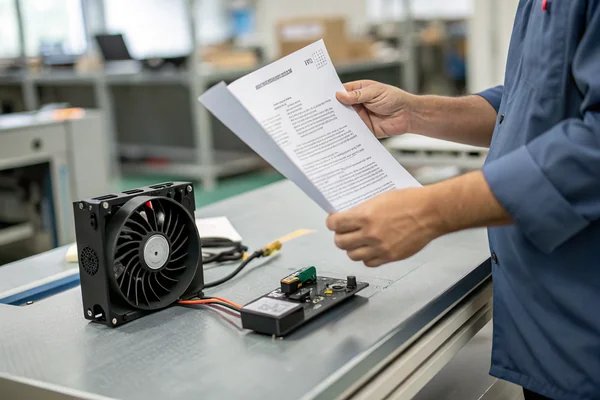
A laser engraver that runs perfectly for an hour and then starts producing inconsistent burns isn't a laser problem most of the time. It's a driver board quietly overheating inside a sealed enclosure.
A DC axial fan matters in laser engravers and CNC machines because the driver electronics, stepper motors, and power supplies generate real heat in a compact enclosure, and that's a separate cooling job from fume or dust extraction -- confusing the two leads to equipment that looks ventilated but still runs hot.
- Component cooling and fume/dust extraction are two different jobs with different airflow requirements, even though both involve moving air through the machine.
- CNC environments are genuinely hostile to standard fans -- metal and wood dust gets pulled straight into a normal fan's bearing and windings over time.
- Laser engraver electronics compartments usually need moderate, steady airflow rather than high CFM, since the heat sources are distributed power components, not one concentrated hot spot.
- Fan mounting location affects both cooling effectiveness and how much noise reaches the operator, and those two goals sometimes pull in different directions.
- Higher laser power or faster cutting speed generally means more heat from the driver electronics, not just from the workpiece -- cooling needs scale with the machine's duty cycle, not just its nameplate power.
Getting cooling right on a laser engraver or CNC machine means treating the electronics compartment as its own thermal problem, separate from whatever extraction system handles fumes or debris.
Table of Contents
What Actually Needs Cooling Inside a Laser Engraver or CNC Machine?
The workpiece gets hot. So does the electronics compartment, for a completely different reason.
Laser and CNC electronics compartments need cooling because driver boards, stepper motor controllers, and power supplies generate continuous heat during operation, and that heat has nowhere to go inside a compact, often enclosed cabinet.
The Components That Actually Run Hot
Stepper or servo motor drivers convert control signals into the current needed to move the machine's axes, and that conversion loses energy as heat, especially under continuous cutting or engraving cycles. Laser power supplies, particularly on CO2 or higher-power fiber systems, dissipate a meaningful amount of heat converting input power into the laser's drive current. None of this heat comes from the workpiece or the cutting process itself -- it's generated entirely inside the electronics compartment, often in an enclosure that was designed more around keeping dust and debris out than letting heat escape.
| Heat Source | Typical Location | Cooling Need |
|---|---|---|
| Stepper/servo drivers | Control board compartment | Moderate, steady airflow |
| Laser power supply | Dedicated PSU bay | Higher airflow, concentrated |
| Main control board | Electronics enclosure | Moderate airflow, dust-filtered |
Fume Extraction Isn't the Same Job as Component Cooling -- Are You Confusing the Two?
It's an easy mistake: a machine with a strong exhaust fan looks well-ventilated, even when the electronics are still running hot.
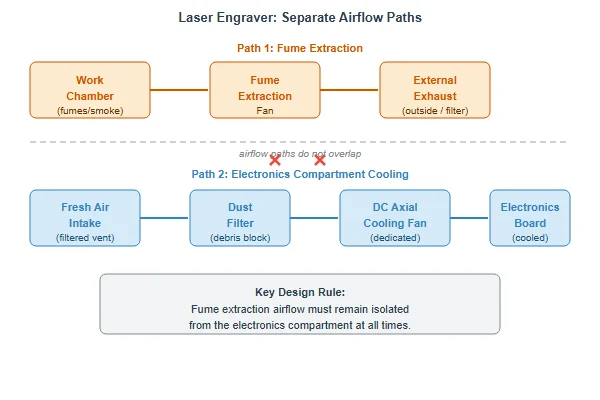
Fume extraction moves smoke and particulate away from the cutting or engraving area for safety and workpiece quality, while component cooling moves air specifically through the electronics compartment -- one system rarely does both jobs well.
Two Airflow Paths, Two Different Jobs
A fume extraction fan is sized and positioned to pull smoke and fine particulate away from the laser's work area, usually venting outside or through a filter, and its airflow path runs across the cutting bed, not through the electronics bay. A machine can have excellent fume extraction and still cook its own driver boards, because the two airflow paths simply don't overlap.
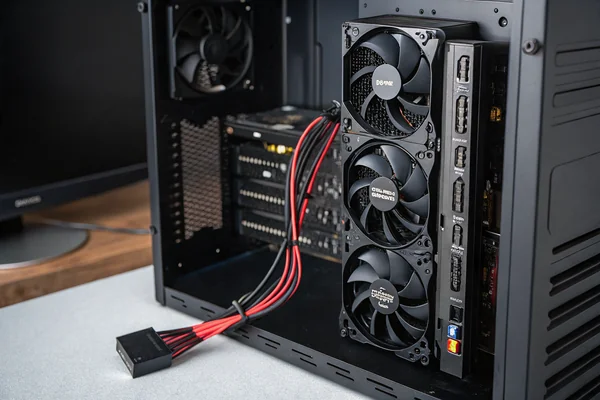
Component cooling needs its own dedicated fan (or fans) with an intake and exhaust path specifically through the electronics compartment, ideally with some filtering to keep dust and debris out of the airflow. Treating fume extraction as if it also handles electronics cooling is one of the more common design oversights on smaller or hobbyist-grade machines.
Can a Standard Fan Survive the Dust Inside a CNC Enclosure?
CNC dust is genuinely harder on a fan than most electronics cooling environments.
A standard fan generally can't survive sustained CNC dust exposure -- metal and wood particulate works into the bearing and motor over time, so CNC environments need fans with real dust protection, not just a fan that happens to be nearby.
What Dust Actually Does to a Fan
Fine metal or wood dust doesn't just settle on a fan's surface -- it gets pulled through the fan by the very airflow the fan generates, working into the bearing over time and accelerating wear, and it can build up on motor windings enough to affect heat dissipation from the motor itself. A fan that would run for years in a clean electronics cabinet can fail in months inside an unfiltered CNC enclosure.
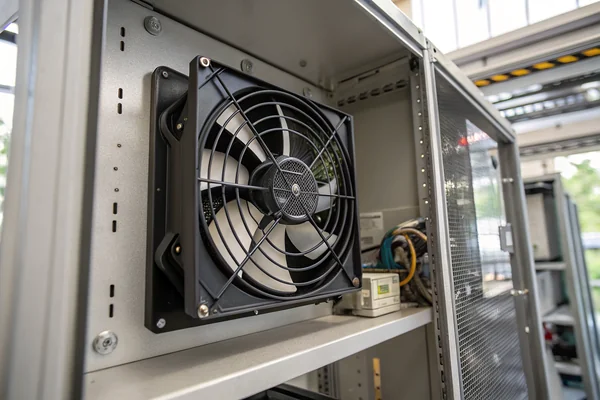
The practical fix is a combination of an IP-rated1 fan for dust ingress protection and, where possible, a filtered intake so the fan isn't pulling raw shop air directly across its own bearing. For CNC applications specifically, this is worth specifying explicitly rather than assuming a general-purpose electronics cooling fan will hold up.
What Fan Specs Should You Actually Look For in a Laser Engraver?
The right spec depends more on the enclosure's airflow path than on the laser's power rating alone.
Look for a fan with moderate, steady CFM matched to the electronics compartment's actual airflow path, an appropriate voltage for the machine's control system (commonly 12V or 24V), and dust protection suited to the shop environment the machine operates in.
Matching the Fan to the Actual Enclosure
Laser engraver electronics compartments are usually moderate heat loads distributed across several components rather than one concentrated hot spot, which means steady CFM through a sensible intake/exhaust path typically matters more than raw peak airflow. Voltage should match whatever the machine's control system already supplies -- retrofitting a fan on a different voltage adds unnecessary complexity.
For machines operating in a typical workshop rather than a clean lab environment, at least basic dust protection is worth specifying even outside dedicated CNC applications, since laser engravers accumulate their own debris from cut materials over time.
Where Should the Fan Actually Mount, and How Loud Is Too Loud?
Mounting location affects cooling effectiveness and noise at the same time, and the two don't always point the same direction.
Mount the fan to create a clear intake-to-exhaust path across the hottest components, and prioritize a quieter fan with PWM speed control for desktop or home-shop machines where the operator sits close to the equipment for extended periods.
Balancing Airflow Path and Operator Noise
The most effective mounting position, thermally, is usually wherever creates the most direct path from cool intake air to the hottest components and out an exhaust vent -- which isn't always the quietest position relative to the operator. For machines used in a home workshop or small studio, where someone sits near the equipment for hours at a time, noise becomes a real design constraint, not just a thermal one.
PWM-controlled fans that run slower during idle or light-duty periods and ramp up only under sustained heavy cutting reduce the average noise the operator actually experiences, without sacrificing cooling during the periods that need it most.
Does Laser Power or Cutting Speed Change How Much Cooling You Need?
Heat generation scales with how hard the machine actually works, not just its rated capacity.
Higher laser power and faster, more continuous cutting cycles generally increase heat generation in the driver electronics and power supply, so cooling needs should be sized around the machine's real duty cycle, not just its nameplate rating.
Duty Cycle Matters More Than Peak Rating
A machine rated for a given laser power but run at low duty cycle -- short bursts with long idle periods -- generates meaningfully less average heat than the same machine run at high duty cycle for hours of continuous engraving. Cooling sized only around the nameplate peak rating can still leave a machine running hot in practice if it's actually used at sustained high duty cycle in production, rather than the light hobbyist use the original cooling spec assumed.
This is worth considering explicitly for any machine moving from occasional hobby use into more continuous production use -- the cooling that was adequate at low duty cycle may not keep up once the machine runs harder, longer, more often.
What Goes Wrong When Laser or CNC Electronics Run Hot?
The failure modes here are more about consistency and lifespan than dramatic breakdowns.
Overheated laser and CNC electronics typically show up as inconsistent output quality, intermittent errors, or shortened component life, rather than sudden dramatic failure -- which makes the problem easy to misdiagnose as something else.
Why Overheating Looks Like a Different Problem
A stepper driver running hot can produce subtle positioning inconsistencies that look like a mechanical or calibration issue rather than a thermal one. A laser power supply running hot can drift in output consistency, producing engraving or cutting results that vary across a job in ways that seem random until someone checks enclosure temperature. None of these symptoms point obviously to "the electronics are overheating," which is exactly why unexplained quality or reliability issues on a laser or CNC machine are worth checking against enclosure temperature before assuming a mechanical or software cause.
We've supplied fans into laser engraving and CNC electronics programs for over 20 years, and the most common support request we get isn't about airflow performance -- it's about fans that failed early from dust ingress in unfiltered shop environments. Every fan we build for this segment goes through our in-house dust and vibration testing as part of our IATF 16949 and ISO 9001 quality process, and we can supply IP-rated options validated specifically for continuous operation in dusty manufacturing environments, not just clean-room conditions.
FAQ
Can I use the same fan for fume extraction and electronics cooling?
Not effectively. The two systems need separate airflow paths -- one across the work area for fume/particulate extraction, one through the electronics compartment for component cooling.
What voltage do most laser engraver and CNC control systems use for fans?
12V and 24V are both common, depending on the specific control board and power supply architecture. Match the fan to whatever voltage the machine's control system already provides.
Do I need a filtered fan even if my shop has general dust collection?
Often yes. Shop-level dust collection reduces ambient dust but rarely eliminates fine particulate near the machine itself, and even modest exposure over months can affect an unfiltered fan's bearing life.
How do I know if my laser engraver's electronics are actually overheating?
Watch for inconsistent output quality, intermittent errors, or components that feel unusually hot to the touch after extended operation. A simple temperature check inside the electronics compartment during a long job is the most direct way to confirm.
Does upgrading to a higher-CFM fan always improve cooling in these machines?
Not necessarily. If the enclosure's airflow path is restrictive or there's no clear exhaust route, a higher-CFM fan mostly adds noise without proportionally improving cooling. Airflow path design matters as much as fan capacity.
Is it worth adding a second fan instead of upgrading to a bigger single fan?
Sometimes, especially if heat sources are in different parts of the enclosure. Two moderate fans positioned near different heat sources can outperform one larger fan trying to cover the whole compartment from a single location.
Cooling a laser engraver or CNC machine's electronics is a genuinely separate job from fume or dust extraction, and treating it as an afterthought shows up later as inconsistent output quality or early component failure. At Herays, our Dongguan facility has supplied dust-resistant, continuous-duty DC fans into laser and CNC electronics programs for over 20 years, validated under ISO 9001 and IATF 16949 certification. If you're specifying cooling for shop-floor equipment, ask for real dust and vibration test data, not just a clean-room CFM number.
The IP (Ingress Protection) code rates how well an enclosure resists solid particles and moisture, expressed as two digits -- the first for dust/solid protection, the second for water. A higher first digit means better resistance to dust working into the fan's bearing and windings. ↩

Liang
I've been working with DC fans for 30 years — long enough to have seen the industry evolve from basic sleeve bearing designs to today's high-efficiency, IP68-rated systems built for the harshest environments imaginable. I founded Herays because I believed manufacturers and engineers deserved a supplier who could talk technical from day one. Not just hand over a datasheet, but actually help you select the right fan for your thermal load, your enclosure, your certification requirements. Most of what I write here comes directly from problems I've solved on the factory floor or in customer applications — medical devices, laser equipment, industrial automation, you name it. If it involves moving air efficiently and reliably, I've probably spent time thinking about it. When I'm not obsessing over airflow curves, I'm usually helping a customer figure out why their cooling system isn't performing the way their simulation said it would.
View all posts by Liang