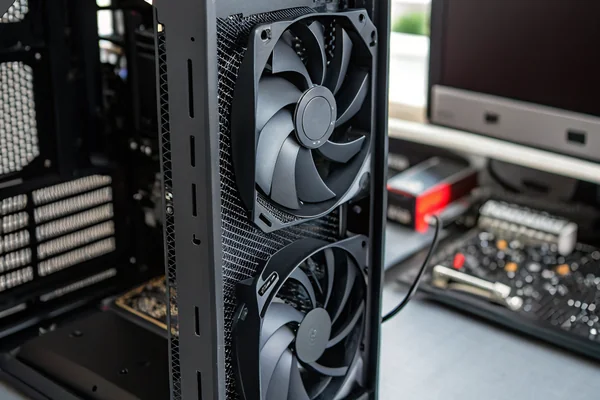
More fans feels like a safe answer -- but the wrong fan count, or the wrong placement, wastes money and can actually hurt thermal performance by disrupting airflow paths rather than reinforcing them.
The right number of case fans depends on your build's heat load, case geometry, and whether you're running air or liquid cooling -- most builds fall into a range of 2 to 6 fans, with diminishing returns setting in quickly past that ceiling unless the thermal load genuinely justifies more.
- There's no universal fan count that works across all builds -- the answer depends on heat output, case layout, and cooling topology, not on a single number.
- Minimal and budget builds run well on 2–3 fans when components are modest and airflow paths are clean; adding more fans won't help if the basics aren't right first.
- Mid-range gaming and workstation builds typically land at 4–5 fans, enough to establish clear intake/exhaust pressure balance without overcomplicating the layout.
- High-airflow and liquid-cooled builds often need 5–6+ fans, but only because radiators and dense component layouts impose real additional airflow demands that justify the count.
- Diminishing returns kick in sooner than most builders expect -- beyond a well-balanced layout, more fans add noise and cost without meaningfully reducing temperatures.
Understanding what actually drives fan count -- heat load, airflow path, and cooling topology -- gets you to the right answer faster than counting slots and filling them.
Table of Contents
Is There Really No Universal Fan Count, or Does Conventional Wisdom Apply?
Every forum thread has a confident answer, but the "just add more fans" instinct often leads builds astray.
Fan count is determined by the interaction of thermal load, case geometry, and cooling architecture -- not by a universal rule of thumb. A well-ventilated case with a 65W CPU and integrated graphics genuinely needs far fewer fans than a high-end gaming rig running a 280W GPU under load.
Why Context Overrides Conventional Rules
The reason "just run 3 intake, 2 exhaust" gets repeated so often is that it happens to work reasonably well for a certain class of mid-tower gaming build -- but it works because that class of build has a specific thermal load and case volume, not because 3-in/2-out is physically optimal for all configurations. Apply the same layout to a compact ITX case with a power-hungry GPU and the restricted internal volume makes intake placement far more critical than raw count. Apply it to a large full-tower workstation and you may find airflow channeling is the problem, not quantity.
The variables that actually determine how many fans a build needs are:
| Variable | Why It Matters |
|---|---|
| CPU TDP | Higher TDP means more heat to evacuate, directly increasing airflow demand |
| GPU TDP | Often the largest single heat source in gaming builds, frequently underweighted |
| Case internal volume | Larger volume means more air to cycle; also affects stratification risk |
| Component density | Dense layouts create local hot spots that point cooling can't reach |
| Cooling topology (air vs. liquid) | Liquid cooling offloads CPU heat to a radiator, changing the fan layout logic entirely |
| Ambient temperature | Higher ambient shrinks temperature headroom, effectively increasing fan demand |
Getting the fan count right starts with being honest about where the heat is actually coming from and where it needs to go -- not with filling mounting positions because they exist.
Minimal Builds: Do 2–3 Fans Actually Work, or Is That Cutting Corners?
Under-building a cooling system is a real problem, but over-engineering a low-TDP build wastes both money and acoustic headroom.
2–3 fans is genuinely sufficient for builds with modest thermal loads -- a CPU in the 65W range, no dedicated GPU or a low-TDP card, in a reasonably sized mid-tower case. The limiting factor at this spec level is rarely fan count; it's usually intake placement and obstruction, not quantity.
What a Minimal Fan Layout Should Actually Look Like
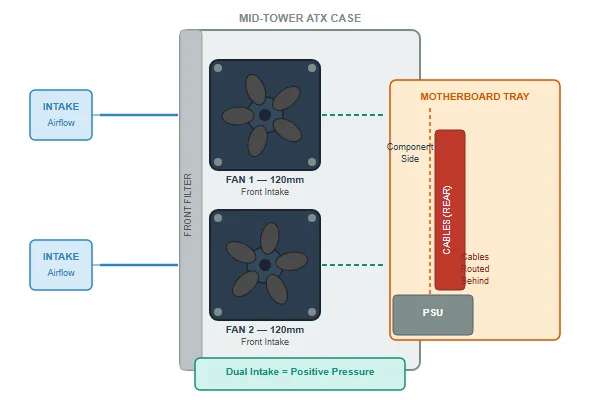
A two-fan setup for a low-load build typically runs one intake at the front of the case and one exhaust at the rear, establishing a basic front-to-back positive pressure or neutral pressure airflow path. This is enough to keep temperatures in check when the thermal load doesn't exceed what that modest air movement can carry away.
Adding a third fan -- typically a second front intake or a top exhaust -- becomes useful in two situations: the case has a side-mounted or top-mounted radiator that needs direct airflow, or the GPU is generating more heat than the two-fan path handles comfortably. A third fan isn't padding at that point; it's responding to a real airflow gap.
The mistake in minimal builds isn't using too few fans -- it's using too few fans and then expecting the remaining fans to compensate for a poor intake path. A case with a dense front filter, side cable obstruction, and a single intake fan will run warmer than a case with two well-positioned intakes even at the same total fan count. Position and path matter as much as number.
Balanced Gaming and Mid-Range Workstation Builds: Why Do 4–5 Fans Hit the Sweet Spot?
The thermal demands of a mid-range build push past what a minimal layout can handle, but there's a logical reason 4–5 fans consistently shows up as the right answer.
4–5 fans suits builds combining a mid-to-high-range GPU (150–250W TDP) and a modern multi-core CPU, because that thermal load requires a sustained airflow path with enough volume to remove heat from multiple sources simultaneously -- a two-fan layout simply can't cycle enough air fast enough under sustained load.
How to Distribute 4–5 Fans Effectively
The most common and effective layout at this count is two or three front intakes plus one or two rear/top exhausts, establishing a pressure gradient that pulls cool air across the GPU and CPU and pushes warm air out through the top and rear where it naturally rises. The logic behind this distribution is not aesthetic -- it matches the physical direction heat wants to travel (upward) with the exhaust path.
A five-fan configuration often looks like this in practice:
| Position | Fan Count | Role |
|---|---|---|
| Front intake | 2–3 | Primary cool air supply across GPU and CPU |
| Rear exhaust | 1 | Direct CPU cooler exhaust path |
| Top exhaust | 1 | Hot air evacuation following natural convection |
At this build tier, fan speed management becomes relevant in a way it isn't for minimal builds. Running all fans at full speed in a four-fan setup produces noticeably more noise than necessary at idle or light load, so PWM-controlled fans1 that respond to actual thermal demand rather than fixed voltage are worth specifying -- the acoustic difference under real workloads is significant.
High-Airflow and Liquid-Cooled Builds: When Does Fan Count Actually Justify Itself?
Liquid cooling changes the calculation meaningfully -- it doesn't reduce the total number of fans needed, it just redistributes where they go.
High-airflow and liquid-cooled builds legitimately need 5–6+ fans because the radiator itself requires dedicated fan coverage, which consumes fan mounting positions before the case's ambient cooling needs are even addressed -- liquid cooling trades CPU heat to a radiator array, but that array still needs fans to reject that heat to room air.
The Radiator Fan Accounting Problem
This is where builders frequently undercount. A 360mm radiator requires three 120mm fans just to service the radiator -- those fans are doing thermal work for the CPU cooling loop, not for the case. That means a liquid-cooled build needs to account for radiator fans separately from the fans handling GPU and ambient case temperature. A build with a 360mm top-mounted radiator and two front intake fans technically has five fans, but only two of them are managing case ambient temperature. If the GPU is a high-TDP card, those two fans may not be enough.
High-airflow builds without liquid cooling face a similar accounting challenge when running multiple high-TDP components. A workstation with a power-hungry CPU and two GPUs has heat sources distributed across the case in ways a simple front-to-back layout can't fully address, which is where additional targeted fans -- positioned to move air across specific hot zones rather than just contributing to the general airflow path -- become genuinely justified rather than optional.
When Do More Fans Stop Helping? Understanding Diminishing Returns in Practice
Most builders add their fifth or sixth fan expecting a temperature drop proportional to the first -- the physics doesn't work that way.
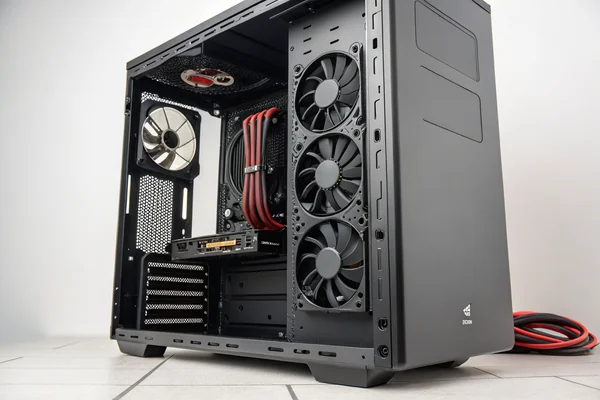
Diminishing returns in case cooling set in when additional fans no longer meaningfully improve the airflow path and instead begin competing with existing fans or adding noise without thermal benefit -- typically once intake and exhaust positions are reasonably matched and airflow is coherent, adding more fans produces marginal temperature gains measured in single digits.
Why the Physics Caps Out
The cooling capacity of a given fan layout is ultimately bounded by two things: how much air can physically pass through the intake restrictions (front filters, mesh panels, drive cage obstructions), and how effectively that air makes contact with heat-generating surfaces before exiting. Once intake airflow is maximized for a given case opening area, adding more intake fans doesn't increase the total air volume moving through the case -- the restriction is upstream of the fans, not the fans themselves.
Exhaust similarly hits a ceiling when the case's natural convection path is already well-served. A top-rear exhaust pair in a mid-tower is typically sufficient to evacuate rising hot air; a third top exhaust fan is unlikely to meaningfully reduce temperatures because the available hot air is already being moved efficiently.
The practical signal that a build has hit diminishing returns is when an additional fan reduces peak temperatures by 1–2°C -- within the noise floor of temperature measurement variability -- while adding 3–5 dB to the acoustic environment. That tradeoff is rarely worth making unless the thermal budget is extremely tight.
What Fan Specifications Actually Matter When You're Selecting Case Fans?
Fan count gets all the attention, but the wrong fans at the right count still underperform.
For case fans, the specs that actually determine real-world performance are static pressure2 versus free-air CFM rating, noise level at operating speed, and bearing type for longevity -- the diameter and connector type matter for fitment, but they don't tell you how the fan actually performs in your specific airflow path.
Matching Fan Spec to Fan Position
Not all mounting positions in a case impose the same airflow conditions on the fan. Front intakes facing a mesh panel or dense filter are working against meaningful resistance -- that's a job for a static pressure-optimized fan with enough pressure capability to maintain airflow through the restriction. Rear exhausts and top exhausts in unobstructed positions are working in near-free-air conditions -- that's where a higher-CFM, lower-pressure fan performs efficiently without wasting static pressure capability that the position doesn't require.
Running high-static-pressure fans in unobstructed positions doesn't break anything, but it's an inefficiency: you're paying for pressure capability that the airflow path doesn't demand, often at the cost of more noise per unit of airflow delivered. Running high-CFM fans against a restrictive front filter produces the reverse problem -- the fan hits its operating point on the wrong part of its P-Q curve3 and delivers less airflow than its free-air rating suggests.
| Fan Position | Typical Condition | Recommended Fan Type |
|---|---|---|
| Front intake (with filter) | High resistance | Static pressure optimized |
| Rear exhaust | Low resistance | High CFM |
| Top exhaust | Low-to-medium resistance | High CFM |
| Radiator (push or pull) | High resistance | Static pressure optimized |
Our PC Case Cooling Fan line is engineered for exactly the position-matching problem described here -- we produce both static pressure optimized and high-CFM variants, each validated on our in-house CFM airflow test system and anechoic noise test chamber so the published specs reflect real operating conditions rather than best-case bench measurements. If you're specifying fans for a multi-position layout that needs different performance characters at front intake versus top exhaust, we can discuss the right match for each position.
How Should You Think About Fan Count When Specifying or Sourcing in Bulk?
Individual builders optimize for one build; procurement teams need a decision framework that holds across many configurations.
For bulk sourcing, the practical approach is to define fan count by build tier rather than by individual system -- establishing a small matrix of validated configurations (minimal/mid/high-performance) and sourcing fans within each tier that meet the position-specific requirements for that thermal load, rather than trying to specify a single universal fan for all positions.
Why Tier-Based Specification Reduces Procurement Complexity
The alternative -- picking one fan model and deploying it everywhere -- sounds simpler but creates problems in the field. A high-static-pressure fan that's right for a radiator position may be unnecessarily loud (and expensive) in a rear exhaust position doing almost no work against resistance. A high-CFM fan that performs well as a rear exhaust will underdeliver as a front intake against a filter in a more demanding build.
Tier-based specification allows procurement to match fan count and type to build class, which also simplifies inventory: a three-tier approach might stock two fan models (a static pressure variant and a high-CFM variant) in standard quantities for each tier, rather than maintaining a single large stock of a compromise fan that's suboptimal everywhere. When ordering at volume from a manufacturer, specifying the position and resistance conditions for each fan application -- not just diameter and connector -- also gives the supplier the context needed to recommend or validate the right design rather than defaulting to a catalog spec that may not match.
FAQ
Is it better to have more intake fans or more exhaust fans?
Slightly more intake than exhaust (positive pressure bias) is generally preferred because it reduces passive dust infiltration through unsealed gaps. A 2:1 or 3:2 intake-to-exhaust ratio works well for most builds; exact balance matters less than having both directions covered.
Does fan size affect how many fans you need?
Larger fans move more air at lower RPM and lower noise, so a single well-placed 140mm fan can replace two 120mm fans in some positions. Larger fans don't reduce the need to cover all airflow positions, but they can reduce total count while maintaining equivalent airflow volume.
Can you have too many fans in a case?
Yes, practically -- too many fans competing for the same intake or exhaust path can create turbulence and pressure conflicts that reduce effective airflow. Beyond the diminishing returns threshold, additional fans add noise and draw power without improving temperatures.
Does fan speed matter more than fan count?
For a given fan model, speed determines actual airflow delivered. A three-fan layout running at higher speed can outperform a five-fan layout running at minimal speed -- but higher speed means more noise. The right tradeoff is a count and speed combination that meets thermal targets at acceptable noise levels, not maximizing either variable independently.
Do RGB fans perform differently from non-RGB fans?
Thermally, no -- RGB lighting in a fan doesn't affect airflow performance. The relevant differences are cost (RGB fans cost more) and controller complexity (RGB fans may require additional headers or software). Acoustic and airflow specs between equivalent RGB and non-RGB models from the same series should be identical.
Should top-mounted fans be intake or exhaust?
Top exhaust is almost always correct for standard cooling configurations, because hot air naturally rises and a top exhaust removes it efficiently following convection. Top intake can work in specific builds (such as some radiator-top configurations), but it fights against natural convection and requires careful pressure management to avoid channeling warm air back across components.
Does adding more fans help with GPU temperatures specifically?
Sometimes -- GPU temperature is primarily determined by the GPU's own cooler and the temperature of air it draws from the surrounding case. Improving case ambient temperature through better airflow does reduce GPU inlet air temperature, but the marginal improvement per additional fan decreases quickly once the basic airflow path is coherent.
Fan count is only one variable in case cooling, but it's the one builders spend the most time debating -- the better question is whether the fans you have are positioned correctly, matched to the airflow resistance of each position, and sized for the thermal load the build actually produces. Herays has engineered DC axial and PC case cooling fans from our Dongguan facility for over 20 years, validated under ISO 9001, ISO 14001, and IATF 16949 certification. If you're specifying fans for a specific build tier or sourcing at volume, we're glad to discuss the right configuration for your application.
PWM (Pulse Width Modulation) fan control is a method of adjusting fan speed by rapidly switching power on and off at a fixed frequency, with the ratio of on-time to off-time (duty cycle) determining effective speed. It allows precise, low-noise speed control across a wide RPM range, which matters for builds where fans need to respond to real-time thermal load rather than running at a fixed voltage. ↩
Static pressure is the measure of a fan's ability to push air against resistance -- filters, heatsink fins, radiator cores -- expressed in millimeters of water (mmH₂O) or Pascals. A fan's static pressure rating determines whether it maintains useful airflow when mounted against an obstruction, not just in open-air conditions. ↩
The P-Q curve (pressure-flow curve) plots a fan's static pressure output against its volumetric airflow rate across its operating range, showing how performance shifts as back-pressure increases. A fan's real operating point in any installation sits on this curve at the intersection of the fan curve and the system resistance curve, which is why free-air CFM ratings alone don't predict installed performance. ↩

Liang
I've been working with DC fans for 30 years — long enough to have seen the industry evolve from basic sleeve bearing designs to today's high-efficiency, IP68-rated systems built for the harshest environments imaginable. I founded Herays because I believed manufacturers and engineers deserved a supplier who could talk technical from day one. Not just hand over a datasheet, but actually help you select the right fan for your thermal load, your enclosure, your certification requirements. Most of what I write here comes directly from problems I've solved on the factory floor or in customer applications — medical devices, laser equipment, industrial automation, you name it. If it involves moving air efficiently and reliably, I've probably spent time thinking about it. When I'm not obsessing over airflow curves, I'm usually helping a customer figure out why their cooling system isn't performing the way their simulation said it would.
View all posts by Liang