Plugging a fan into the wrong header doesn't always fail loudly -- sometimes it just runs at full speed forever, or the RGB lighting never syncs, and the cause turns out to be a mismatched connector.
PC case fan connectors fall into four common types -- 3-pin voltage control, 4-pin PWM, Molex power-only, and ARGB/RGB lighting connectors -- each serving a different function, and mixing them up is one of the most common sources of "my fan won't do what I expect" problems in a build.
- 3-pin connectors control speed by varying voltage, while 4-pin PWM connectors control speed through a separate signal wire at constant voltage, and the two aren't fully interchangeable for speed control purposes.
- Molex connectors provide power only, with no speed control or tachometer signal, typically used for older fans or direct power-supply connections that bypass motherboard control entirely.
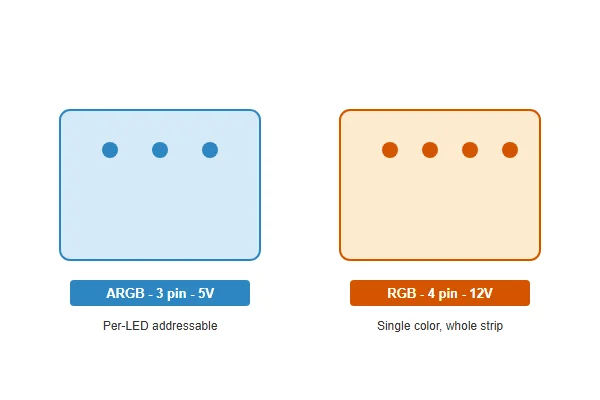
- ARGB and RGB are electrically incompatible despite looking similar -- ARGB runs at 5V with 3 pins, RGB runs at 12V with 4 pins, and connecting one to the wrong header can damage LEDs.
- A 4-pin PWM fan will still spin on a 3-pin header, but loses PWM speed control and instead runs based on voltage alone, often defaulting to full speed.
- Reading the pin labeling and voltage rating printed near a header, rather than assuming based on pin count alone, is the most reliable way to avoid a connector mismatch.
Understanding what each connector type actually controls -- power, speed, or lighting -- prevents most of the mismatches that show up as unexpected fan behavior.
Table of Contents
What Are the Main Fan Connector Types Found in a Typical Build?
Modern builds commonly mix several connector types across fans, headers, and lighting, which is exactly where confusion starts.
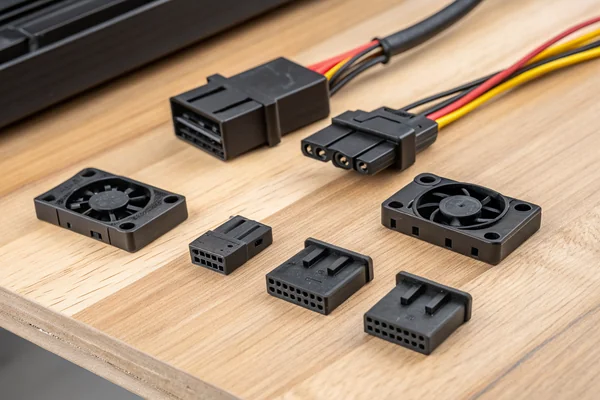
The four connector types you'll encounter in a typical PC build are 3-pin (voltage-controlled fan power), 4-pin PWM (signal-controlled fan power), Molex (power-only, no control), and ARGB/RGB (lighting only, separate from fan power entirely) -- each plugs into a physically distinct header, though 3-pin and 4-pin headers are cross-compatible for basic operation.
Why Connector Type and Header Type Aren't Always the Same Thing
A connector's pin count tells you what it's physically capable of, but not necessarily what control method is actually in use -- a 4-pin fan plugged into a 3-pin header, or vice versa, will still spin, just without the full functionality either side supports. Lighting connectors (ARGB/RGB) are entirely separate from a fan's power and speed connector, meaning a single fan often has two separate cables running to two separate headers: one for power/speed, one for lighting.
| Connector | Pins | Controls | Common Use |
|---|---|---|---|
| 3-pin | 3 | Voltage-based speed | Older/budget fans |
| 4-pin PWM | 4 | Signal-based speed | Modern case/CPU fans |
| Molex | 4 (large) | Power only | Direct PSU connection |
| ARGB | 3 | Addressable lighting (5V) | Per-LED RGB effects |
| RGB (12V) | 4 | Fixed-color lighting (12V) | Simpler RGB strips |
How Does a 3-Pin Voltage Control Connector Actually Work?
3-pin connectors represent the simpler, older approach to fan speed control still found on many budget fans.
A 3-pin connector carries power, ground, and a tachometer signal wire that reports fan speed back to the motherboard, with speed control achieved by varying the voltage supplied to the fan -- lower voltage means lower speed, but this method has a narrower usable speed range than PWM.
Why Voltage Control Has Real Limitations
Reducing voltage below a certain threshold causes many fans to stall or run unstably rather than simply slowing down further, which limits how low a 3-pin fan can practically be throttled compared to PWM control. The motherboard (or a fan controller) still monitors the tachometer wire to report RPM, but the actual speed adjustment mechanism is cruder than PWM's signal-based approach. This is part of why 3-pin fans are increasingly uncommon on newer case fans, even though many motherboards still support 3-pin headers for backward compatibility.
What Makes 4-Pin PWM Different, and Why Has It Become the Standard?
PWM's separate control signal is the key mechanical difference that gives it a wider, more precise speed range.
A 4-pin PWM connector adds a dedicated pulse-width-modulation signal wire alongside constant-voltage power, allowing the motherboard to control speed by rapidly switching power on and off at a fixed frequency rather than varying voltage -- this produces a wider, more stable speed range and has become the standard for modern case and CPU fans.
Why Constant Voltage Plus a Signal Wire Beats Variable Voltage
Because the fan always receives full voltage and speed is instead controlled by the duty cycle of rapid on/off switching, PWM fans can typically run stably down to much lower speeds than voltage-controlled equivalents -- often 20-30% duty cycle versus a 3-pin fan's practical floor closer to 40-50% of its rated voltage. This wider range is a major reason PWM has become the default expectation for case fans, particularly in builds where quiet idle operation matters.
What Is a Molex Connector Actually Used For on a Fan?
Molex connectors solve a different problem than 3-pin or 4-pin connectors -- power delivery without any control.
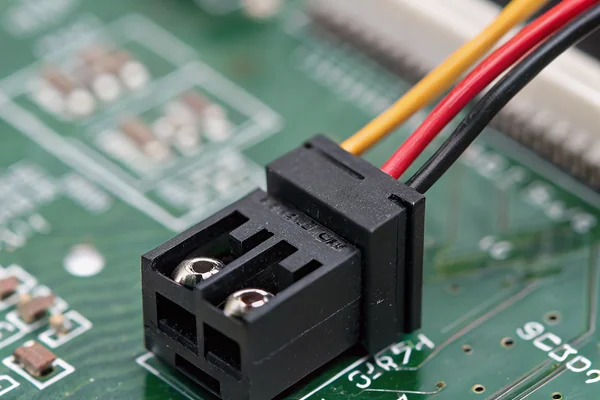
A Molex connector delivers power directly from the power supply, bypassing motherboard control entirely -- fans wired this way run at a fixed speed with no PWM or voltage-based speed adjustment and no tachometer feedback, making them common for older fans, high-power fans, or fans intended to run continuously at full speed.
Why Some Builds Still Use Molex Deliberately
Beyond legacy compatibility, Molex connections are sometimes chosen deliberately for fans that should always run at a known fixed speed regardless of motherboard fan curve settings -- a supplemental exhaust fan in a server chassis, for instance, where guaranteed constant airflow matters more than quiet variable-speed operation. The tradeoff is losing any software or BIOS visibility into that fan's actual speed or health, since there's no tachometer signal being reported back.
How Do ARGB and RGB Lighting Connectors Actually Differ?
Both connector types produce colorful lighting, but the underlying electrical and control approach is fundamentally different.
ARGB (Addressable RGB) uses a 3-pin, 5V connector that allows each individual LED to be controlled separately for effects like color chasing, while RGB uses a 4-pin, 12V connector where the entire strip or fan ring changes color together as a single unit -- the two are not interchangeable and connecting one type to the wrong voltage header risks damaging the LEDs.
Why Voltage Mismatch Is the Real Danger Here
Because ARGB headers supply 5V and RGB headers supply 12V, plugging an ARGB component into a 12V RGB header (or vice versa without an adapter rated for the conversion) can overdrive or underpower the LEDs, in some cases causing permanent damage. Motherboards with both header types typically label them clearly, but the physical connector shape alone isn't always a reliable enough distinguishing feature at a glance -- checking the printed voltage label near the header before connecting anything new is the safer habit.
Can You Mix Connector Types Within a Single Build Safely?
Most real builds do mix connector types, and that's generally fine as long as each type goes to its matching header.
Mixing 3-pin, 4-pin, Molex, and ARGB/RGB connectors within a single build is normal and safe, as long as each connector is matched to its correct corresponding header type -- the risk isn't mixing types across a build, it's connecting a specific component to the wrong header type for that component.
Where Mixing Actually Goes Wrong
Problems arise specifically from voltage or signal mismatches at an individual connection point -- an ARGB device on a 12V header, or a fan expecting PWM control plugged somewhere that only provides fixed voltage -- not from having different connector types present elsewhere in the same build. Fan hubs and splitters, which let multiple fans share a single motherboard header, add another point where matching connector type to hub type matters, since a PWM hub won't correctly control 3-pin fans and vice versa.
What Should You Check Before Buying Replacement or Additional Fans?
Getting connector compatibility right before purchase avoids a frustrating return or a fan that never performs as expected.
Before buying replacement or additional case fans, confirm your motherboard's available header types and count, check whether you need PWM speed control specifically, and separately confirm your lighting header type (ARGB 5V or RGB 12V) if the fan includes lighting -- these are independent purchasing decisions, not one combined spec.
Why Treating Power/Speed and Lighting as Separate Decisions Matters
A fan's power/speed connector type and its lighting connector type are genuinely independent specs, and a fan can be a perfect PWM match while having the wrong lighting header type for your board, or vice versa. Checking your motherboard's manual or specification page for exact header counts and types -- not just assuming based on a previous build -- avoids buying fans that need an adapter or won't achieve full functionality once installed.
Our PC case cooling fan line ships with clearly labeled 4-pin PWM connectors as standard, and we can configure custom cable and connector options -- including 3-pin, Molex adapters, or ARGB/RGB lighting variants -- for OEM and volume orders. Every fan is validated on our in-house testing equipment before shipment, and our Dongguan facility has supplied PWM-controllable DC fans for over 20 years under ISO 9001 certification.
FAQ
Can I use an adapter to convert a 3-pin fan to work on a 4-pin PWM header?
Yes, physically, but the fan itself still won't gain PWM speed control since that requires the fan's internal circuitry to respond to a PWM signal -- an adapter only handles the physical connection, not the fan's actual control method.
Will connecting an ARGB fan to a 12V RGB header damage it?
It can. The voltage mismatch risks overdriving the LEDs, so always confirm header voltage before connecting, and use a proper ARGB-to-RGB adapter only if it's specifically rated for safe voltage conversion.
Do all motherboards have both ARGB and RGB headers?
No -- many boards only include one type or the other, and some budget boards include neither. Checking your specific motherboard's specification sheet before buying RGB fans is worth doing.
Why does my 4-pin fan run at full speed on a 3-pin header?
Many fans default to full speed when they don't detect a PWM signal, which is what happens on a 3-pin header. This is normal behavior, not a fault, but it does mean you lose speed control on that header.
Is a Molex-powered fan louder than a PWM fan by default?
Generally yes in practice, since it runs at a fixed speed with no ability to throttle down during low-load or idle periods, unlike a PWM fan that can spin down significantly when cooling demand is low.
Can I daisy-chain multiple ARGB fans off a single header?
Often yes, up to a current or LED-count limit specified by your motherboard, using each fan's ARGB pass-through connector. Check your motherboard's maximum supported LED count per ARGB header before chaining more than a few fans.
Getting connector types right is a small detail that prevents most of the confusing fan behavior builders run into after installation. At Herays, our Dongguan facility has manufactured PWM-controllable DC case fans for over 20 years under ISO 9001 and IATF 16949 certification, with connector configurations available for OEM and custom builds. If you're specifying fans for a custom or volume build, we're glad to talk through connector and control options directly.

Liang
I've been working with DC fans for 30 years — long enough to have seen the industry evolve from basic sleeve bearing designs to today's high-efficiency, IP68-rated systems built for the harshest environments imaginable. I founded Herays because I believed manufacturers and engineers deserved a supplier who could talk technical from day one. Not just hand over a datasheet, but actually help you select the right fan for your thermal load, your enclosure, your certification requirements. Most of what I write here comes directly from problems I've solved on the factory floor or in customer applications — medical devices, laser equipment, industrial automation, you name it. If it involves moving air efficiently and reliably, I've probably spent time thinking about it. When I'm not obsessing over airflow curves, I'm usually helping a customer figure out why their cooling system isn't performing the way their simulation said it would.
View all posts by Liang