There's no single "correct" RPM for a case fan -- the right speed depends entirely on what you're trying to optimize, and chasing the wrong target wastes either thermal headroom or quiet.
Case fan speed should generally sit as low as possible while still meeting your system's cooling requirement -- for most builds that means idling near 30-40% speed, ramping through 50-70% under moderate load, and reserving 80-100% for genuine sustained heavy load, rather than running high speeds by default.
- There's no universal "correct" RPM -- the right speed depends on your specific case airflow, component heat output, and how much you prioritize quiet versus maximum cooling headroom.
- Running fans faster than necessary doesn't meaningfully improve temperatures once airflow needs are already met, but it does add noise and slightly increases power draw.
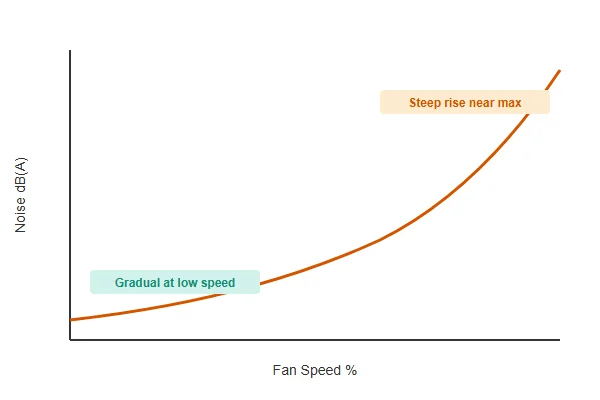
- The relationship between fan speed and noise isn't linear -- noise increases disproportionately as speed approaches a fan's maximum, which is why staying well below max speed has an outsized quiet benefit.
- Full speed should be reserved for genuine sustained heavy load, not treated as the default "safe" setting, since most systems spend the vast majority of their time well below that thermal demand.
- Monitoring actual temperatures under your real workloads, not just trusting a generic speed setting, is the only reliable way to confirm your chosen speed profile is actually adequate.
Understanding the relationship between speed, cooling, and noise -- rather than defaulting to "faster is safer" -- leads to a quieter system that still meets its actual thermal needs.
Table of Contents
What's a Realistic RPM Range for Common Case Fans?
Typical case fan speed ranges vary by size, but understanding the general range helps set realistic expectations.
Common 120mm and 140mm case fans typically operate in a range from roughly 300-500 RPM at their lowest stable speed up to 1200-2000 RPM at maximum, with the exact range varying by specific fan model -- larger fans generally achieve comparable airflow at lower RPM than smaller fans, which is part of why fan size and RPM are closely linked design decisions.
Why Fan Size and RPM Trade Off Against Each Other
A larger fan blade sweeps more air per rotation than a smaller one, meaning it can achieve the same airflow target at a lower rotational speed -- which is a major reason 140mm fans are often perceived as quieter than 120mm fans even at similar airflow output, independent of any other design difference. This relationship is why upgrading fan size, not just fan brand or model, is one of the more effective ways to reduce noise at a given cooling target, provided your case has room for the larger size.
| Fan Size | Typical Min RPM | Typical Max RPM |
|---|---|---|
| 92mm | 500-800 | 2500-3500 |
| 120mm | 300-500 | 1200-2000 |
| 140mm | 300-500 | 1000-1800 |
How Does the RPM-to-Noise Relationship Actually Work?
Understanding this relationship explains why small speed reductions near the top of a fan's range have an outsized quiet benefit.
Fan noise increases disproportionately as speed approaches a fan's maximum rating -- acoustic output scales roughly with the fifth power of blade tip speed, meaning even modest speed reductions near the top of the range produce meaningfully larger noise reductions than the same percentage reduction would near the bottom of the range.
Why This Makes the Top of the Speed Range the Best Place to Cut
Because the relationship is so steeply nonlinear near maximum speed, reducing a fan from, say, 90% to 70% of its maximum typically produces a much larger perceived noise reduction than reducing from 40% to 20%, even though both represent the same 20-percentage-point cut. This is why capping a fan's maximum speed at something below its absolute rated maximum -- rather than only adjusting the low end of the curve -- is often the single most effective noise reduction available, provided your cooling needs don't actually require that top-end headroom.
What's the Actually Optimal RPM for Cooling Versus Silence?
The "optimal" speed genuinely depends on which of these two priorities matters more for your specific situation.
For cooling-priority builds, optimal RPM is whatever speed keeps component temperatures within their safe operating range under your heaviest realistic workload, with reasonable margin -- for silence-priority builds, optimal RPM is the lowest speed that still keeps temperatures acceptable under your typical, not worst-case, daily workload.
Why These Two Targets Produce Genuinely Different Curves
A cooling-priority curve is built around worst-case thermal headroom, generally accepting more noise during heavy load in exchange for confidence the system won't throttle or overheat under maximum demand. A silence-priority curve instead accepts running warmer than strictly necessary during rare peak moments, in exchange for meaningfully quieter operation during the much larger fraction of time spent at typical load. Neither approach is objectively correct -- the right choice depends on whether your workloads genuinely hit sustained maximum load often enough to justify the noise tradeoff.
When Should You Actually Let Fans Run at Full Speed?
Full speed has a legitimate role, but it shouldn't be the default state for most systems most of the time.
Full fan speed is appropriate during genuine sustained heavy load -- extended gaming sessions, rendering, compiling, or other workloads that keep components near their thermal limits for extended periods -- but running full speed constantly as a default "safe" setting wastes the noise reduction available during the much larger fraction of time spent at lighter load.
Why "Always Full Speed" Is a Common but Avoidable Mistake
Some builders default to maximum fan speed permanently out of an understandable but often unnecessary caution about thermal safety, without recognizing that a well-configured fan curve provides the same protection during genuine heavy load while running significantly quieter the rest of the time. A properly tuned curve reaches full speed exactly when the system actually needs it, rather than running at that noise level continuously regardless of actual thermal demand.
What Tools Actually Let You Monitor Fan Speed Accurately?
Confirming your chosen speed profile is working as intended requires actual measurement, not assumption.
Motherboard BIOS/UEFI dashboards, vendor software utilities, and third-party monitoring tools all provide real-time fan RPM readouts, typically alongside temperature data -- cross-referencing RPM against actual component temperature under your real workloads is the reliable way to confirm your speed configuration is achieving what you intended.
Why Cross-Referencing Speed and Temperature Together Matters More Than Either Alone
RPM alone doesn't tell you whether a speed setting is adequate -- a fan spinning at a seemingly reasonable speed that still allows temperatures to climb toward throttling limits indicates the curve needs adjustment, regardless of what the RPM number itself looks like. Monitoring both together under representative real workloads, not just a quick BIOS screen check at idle, is what actually validates whether a chosen speed profile is achieving its intended balance of cooling and noise.
Does Fan Speed Affect Long-Term Reliability, Not Just Immediate Noise and Cooling?
Speed choices have consequences that extend beyond the immediate noise-versus-cooling tradeoff.
Running fans consistently at very high speed for extended periods can accelerate bearing wear compared to more moderate speeds, while excessive speed cycling -- rapid oscillation between speeds -- adds mechanical stress from repeated acceleration and deceleration; a smoother, appropriately-sized speed curve tends to be gentler on fan longevity than either extreme.
Why Moderate, Stable Speed Often Outperforms Either Extreme
Bearings experience more wear at sustained high RPM due to increased friction and heat, while frequent speed changes add their own mechanical stress from repeated acceleration and deceleration cycles -- both extremes can shorten effective fan lifespan compared to a moderate, appropriately-spaced speed curve that avoids unnecessary time at maximum speed and unnecessary oscillation. This is one more reason a thoughtfully configured fan curve, rather than either "always full speed" or a too-tightly-spaced reactive curve, tends to be the better choice across noise, cooling, and longevity simultaneously.
Our PC case cooling fan line is engineered for stable performance across a wide speed range, validated on our in-house dynamic balance correction and anechoic noise testing equipment at our Dongguan facility -- including verification that fans run cleanly at both low and high ends of their rated speed range without excess vibration or tonal noise. Over 20 years of production experience under ISO 9001 certification means every fan we ship is built to perform predictably across the full speed range your fan curve actually uses.
FAQ
Is a lower maximum RPM fan always quieter than a higher maximum RPM fan?
Not necessarily at the same actual operating speed -- a fan with a higher rated maximum but running at a moderate percentage of that maximum can be quieter than a lower-max-RPM fan running near its own ceiling. Compare at matched actual RPM or airflow, not just rated maximum.
Does fan speed monitoring software slow down my system?
Modern monitoring utilities have negligible performance impact for typical use, though running many overlapping monitoring tools simultaneously is generally unnecessary and worth avoiding for simplicity.
Should idle fan speed ever be truly 0 RPM?
Only if your specific fan and motherboard support a genuine zero-RPM idle mode, and even then it's worth confirming case temperatures stay acceptable during extended idle periods before relying on it as your default configuration.
Why does my fan feel louder at a given RPM than a friend's supposedly identical fan?
This can result from mounting differences (vibration transmission through the case), age-related bearing wear, or genuine unit-to-unit manufacturing variance -- all worth checking before assuming a spec discrepancy.
Is it worth buying higher-max-RPM fans I'll never actually run at full speed?
Sometimes -- a fan with more headroom above your typical operating speed may run more efficiently and generate less noise at your target speed than a fan already near its own limit at that same target, though this varies by specific model.
How often should I revisit and re-tune my fan speed configuration?
Whenever your workload pattern changes meaningfully, ambient temperature changes seasonally, or after any hardware change that affects thermal load -- a curve tuned for one usage pattern may not stay optimal indefinitely.
Getting fan speed right is less about finding one correct RPM and more about matching your speed curve honestly to whether cooling headroom or quiet matters more for how you actually use your system. At Herays, our Dongguan facility has engineered PC case cooling fans validated for stable performance across their full rated speed range for over 20 years under ISO 9001 certification. If you're specifying fans for a build with specific speed or acoustic targets, we're glad to talk through the tradeoffs directly.

Liang
I've been working with DC fans for 30 years — long enough to have seen the industry evolve from basic sleeve bearing designs to today's high-efficiency, IP68-rated systems built for the harshest environments imaginable. I founded Herays because I believed manufacturers and engineers deserved a supplier who could talk technical from day one. Not just hand over a datasheet, but actually help you select the right fan for your thermal load, your enclosure, your certification requirements. Most of what I write here comes directly from problems I've solved on the factory floor or in customer applications — medical devices, laser equipment, industrial automation, you name it. If it involves moving air efficiently and reliably, I've probably spent time thinking about it. When I'm not obsessing over airflow curves, I'm usually helping a customer figure out why their cooling system isn't performing the way their simulation said it would.
View all posts by Liang