Print quality issues that look like a filament or temperature problem often trace back to a part cooling fan that isn't delivering focused, adequate airflow to the freshly extruded layer.
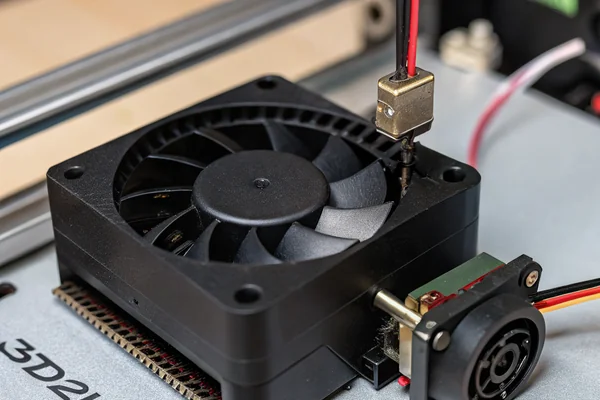
Part cooling in FDM 3D printing relies on a blower fan -- not a standard axial fan -- to deliver focused, directed airflow that solidifies each layer quickly enough to support overhangs and bridges without warping or drooping, and the specific blower's pressure and flow characteristics directly affect print quality on detail-heavy models.
- Part cooling airflow needs to be focused and directed at the nozzle's immediate vicinity, which is why 3D printers use small blowers rather than open axial fans for this specific job.
- Insufficient part cooling shows up as drooping overhangs, poor bridging, and rounded fine details -- symptoms that are sometimes misdiagnosed as temperature or filament issues.
- Common blower sizes in 3D printer hot ends are compact -- 5015, 5010, and 4010 designations refer to specific diameter and thickness combinations in millimeters.
- Voltage matters for compatibility -- most desktop 3D printers run on either 12V or 24V systems, and part cooling blowers need to match the printer's actual voltage rail.
- Upgrading a stock part cooling blower is one of the more effective print-quality improvements available, particularly for printers that shipped with an underpowered stock fan.
Understanding why part cooling specifically needs a blower's characteristics -- not just any fan moving air nearby -- clarifies why this component deserves more attention than its small size suggests.
Table of Contents
Why Is Part Cooling So Critical in FDM 3D Printing Specifically?
Part cooling airflow directly determines whether freshly extruded plastic can support the geometry the print design demands.
Part cooling airflow rapidly solidifies each freshly extruded layer of plastic, which is essential for the layer to hold its shape and support subsequent layers -- without adequate, focused cooling, overhangs droop, bridges sag, and fine details lose sharpness because the plastic stays soft too long after extrusion.
Why Timing Makes This Different From General Cooling
Unlike general electronics cooling, where the goal is steady-state temperature management, part cooling operates on a much faster timescale -- the freshly extruded layer needs to solidify within a fraction of a second of leaving the nozzle to support the next layer printed on top of it. This tight timing requirement is why part cooling airflow needs to be both immediate (positioned right at the nozzle) and adequately powered, rather than just generally present somewhere near the print.
Why Does Part Cooling Use a Blower Instead of a Standard Axial Fan?
The physical geometry of the cooling task specifically favors a blower's characteristics over an axial fan's.
Blowers deliver focused, directional airflow through a duct or shroud aimed precisely at the nozzle and freshly printed layer, while a standard axial fan's broader, less directional airflow pattern would cool a wider area less precisely -- the blower's higher static pressure also lets it push air effectively through the narrow ducting typical of part cooling shrouds.
Why Directional Precision Matters More Than Raw Airflow Volume
An axial fan blowing broadly around the print head can create inconsistent cooling across different areas of a print, and its airflow pattern doesn't concentrate well through the narrow ducting most part cooling shroud designs use. A blower's centrifugal design naturally produces a more focused, directable airflow stream that can be routed precisely to the nozzle vicinity through a shroud, delivering more consistent and effective cooling exactly where the freshly extruded plastic needs it.
What Do the Common Blower Size Designations Actually Mean?
Understanding these size codes helps when sourcing a replacement or upgrade blower.
Common 3D printer part cooling blower sizes are designated by numbers like 5015, 5010, and 4010, where the first two digits indicate diameter in millimeters and the last two indicate thickness -- a 5015 blower is 50mm in diameter and 15mm thick, while a 4010 is 40mm in diameter and 10mm thick.
Why Getting This Designation Right Matters for Compatibility
Confusing these designations when sourcing a replacement can result in a blower that's the wrong physical size for your printer's hot end mount, even if the electrical specs otherwise match. Thicker blowers (like a 5015 versus a 5010) generally move more air at a given speed but require more physical clearance around the hot end, which matters for printers with tight X-carriage or hot end mounting geometry. Confirming your printer's exact designation before ordering a replacement avoids a costly size mismatch.
| Designation | Diameter | Thickness | Common Use |
|---|---|---|---|
| 4010 | 40mm | 10mm | Compact hot ends |
| 5010 | 50mm | 10mm | Standard mid-size |
| 5015 | 50mm | 15mm | Higher airflow, more clearance needed |
Does Voltage Actually Matter When Choosing a Part Cooling Blower?
Voltage mismatch is one of the more common and easily avoidable mistakes when sourcing a replacement blower.
Most desktop 3D printers run their part cooling blower on either 12V or 24V, matching the printer's main control board voltage rail, and installing a blower rated for the wrong voltage will either underperform significantly (12V blower on partial voltage) or risk damage (voltage mismatch in the other direction) -- confirming your printer's actual voltage before ordering is essential.
Why This Isn't Always Obvious From the Stock Part Alone
Some printer manufacturers don't clearly label the part cooling fan's voltage on the component itself, requiring a check against the printer's mainboard specification or manual instead. Because 12V and 24V blowers of the same physical size and connector type can look visually identical, relying on the printer's documented electrical specification -- not just visual inspection -- is the reliable way to confirm correct voltage before purchasing a replacement.
How Do You Know If Upgrading Your Part Cooling Fan Would Actually Help?
Recognizing the signs of inadequate stock cooling helps decide whether an upgrade is worth pursuing.
Signs that upgrading your part cooling blower would help include consistently drooping overhangs despite reasonable print settings, poor bridging performance, rounded rather than sharp fine details, and audibly weak or inconsistent airflow from the stock fan -- these symptoms point toward a cooling capacity problem an upgraded blower can directly address.
Why Stock Blowers Are a Common Upgrade Target
Many budget and mid-range 3D printers ship with a stock part cooling blower chosen primarily for cost rather than maximum performance, making it one of the more commonly underpowered components on an otherwise capable printer. Upgrading to a higher-airflow blower rated for the same voltage and physical mount is a relatively inexpensive modification that directly addresses a print quality bottleneck many stock configurations leave on the table, particularly for printing challenging geometries with significant overhangs or bridging.
What Should You Check Before Upgrading Your Printer's Part Cooling Fan?
A few checks before ordering prevent a mismatched or ineffective upgrade.
Before upgrading, confirm the exact size designation and voltage of your current blower, check whether your printer's shroud/duct design will accommodate a different blower's airflow characteristics, and verify your mainboard's fan header can supply adequate current for a higher-powered replacement.
Why the Shroud Design Matters as Much as the Blower Itself
A more powerful blower paired with a shroud designed around the original, weaker unit's airflow characteristics may not deliver the expected improvement, since the ducting geometry itself shapes how effectively the airflow reaches the nozzle. Some upgrade paths pair a new blower with a redesigned or reprinted shroud specifically matched to the new fan's characteristics, which is worth researching for your specific printer model before assuming a direct blower swap alone will deliver the full expected benefit.
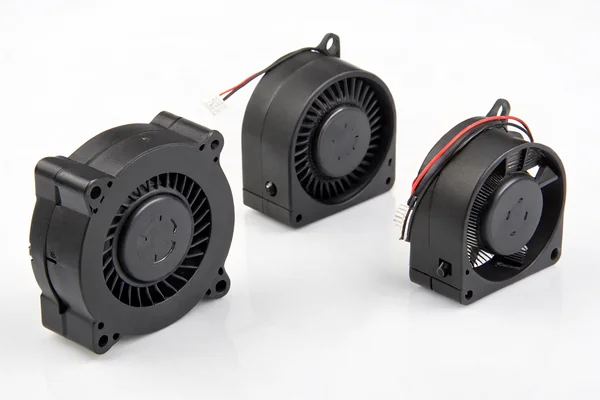
We manufacture compact DC brushless blower fans in common sizes suited to 3D printer part cooling and similar precision electronics applications, validated on our in-house CFM airflow test system at our Dongguan facility. With over 20 years of production experience under ISO 9001 certification, we can support OEM printer manufacturers and volume buyers with voltage-matched, size-specific blower options.
FAQ
Can I use a 24V blower on a 12V-only 3D printer with a voltage converter?
Technically possible with appropriate conversion circuitry, but it adds complexity and potential failure points -- sourcing a blower rated for your printer's actual voltage is the simpler and more reliable approach.
Does part cooling airflow need to be reduced for certain filament types?
Yes -- some filaments (like ABS) are sensitive to rapid cooling and can suffer from warping or layer adhesion issues with aggressive part cooling, while others (like PLA) generally benefit from strong cooling. Printer firmware settings typically allow per-material cooling adjustment.
How do I know my printer's part cooling blower voltage if it's not labeled?
Check your printer's mainboard documentation or manufacturer specification sheet, since the fan connects to a specific voltage rail defined by the mainboard design, even if the blower itself lacks a visible voltage label.
Is a louder part cooling blower always a stronger one?
Not necessarily -- noise depends on blade design and bearing quality as well as airflow output, so comparing actual CFM and pressure specs is more reliable than judging airflow strength by perceived loudness alone.
Can I run my part cooling blower at reduced speed to save noise, and does it hurt print quality?
Yes, many printers allow PWM speed control for part cooling, and running at reduced speed on print sections that don't need aggressive cooling (like solid infill layers) is common practice that doesn't hurt quality when appropriately tuned per print settings.
Do resin (SLA) printers use part cooling blowers the same way FDM printers do?
No -- SLA printing doesn't involve extruded plastic needing rapid solidification the way FDM does, so part cooling blowers in the FDM sense aren't part of typical SLA printer design.
Part cooling blower selection has an outsized effect on FDM print quality relative to its small size and cost, particularly for models with overhangs and bridging. At Herays, our Dongguan facility manufactures compact DC brushless blowers validated for precision electronics and 3D printing applications, backed by over 20 years of experience under ISO 9001 certification. If you're sourcing blowers for a 3D printer product line, we're glad to help match voltage and size specifications.

Liang
I've been working with DC fans for 30 years — long enough to have seen the industry evolve from basic sleeve bearing designs to today's high-efficiency, IP68-rated systems built for the harshest environments imaginable. I founded Herays because I believed manufacturers and engineers deserved a supplier who could talk technical from day one. Not just hand over a datasheet, but actually help you select the right fan for your thermal load, your enclosure, your certification requirements. Most of what I write here comes directly from problems I've solved on the factory floor or in customer applications — medical devices, laser equipment, industrial automation, you name it. If it involves moving air efficiently and reliably, I've probably spent time thinking about it. When I'm not obsessing over airflow curves, I'm usually helping a customer figure out why their cooling system isn't performing the way their simulation said it would.
View all posts by Liang