Struggling to pick the right fan? Confusing specs can lead to poor cooling. Learn how to translate datasheet numbers into real-world performance for your project's success.
A DC axial fan is a cooling device that uses direct current (DC) power. It pulls air in and pushes it out parallel to its central axis, like a propeller. This design is ideal for moving large volumes of air through open spaces or enclosures.
That's the simple definition. But in my experience helping engineers and builders, I've seen many projects suffer because the right fan wasn't chosen. It is not just about moving air. It is about moving the right amount of air against the resistance in your specific system. If you misunderstand this, you might end up with a noisy machine that still overheats. Let's look deeper at what really matters when you choose a fan.
Table of Contents
What Exactly Is a DC Axial Fan?
You see "DC axial fan" on spec sheets. But what does that really mean for your design? Choosing without knowing can lead to costly mistakes and redesigns down the line.
It's a fan powered by Direct Current (DC) that moves air along its axis of rotation. The blades act like a propeller, pulling air from one side and pushing it straight out the other. This makes it efficient for general ventilation and electronics cooling.
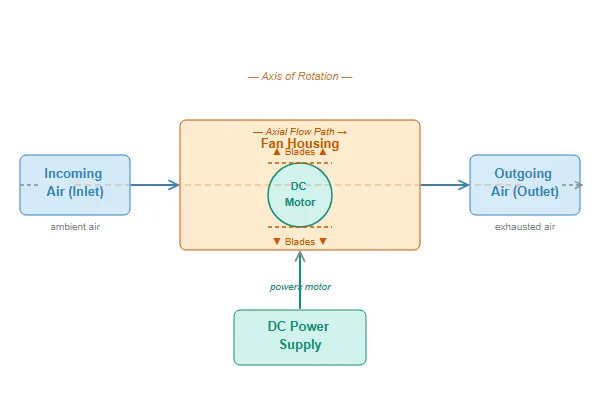
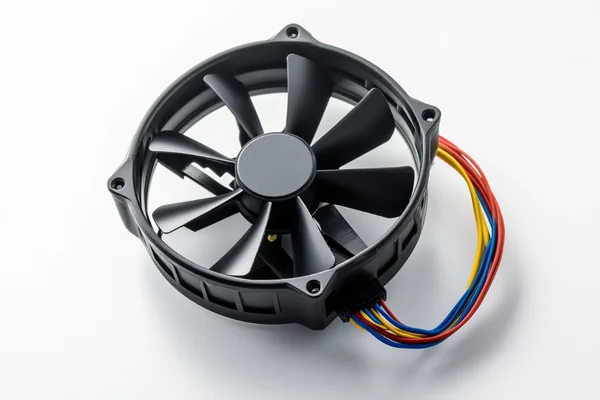
When we break down a DC axial fan, we find a few key parts working together. Understanding these components helps explain why some fans are quiet and others are powerful. At its heart, a DC axial fan is a simple, effective machine made for one purpose: moving air efficiently.
Key Components of a DC Axial Fan
A fan seems simple, but its performance comes from the careful design of three main parts.
- The Motor: Nearly all modern DC fans use a brushless DC motor. These motors are great because they are very reliable and energy-efficient. They don't have brushes that wear out, which gives them a long service life. This brushless design is also what allows for advanced speed control, like PWM, which is essential for balancing cooling performance and noise.
- The Impeller (Blades): This is the part you see spinning. The number, curve, and angle of the blades are engineered to grab air and push it. A fan designed for high airflow might have wider, more curved blades. A fan designed for high pressure might have steeper, more aggressive blades.
- The Frame: The frame does more than just hold the motor and impeller. Its shape, the material it's made from, and the design of the struts that hold the motor all impact airflow and sound. A well-designed frame minimizes turbulence, which reduces noise and helps the air flow smoothly.
How Does a DC Axial Fan Actually Move Air?
Your system is getting hot. You know a fan moves air, but how does it create the cooling effect? Misunderstanding this can lead to ineffective cooling solutions that don't solve the problem.
A DC axial fan works by using a brushless DC motor to spin an impeller. The angled blades on the impeller create a pressure difference, pulling air in from one side and pushing it out the other, parallel to the motor's axis. This directed airflow removes heat from components.
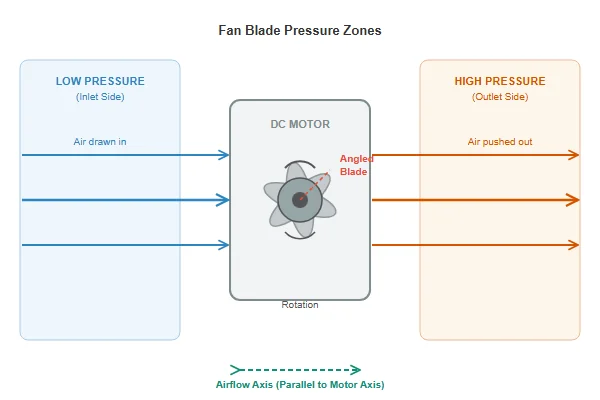
The magic of a DC axial fan is in how its blades interact with the air. Each blade is shaped like an airfoil, which is similar to a small airplane wing. As the impeller spins, the curved shape of the blades forces air to move faster over one side than the other. This creates a low-pressure area on the intake side and a high-pressure area on the exhaust side. Air naturally moves from high pressure to low pressure, so the fan effectively pulls air in and pushes it out in a straight line along its center axis.
The brushless DC motor is the engine driving this process. Unlike simple motors, it uses internal electronics and a Hall effect sensor to control the rotation precisely. This allows for features like Pulse Width Modulation (PWM) speed control, which lets you adjust the fan's speed with a signal from your motherboard or controller. This gives you the power to command full speed when your system is hot and near-silent operation when it's idle. This level of control is a primary reason DC axial fans are the standard for modern electronics.
What Do CFM, RPM, and Static Pressure Really Mean?
Do you just pick the fan with the highest CFM? This common mistake leads to noisy, underperforming systems. You're wasting money on specs that don't help your build.
CFM (Cubic Feet per Minute) measures airflow volume. RPM (Revolutions Per Minute) is fan speed. Static Pressure measures the force the fan can push against resistance. The key is balancing airflow (CFM) and pressure to match your system's resistance, not just maximizing one number.
From my experience, the biggest mistake buyers make is looking at one number on a datasheet. They see a high CFM value and think it's the "best" fan. But specs are a negotiation, not a score. The three key specs—airflow, static pressure, and RPM—are all connected.
Airflow (CFM): How Much Air?
CFM, or Cubic Feet per Minute, tells you the volume of air a fan can move in an unrestricted environment. A high CFM is great for applications with low resistance, like a well-ventilated PC case. It's about moving a lot of air quickly.
Static Pressure: How Hard Can It Push?
Static Pressure tells you how well a fan can perform when its airflow is blocked. It measures the fan's ability to push air against resistance. This resistance, or impedance, is created by things like heatsink fins, dust filters, and dense components. A fan with high static pressure is needed to force air through these obstacles.
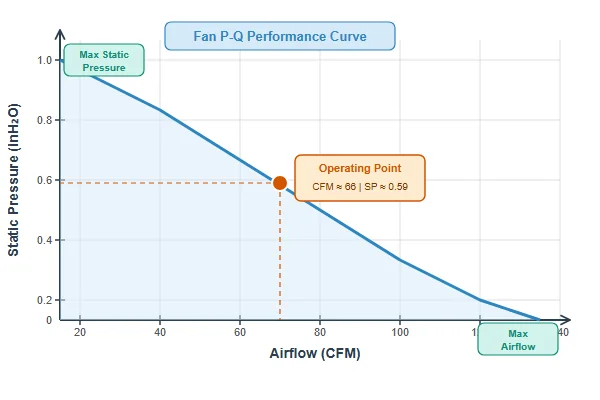
The P-Q Curve: The Most Important Graph
The P-Q curve on a datasheet shows the relationship between a fan's static pressure (P) and its airflow (Q, or CFM). A fan cannot produce maximum airflow and maximum static pressure at the same time. This graph shows the trade-off. Your system creates a certain amount of resistance, and the fan will operate at the single point where your system's resistance curve intersects the fan's P-Q curve.
| Fan Spec | Fan A (Airflow-Optimized) | Fan B (Pressure-Optimized) | Best For... |
|---|---|---|---|
| Max CFM | 120 CFM | 80 CFM | Open PC Case (Fan A) |
| Max Static Pressure | 2.0 mmH₂O | 4.5 mmH₂O | Dense Radiator (Fan B) |
As you can see, Fan A moves more air in an open space, but Fan B is much better at forcing air through a restrictive object like a radiator. Choosing the right one depends entirely on your application.
Should I Use a DC or an AC Axial Fan?
Choosing between AC and DC fans seems simple. But picking the wrong one can limit control, increase noise, and complicate your power design. Don't let this choice be an afterthought.
DC fans are better for most modern electronics. They run on low-voltage DC, are more energy-efficient, quieter, and offer precise speed control (PWM). AC fans are simpler and run on mains voltage, making them suitable for heavy industrial ventilation where fine control isn't needed.
For the customers we work with, the choice is almost always a DC fan. The needs of modern electronics—from PC hardware to compact industrial devices—align perfectly with what DC fans offer. While AC fans have their place, they are built for a different world of applications. Let's break down the key differences to see why DC is often the clear winner for electronics cooling.
Voltage and Power Source
The most obvious difference is the power they use. DC fans run on low-voltage Direct Current (typically 5V, 12V, 24V, or 48V), which is already present in most electronic systems. AC fans run on high-voltage Alternating Current from a wall outlet (like 115V or 230V), making them better suited for large, self-contained industrial machinery.
Control and Efficiency
This is where DC fans truly shine. Their brushless motors are inherently more efficient and allow for precise speed control via a PWM signal. This means you can run them slowly for silence and ramp them up for performance. AC fans are typically single-speed or have very limited speed control, making them louder and less flexible.
| Feature | DC Axial Fan | AC Axial Fan |
|---|---|---|
| Voltage | Low Voltage (5V, 12V, 24V) | High Voltage (115V, 230V) |
| Control | Excellent (PWM for precise speed) | Limited or single-speed |
| Efficiency | High | Lower |
| Noise | Generally quieter, very controllable | Often louder, constant noise level |
| Typical Use | Computers, Servers, 3D Printers | Industrial cabinets, large machinery |
For any application that requires intelligent thermal management, a DC fan is the superior choice.
Where Are DC Axial Fans Actually Used?
You know what a DC fan is, but where does it fit? Applying a fan in the wrong context means it won't cool properly. Let's see some real-world examples to make it clear.
DC axial fans are used everywhere from PC cases and power supplies to 3D printers and industrial control cabinets. They excel at general enclosure ventilation, cooling heatsinks in open airflow, and any application where reliable, controlled airflow is needed to manage heat.
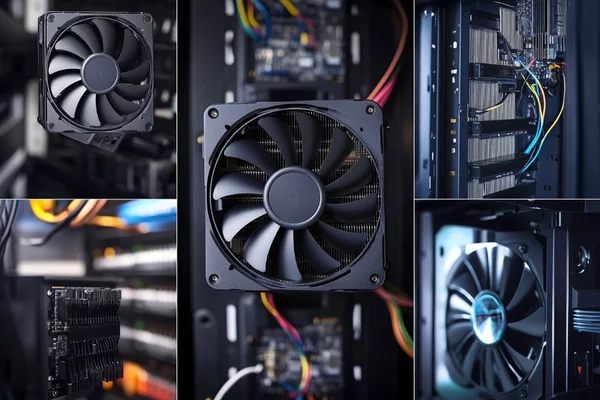
The best way to understand the importance of fan specs is to see them in action. The fan that works perfectly in one device would fail completely in another. It all comes back to matching the fan's strengths—high airflow or high static pressure—to the cooling challenge. We can group these applications into two main categories.
High Airflow Applications (CFM-focused)
These applications have very little resistance, so the main goal is to move a large volume of air to flush out heat.
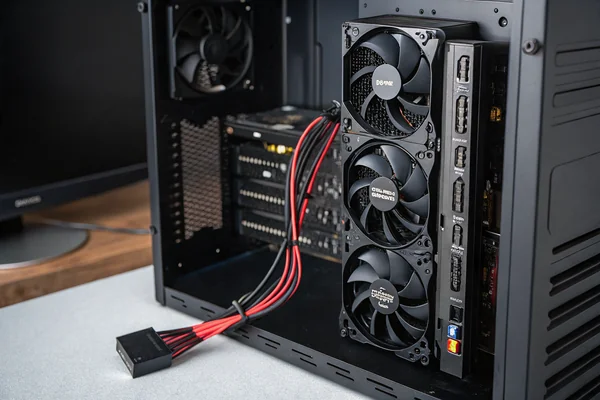
- PC Case Cooling: Intake and exhaust fans in a computer case are a classic example. The interior of the case is relatively open. Your goal is to create a constant flow of cool air in and hot air out. Here, a fan with a high CFM rating will perform best.
- Electronics Enclosure Ventilation: Imagine a large control cabinet for industrial automation. The fan's job is to prevent heat from building up inside the entire space. As long as the vents are not heavily filtered, an airflow-focused fan works well.
High Pressure Applications (Pressure-focused)
These applications have significant resistance that blocks airflow. A fan must be powerful enough to push through the obstruction.
- CPU Coolers & Liquid Cooling Radiators: These are made of dense arrays of metal fins. Air has to be forced through these tight spaces to be effective. A high-CFM fan with low static pressure would barely move any air here. You need a high-pressure fan to overcome the resistance and maintain airflow.
- 3D Printers & Compact Devices: In a 3D printer's hotend, a small fan must push a concentrated stream of air through a compact heatsink. In devices like mini-projectors or embedded systems, components are packed tightly, creating restrictive airflow paths. In all these cases, static pressure is far more important than the maximum CFM rating.
Conclusion
Choosing the right DC axial fan is not about finding the highest specs. It's about understanding your system and matching the fan's airflow and static pressure to your specific cooling needs.

Liang
I've been working with DC fans for 30 years — long enough to have seen the industry evolve from basic sleeve bearing designs to today's high-efficiency, IP68-rated systems built for the harshest environments imaginable. I founded Herays because I believed manufacturers and engineers deserved a supplier who could talk technical from day one. Not just hand over a datasheet, but actually help you select the right fan for your thermal load, your enclosure, your certification requirements. Most of what I write here comes directly from problems I've solved on the factory floor or in customer applications — medical devices, laser equipment, industrial automation, you name it. If it involves moving air efficiently and reliably, I've probably spent time thinking about it. When I'm not obsessing over airflow curves, I'm usually helping a customer figure out why their cooling system isn't performing the way their simulation said it would.
View all posts by Liang